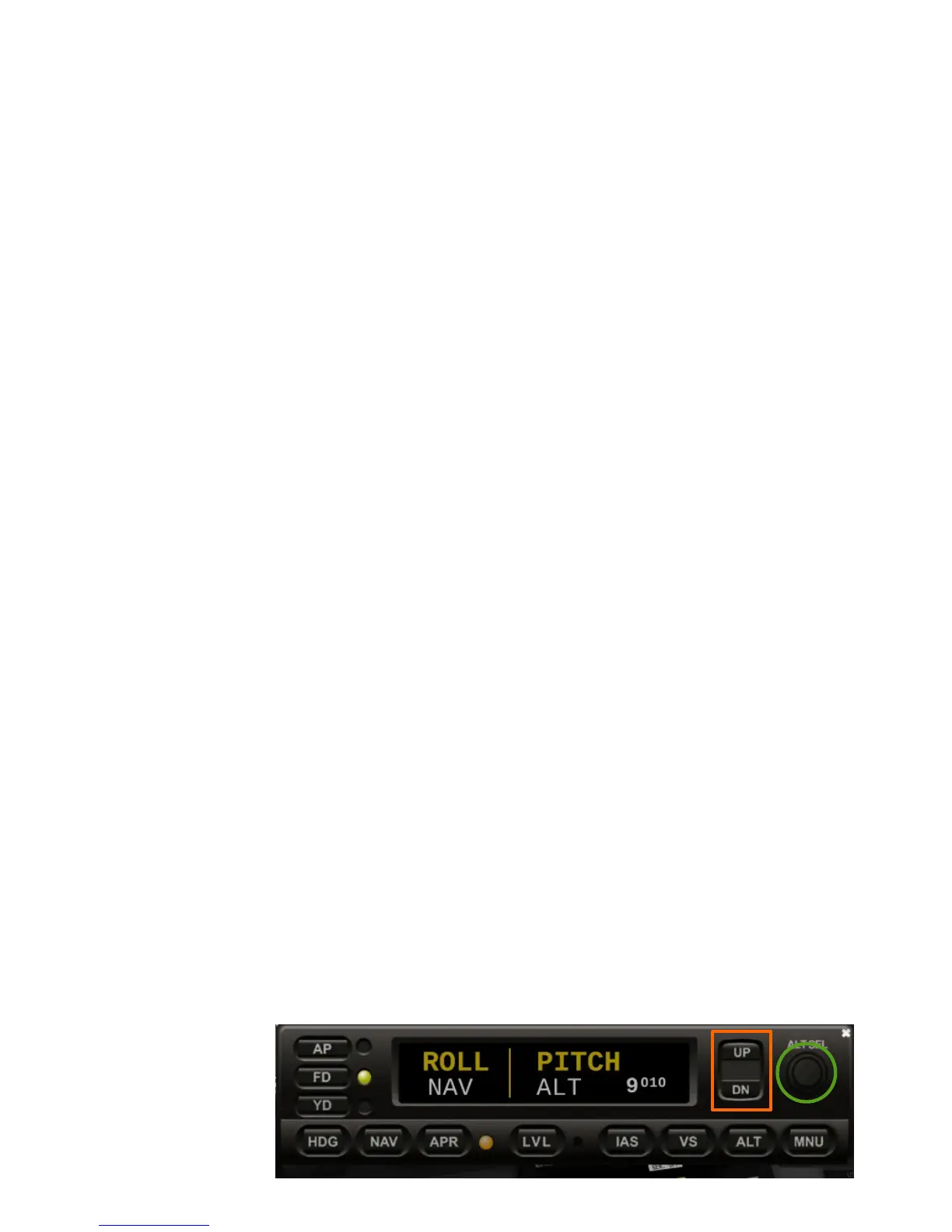
THE S-TEC 5000 AUTOPILOT
The Genesys S-TEC 5000 autopilot device is situated
below the center display.
●
AP: This button activates or de-activates the
autopilot.
●
FD: This button shows or hides the flight director
bars on the PFD. The flight director shows you the
direction and altitude you need to fly in order to reach
a set target heading and target altitude.
●
YD: This button activates or de-activates the yaw
damper.
●
HDG: This button activates the autopilot's heading
hold mode. The autopilot will follow the heading bug
you set on the PFD's HSI.
●
NAV: This button activates the autopilot's navigation
mode. The autopilot will follow the active navigation
source. Change the navigation source with the „HSI
SRC“ softkey in the PFD menu.
●
APR: This button activates the autopilot's approach
mode. Use this button for capturing the localizer and
glideslope of an ILS approach.
●
LVL: This button activates the autopilot's level mode,
in which the autopilot will level the wings of the plane.
●
IAS: This button activates the IAS hold mode. The
autopilot will try to hold the indicated airspeed set on
the PFD's speedtape.
●
VS: This button activates the vertical speed mode.
The autopilot will try to climb or descend with the
speed selected with the “UP/DN” buttons. The
autopilot will climb or descend to the altitude pre-
selected with the “ALT SEL” knob.
●
ALT: This button activates the altitude hold mode.
The autopilot will hold the current or pre-selected
altitude.
●
MNU: – not used in simulation –
●
ALT SEL: This knob is used to pre-select an altitude
for the autopilot's VS and ALT modes.
16


 To Next Page