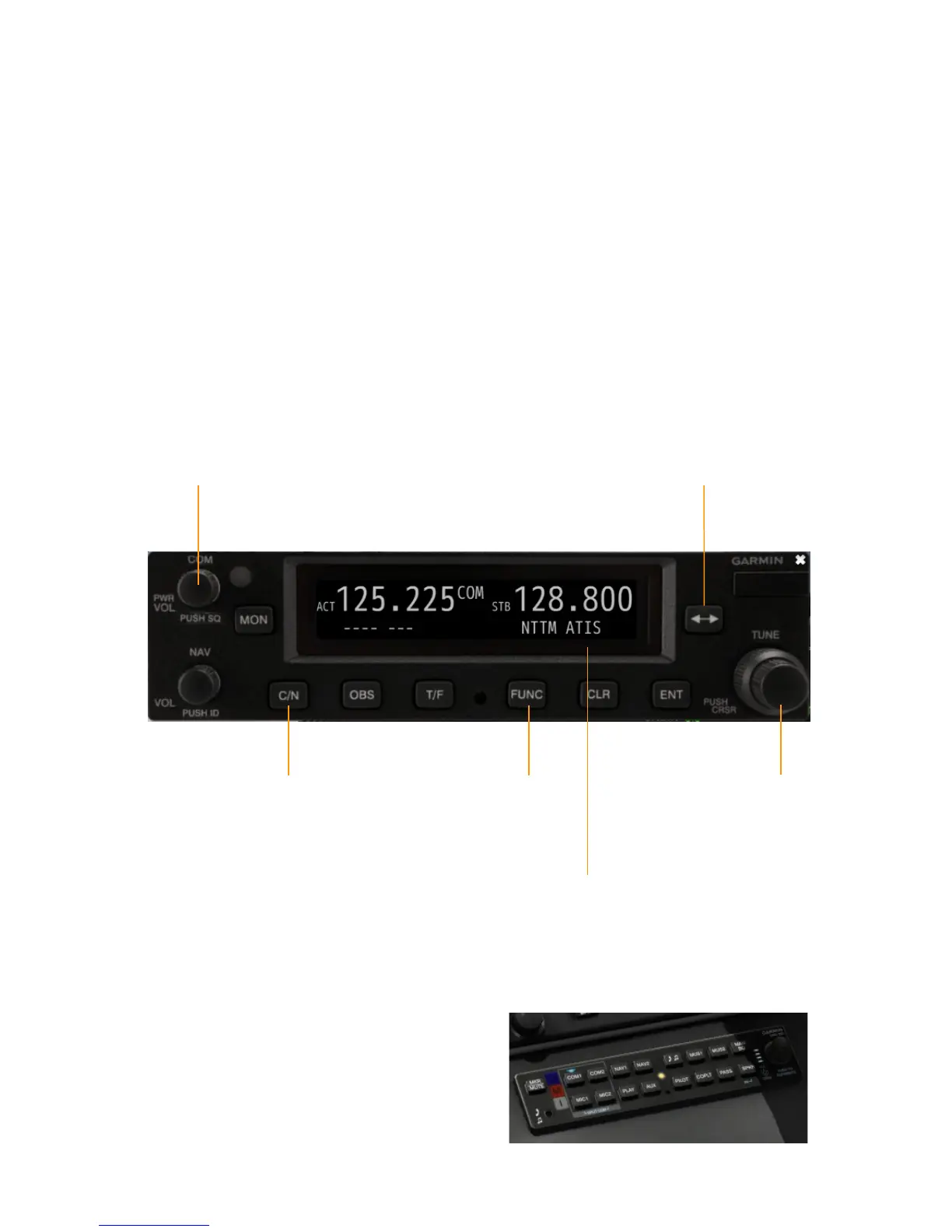
THE GARMIN GNC255 RADIOS
Our Epic E1000 Skyview is equipped with two Garmin
GNC255 radios for controlling COM and NAV
frequencies. One radio is above the pilot's PFD, the
second one is above the co-pilot's PFD.
Click the COM knob to power on the device (please note
that avionics needs to be switched on first.) The display
either shows COM or NAV; you can toggle this with the
C/N button. If a given frequency has a published name
(such as NTTM ATIS), it is shown beneath the frequency.
Use the FUNC button to toggle between traditional and
8.33 Khz channel spacing.
The other buttons of the GNC255 are not simulated in
this version of the aircraft.
To control the audio output of the radios, use the Garmin
GMA 350 audio panel, located on the pedestal, below the
MVP50 and above the throttle. Blue triangular LEDs
above the various audio source buttons (such as COM1,
NAV1, etc.) indicate that you will hear the related audio
source. Press the button to mute the respective source;
press again to switch it on.
15
Click: Power-on
Toggle
8.33 Khz
COM spacing
Toggle
COM/NAV
Name of
selected COM
frequency
Toggle
Active/Standby
Turn to
change
standby
frequency
GMA350


 To Next Page