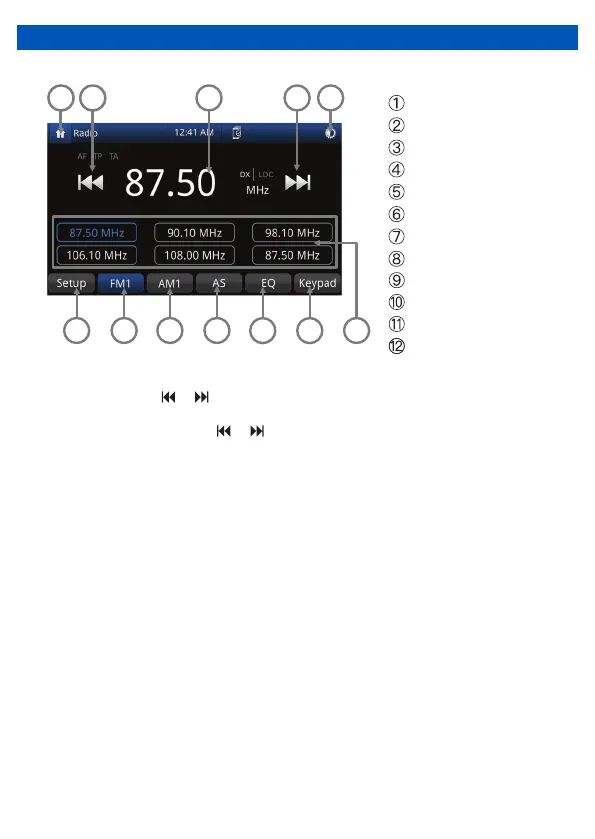
RADIO MODE
To enter Radio Mode, touch “Radio” icon on the Main Menu
Seek down
Home screen/back button
Radio frequency
Seek up
AF and TA settings
Display On/Off
FM Band button
AM Band button
Auto Store button
EQ Mode button
Keypad button
or
or
4 5
Auto Tuning
Press the seek icon ( ) on the TFT Monitor screen to increase / decrease the
tuning frequency one step at 0.05MHz increments for FM and 9KHz increments for AM.
Press and hold the seek icon ( ) on the TFT Monitor screen to seek the available
channel by increasing or decreasing the tuning frequency.
FM and AM
Touch the “FM1” or “AM1” on the screen to change among the following bands: FM1,
FM2, FM3 or AM1 and AM2.
Preset Stations
Six(6) stored stations for the current band appear on the screen, touch the preset directly
for use or press the number buttons located on the head unit.
Storing a Station
1. Select a station. (Example: FM1 103.6MHz)
2. Touch and Hold the desired preset number for 3 seconds to store the Radio station.
Recalling a Stored Station
1. Select a Band (If needed).
2. Touch the preset button on which the corresponding radio station is stored or press the
number button on the Radio panel.
3
Preset station list


 To Next Page