BLUETOOTH MODE
1
2
3
4 556
When the phone connects to the unit successfully, all of the phone’s Bluetooth enabled
options will be active.
This unit can be paired with 5 mobile phones, but only one can be active at a time.
The unit Bluetooth name is AERPRO
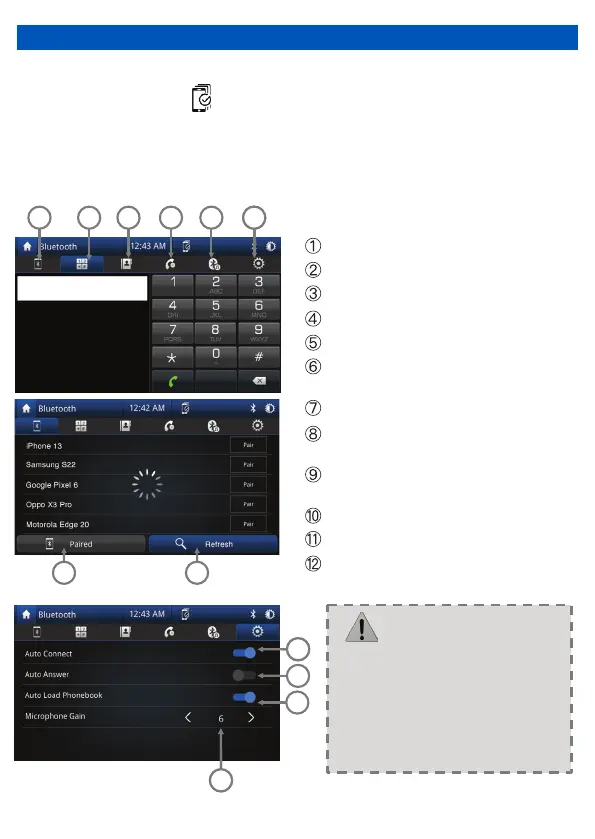
Touch the icon to enter pairing mode
Touch the icon to keypad
Touch to open the phone book
Touch to open the phone interface
Touch the icon to enter Bluetooth music
Touch the icon to enter Bluetooth
settings
Touch to go to connected device screen
Touch “Refresh” to search for bluetooth
devices
Auto connect to your previously paired
bluetooth device
Auto answer for incoming calls
Sync Call logs and Contacts
Microphone gain volume control
> Some mobile phones may not
support the download function.
> Depending on the music player
you are using, streaming may not
be supported.
5
8
12
NOTE: Bluetooth mode can only be accessed when not connected to Android Auto
or Apple Carplay. Press icon to go to connected devices screen.
5
•
•
•


 To Next Page