V1 Page 7
8. Programming as an Alarm Dialler
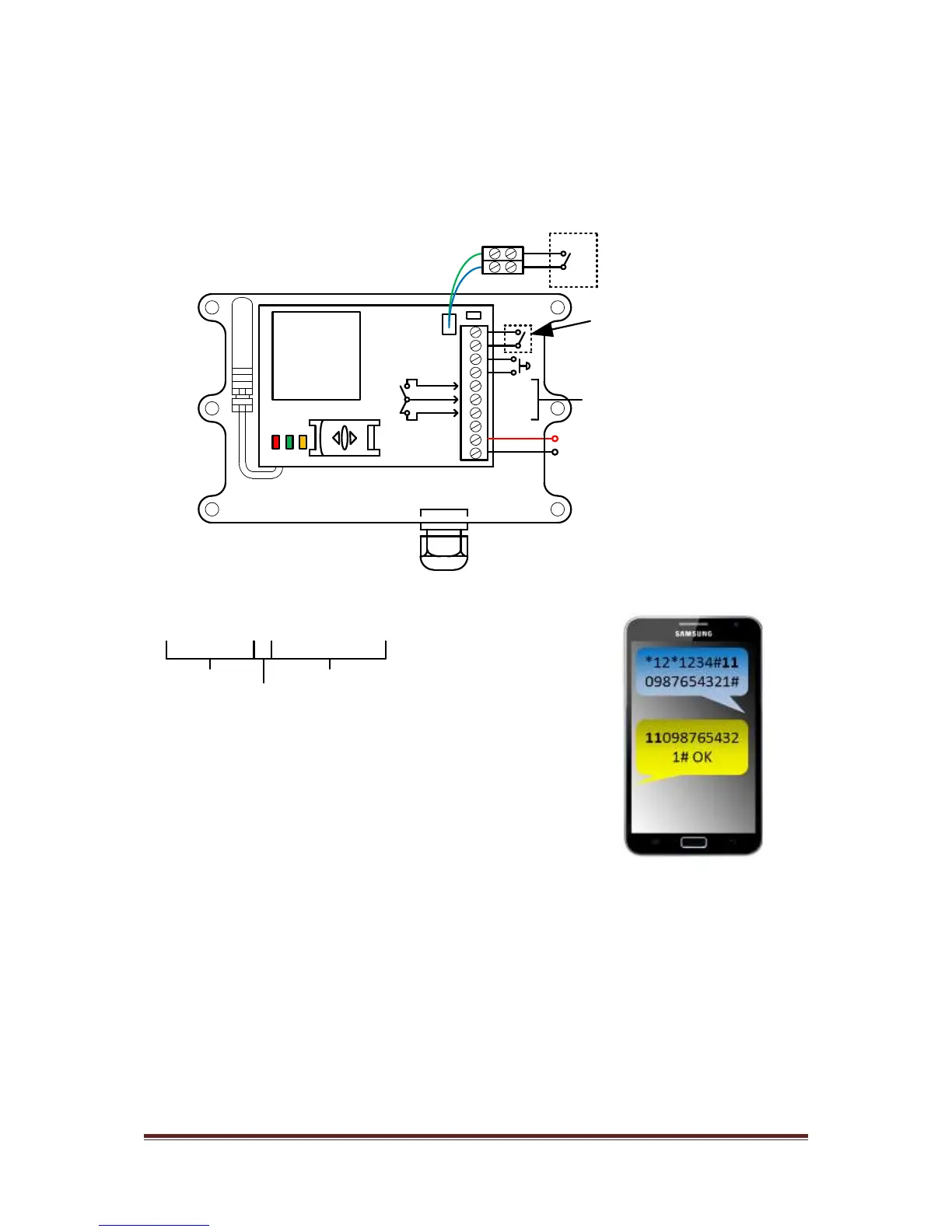
If you are using this device as an alarm signalling device, you will need to connect an input
trigger to the terminals shown below. This input trigger should be a momentary volt free
trigger from an alarm panel or sensor device.
AC
AC
VCC
N/C
COM
N/O
GSM
modem
Volt free
relay output
Optional input limit
switch
open
close
12-24
ac-dc
Momentary input
trigger from
alarm device
You may send a SMS to tell the unit which numbers to dial when the alarm is triggered…
*12*1234#110987654321#
Pass code
Function code
Data
*12*1234#11telephonenumber1#12telephonenumber2#13telephonenumber3#
TIP: Save the sim card number of the device into the users phone as a meaningful name
such as “ALARM SYSTEM” or “MY HOME ALARM” for example.
This SMS will tell the unit to dial the example number shown.
The unit then sends a SMS reply OK showing the number just
sent.
3 numbers can be sent in the same SMS as follows…


 To Next Page