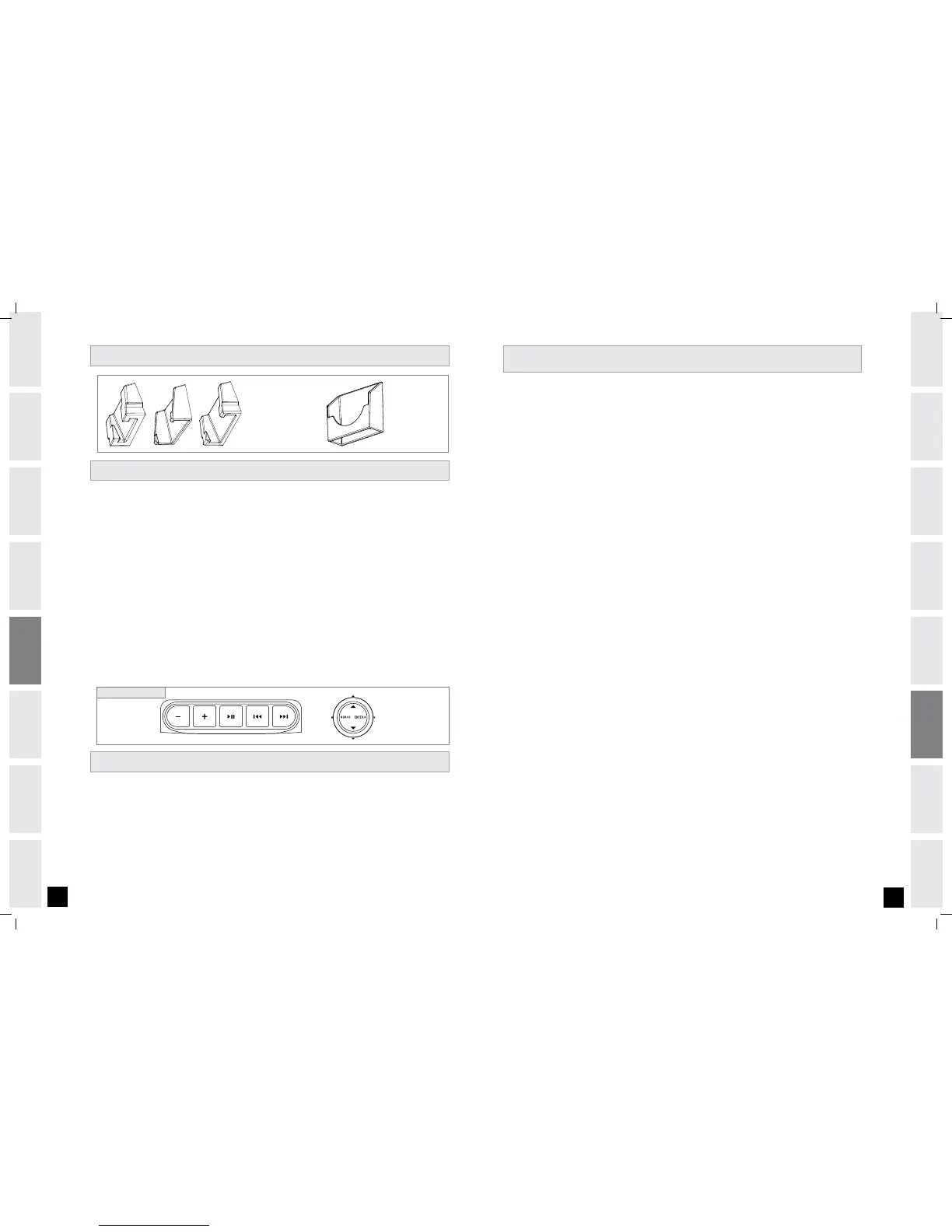
Leave RUBBER PLUG at bottom of DOCKING STATION.
To hold your MP3 player in place in the DOCKING STATION, use the UNIVERSAL MP3 PLAYER INSERT.
NOTE: Only iPods are compatible with the CONNECTOR PIN in the iPod Docking station.
Connect the included AUDIO ADAPTOR CABLE to the AUDIO IN jACK on the top of the CONSOLE and the
HEADPHONE jACK on your CD / MP3 player.
Use your CD/MP3 player buttons to adjust song settings.
NOTE: If you don’t want to use the speakers, you can plug your headphones into the AUDIO OUT jACK at the
bottom of the CONSOLE.
Remove the AUDIO ADAPTOR CABLE when not in use.
1)
2)
3)
4)
5)
The AFG iPod Docking Station is the entertainment solution for your workouts. Various models of iPod with a
dock connector can fit with the use of the included inserts.
Remove rubber plug from bottom of DOCKING STATION.
Place the insert that fits your iPod model into the DOCKING STATION.
NOTE: Dock inserts will not fit all of the way to the bottom of the docking station.
Plug in your iPod by matching the dock connector pin on the ascent trainer with the dock connector on your iPod.
NOTE: If you want to connect a different sized iPod, simply lift out the insert and replace with a new one.
Use the iPod controls below the iPod dock to adjust volume and music selection. Use the iPod programming
button to access full iPod functionality.
NOTE: If you don’t want to use the speakers, you can plug your headphones into the AUDIO OUT jACK at the
bottom of the CONSOLE.
Replace the rubber plug into the bottom of the DOCKING STATION when the station is not in use.
NOTE: iPod audio will not play through speakers if audio adaptor cable is plugged in while iPod is in the
DOCKING STATION.
NOTE: iPod CONSOLE CONTROLS will only function while you are in a program.
1)
2)
3)
4)
5)
iPod Console Controls
ALWAYS CONSULT YOUR PHYSICIAN BEFORE BEGINNING AN EXERCISE PROGRAM.
HOW OFTEN? (Frequency of Workouts)
The American Heart Association recommends that you exercise at least 3 to 4 days per week to maintain
cardiovascular fitness. If you have other goals such as weight or fat loss, you will achieve your goal faster with
more frequent exercise. Whether it’s 3 days or 6 days, remember that your ultimate goal should be to make
exercise a lifetime habit. Many people are successful staying with a fitness program if they set aside a specific
time of day to exercise. It doesn’t matter whether it’s in the morning before breakfast, during lunch hour or while
watching the evening news. What’s more important is that it’s a time that allows you to keep a schedule, and a
time when you won’t be interrupted. To be successful with your fitness program, you have to make it a priority in
your life. So decide on a time, pull out your day planner and pencil in your exercise times for the next month!
HOW LONG? (Duration of Workouts)
For aerobic exercise benefits, it’s recommended that you exercise from between 24 and 60 minutes per session.
But start slowly and gradually increase your exercise times. If you’ve been sedentary during the past year, it may
be a good idea to keep your exercise times to as little as five minutes initially. Your body will need time to adjust
to the new activity. If your goal is weight loss, a longer exercise session at lower intensities has been found to
be most effective. A workout time of 48 minutes or more is recommended for best weight loss results.
HOW HARD? (Intensity of Workouts)
How hard you workout is also determined by your goals. If you use your machine to prepare for a 5K workout,
you will probably work out at a higher intensity than if your goal is general fitness. Regardless of your long
term goals, always begin an exercise program at low intensity. Aerobic exercise does not have to be painful to
be beneficial! There are two ways to measure your exercise intensity. The first is by monitoring your heart rate
using the grip pulse handlebars and the second is by evaluating your perceived exertion level (this is simpler
than it sounds!).
PERCEIVED EXERTION LEVEL
A simple way to gauge your exercise intensity is to evaluate your perceived exertion level. While exercising, if you
are too winded to maintain a conversation without gasping, you are working out too hard. A good rule of thumb
is to work to the point of exhilaration, not exhaustion. If you cannot catch your breath, it’s time to slow down.
Always be aware of these warning signs of overexertion.
CONDITIONING GUIDELI N E S
USING O T H ER MP3/ C D PLAYERS


 To Next Page
 Loading...