i ¸ ,,,,_
m
_ CREW(F)
15rnrn
Qty:18
CONSOLE
SCREWS(F) _ /
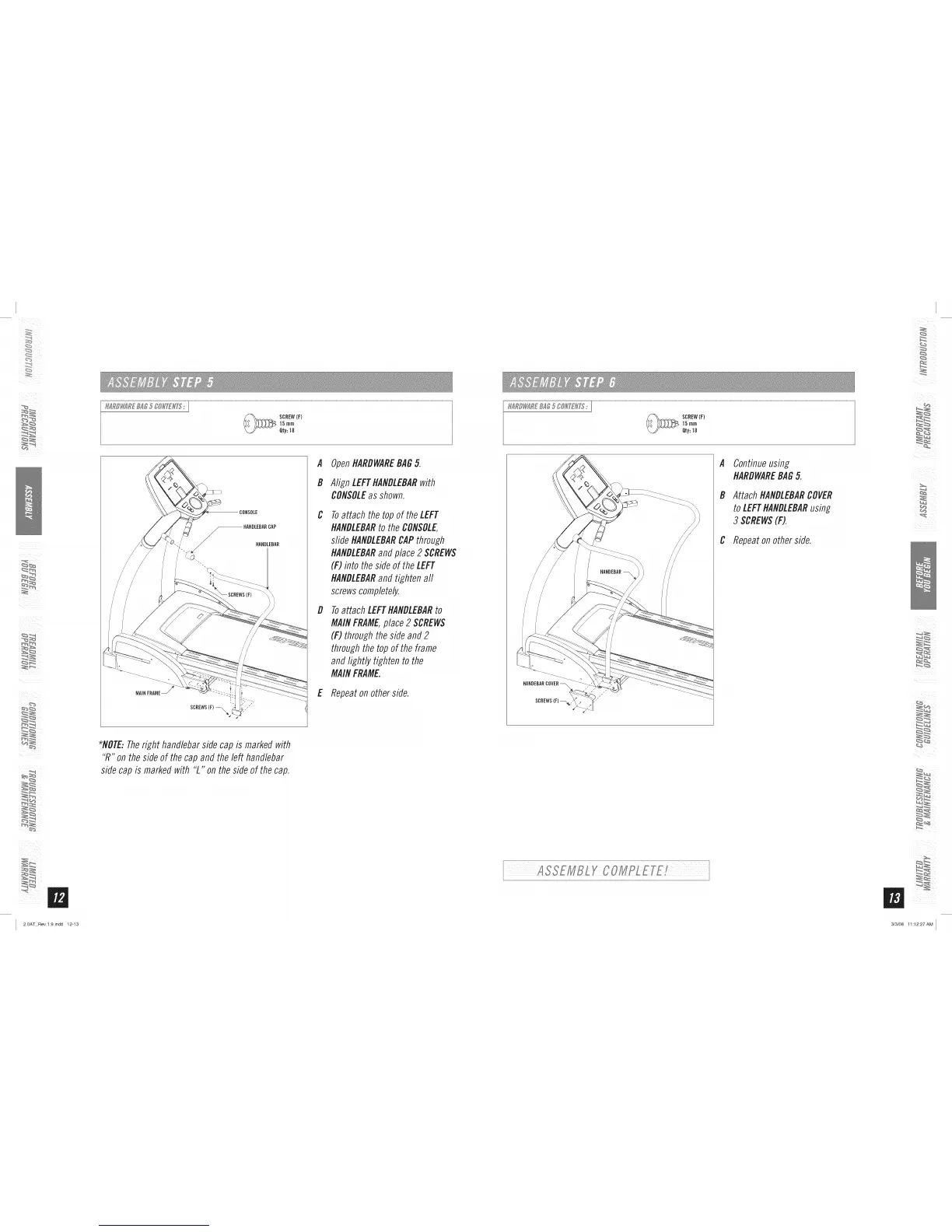
A OpenHARDWAREBAG5.
B Align LEFTHANDLEBARwith
CONSOLEas shown.
C
Toattach the topof theLEFT
HANDLEBARto the CONSOLE,
sfideHANDLEBARCAPthrough
HANDLEBARandplace2 SCREWS
(F) into theside of the LEFT
HANDLEBARand tighten aft
screwscompletely.
D Toattach LEFTHANDLEBARto
MAINFRAME,place 2 SCREWS
(F) through the side and 2
through the top of the frame
and lightly tighten to the
MAINFRAME.
E Repeat on other side.
*_NOTE:Theright handlebar side cap is marked with
"R" on the side of the cap and the left handlebar
side cap is marked with "L" on the side of the cap.
_ CREW(F)
15 rnrn
Qty:18
IIANDEBAR
A
B
Continueusing
HARDWAREBAG 5.
AttachHANDLEBARCOVER
toLEFTHANDLEBARusing
3 SCREWS(F).
C Repeat on other side.
i_i_iiiiiiii
i iii_i
_iiii_i_!!iiI__i_!i_ii!
2.0AT Rev.l.9.indd 12-13 3/3/08 11:12:27AM


 To Next Page