43
to AL6). If this is your first time setting an alarm, use AL1. Press
CENTER to select an alarm to set.
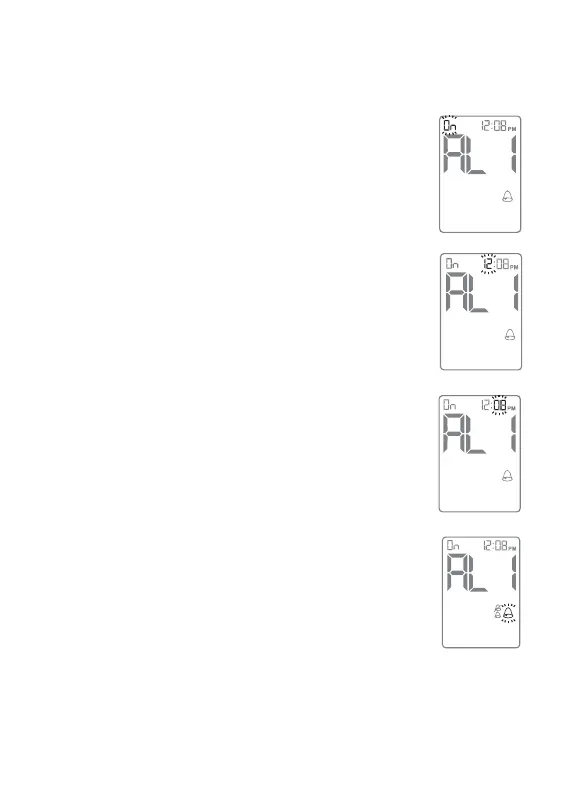
[3] Turning Alarms ON or OFF: Press the
RIGHT or LEFT arrow buttons to enable (ON) or
disable (OFF) the alarm. The default setting is
OFF. Confirm your selection by pressing CENTER
button. Your selections will be highlighted by a
blinking symbol.
[4] Setting Alarm Times: You can now set the
alarm time. First, set the flashing numbers (hour)
with the RIGHT or LEFT arrow buttons. Accelerated
change is possible by holding down the arrow
buttons.
Press CENTER to confirm and to move on to set
the minute.
Set (minute) with the RIGHT or LEFT arrow buttons.
Press the CENTER button to confirm the alarm
time and to move on to set the alarm volume.
[5] Setting Alarm Volumes: There are three
volume options. A silent alarm will only flash the
meter’s backlight. The default setting is “high”. Se-
lect your preferred setting with the RIGHT or LEFT
arrow buttons. Confirm by pressing the CENTER
button. This will bring you back to MENU Mode.
Note: The volume of an alarm will be affected by the meter’s
volume setting, which can be changed in the meter’s settings
(SET) option. If your meter is set to silent mode, then the alarm



 To Next Page