9
Set-up for manual slopes
The Agatec RL110 can be used to manually create slopes for special
applications, stairways, sloped ceilings, etc.
For slopes up to 10%, set up the laser in horizontal mode and use the
keypad or remote to set the slope following the instructions below.
In full manual mode, the unit will not self-level on both axis, meanwhile
the head will continue to rotate. The plane of laser light can be tilted in
either one or both planes.
To use the laser in full manual mode:
• After turning the laser on and allowing it to self-level, press the Manual
button {B-7}. The LED {B-10} indicates that the laser is in manual mode
and you can set slope in the X-axis.
• Press UP/DOWN keys to adjust the slope of the X-axis.
Press the Manual key {B-7} once more to set slope on Y-axis. The LED
{B-10} blinks to indicate that the laser is in manual mode and you can
set slope in the Y-axis.
Keep pressed the MAN key to exit the manual mode and return to the
automatic mode.
Accessories
Remote Control
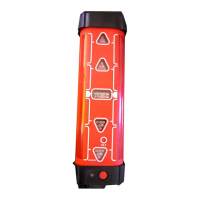
The Remote Control has five buttons.
1) LEFT
2) RIGHT
3) Scan / Rotation Mode
4) UP
5) DOWN
Please refer to the table in "Button Functions" to better understand their
functionality.
• The red LED at the top of the remote will flash each time a button is
pressed, indicating that the remote is transmitting to the laser.
• Battery - To open the battery compartment and change the battery,
push the battery cover in the direction of the arrow. The remote control
requires alkaline battery.
1
3
2
5
4


 To Next Page