3.1
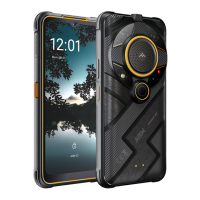
AGM Glory_G1S
1. Receiver
>Waterproof receiver. Do not touch with hard pin
2. Front Camera
>Takes front facing photos
3. Sensors
>Optical proximity sensor and Ambient light sensor
4. Volume Key
>Press to increase/decrease the phone volume
>Press to mute the phone during an incoming call
5. Power Key
>Long press power key to power phone on/off
>Short press power key to lock/unlock the screen.
6. Display
> 6.53inches Display
7. Main Microphone
>For talking and voice recording. Do not touch with hard pin
8. Rope hole
9. Main Camera
>Takes photos and videos
10. Sub MIC
>Noise reducing waterproof microphone. Do not touch with hard pin
11. Laser Pointer
12. Macro Camera
13. Air Pressure Balance Hole
14. SIM/SD Tray and Waterproof Rubber cover
>Supports Nano SIM and Micro SD car
15. LOUDSPEAKER
>Waterproof speaker. May be adjusted to a comfortable volume.
>The speaker volume may become lower after immersion in water but
will recover once dry.
16 Thermal Imaging Camera.
>Click APP IRCamera
17. Infrared Night Vision Camera
>Take photos in dark areas
18. Infrared LEDs
>Night Vision Camera Fill Light
19. PTT KEY/USER DEFINED KEY
Push to talk key. User can also define it as Audio Play,Camera,LED Torch,>
Google Assistant or Laser Pointer.
Press and hold to activate the defined functions when screen is unlocked.
20. Fingerprint
>Fingerprint sensor
21. Area of NFC
22. Charging Connection Spots
>Desktop dock connection spots.



 To Next Page