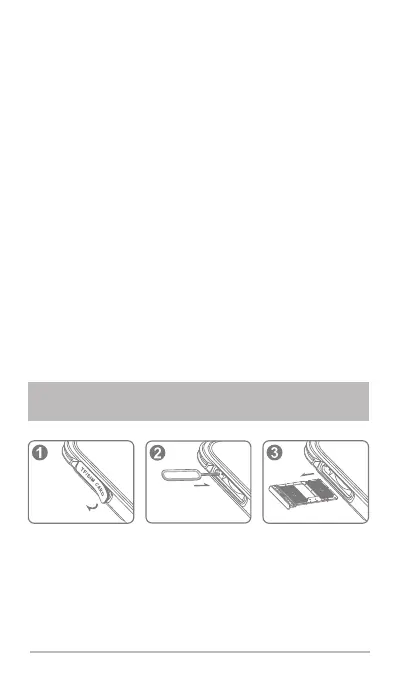
Installing the SIM and Micro SD card:
1. Take off the SIM/SD tray waterproof rubber cover and use
your finger or the metal ejector pin provided to open the SIM tray.
2. Pull out the SIM tray.
3. Place Nano-SIM in inside position.
4. Place Nano-SIM or Micro SD card in outside position.
5. Make sure that the Nano-SIM and Micro SD card metal contact parts are
facing down and that the cut corner aligned with tray in the correct position
as per the diagram shown above.
4.1
PREPARING TO INSTALL THE SIM/
MICRO SD CARD
Useful tips:
2. Do not cover Receiver, Main MIC and Sub MIC.
Waterproof warning:
1. In case the system stops working, press and hold down the
power button until your device vibrates then release.
23. USB Type-C port and Waterproof Rubber Cover
24. 3.5mm Headphone Jack and Waterproof Rubber Cover
25. LED
> LED flash light.
3. Adjust the volume to a comfortable level to prevent hearing
damage.
1. is IP68/IP69K/MIL-STD-810H certified. AGM Glory_G1S
3. If the phone does come in to contact with water, it may affect
the audio for a short period. In this case please dry the phone
using a clean cloth and then allow it to stand and dry naturally for
30 minutes. This should restore the audio to the correct position.
2. USB waterproof rubber cover and SIM/SD tray waterproof
rubber cover must be completely closed to prevent water
damage.
4. Please do not use any other method, hairdryers for
example, other than that listed above to dry your phone as
this will affect the phone performance.
5. If you phone has received a strong shock or has been bent or
twisted ensure that it does not come in to contact with water.



 To Next Page