16 AGM Global Vision
8. Install the head mount/helmet mount adapter (refer to Paragraph 2.2.7).
9. Refer to Paragraph 2.3.2 for operating procedures.
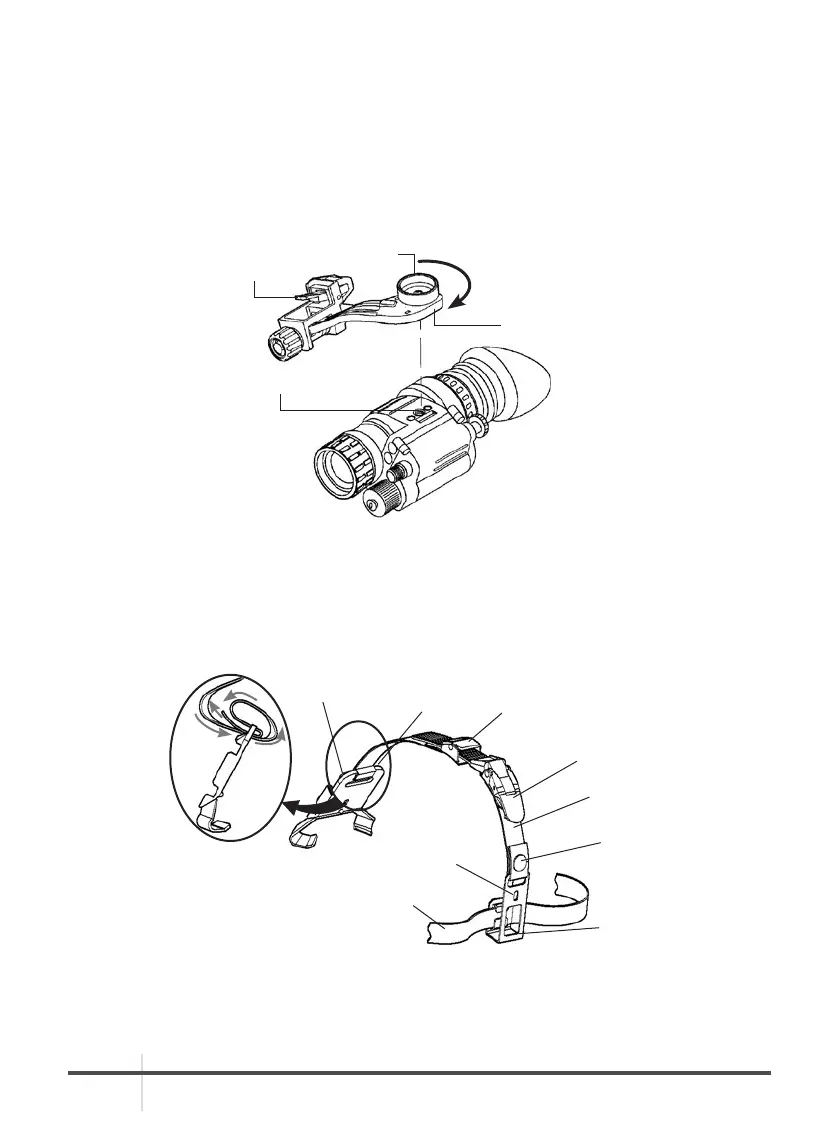
2.2.7 INSTALLATION OF THE HEAD MOUNT/HELMET MOUNT ADAPTER
To install the head mount/helmet mount adapter (Figure 1-2) on the monocular, align the
thumbscrew to the hole and tighten it (Figure 2-4). An alignment boss on the head mount/helmet
mount adapter should fit into the groove on the monocular. Confirm that the boss on the adapter
fits into the groove.
2.2.8 INSTALLATION OF THE HELMET MOUNT TO A HELMET
1. Remove the helmet mount from the carrying case. Refer to Figure 2-5 for helmet mount features.
2. Press the release (Figure 2-6) to remove the mount from the helmet mount bracket.
3. Verify that the strap is laced onto the helmet mount bracket (Figure 2-5).
LATCH
ALIGNMENT BOSS
(HIDDEN)
ALIGNMENT
BOSS GROOVE
THUMBSCREW
FIGURE 2-4. HEADMOUNT/HELMET MOUNT ADAPTER INSTALLATION
KEEPER
HELMET MOUNT
BRACKET
CATCH
BUCKLE
LEVER
STRAP
REAR
SNAP
REAR
MOUNTING
HOLE
REAR
BRACKET
NAPE STRAP
FIGURE 2-5. INSTALLATION OF HELMET MOUNT



 To Next Page