FM Radio
Find “FM Radio” on Home menu with the button to access to its
function. A related list will show:
• Presets. All the saved stations will be listed here.
• Manual tune/Auto tune. When choose “Auto tune”, the searched
stations will be saved in “Presets” automatically.
• FM Recordings. View the radio recording files. You will need to
choose from local folder or card folder if the memory card is
inserted. The radio recordings will also be saved in Recordings>
Recordings library.
3. Sound Settings. Choose to set Equalizer, Variable Speed
Playback and Volume Limit.
4. Bookmarks. Choose to add bookmark for the song that is playing
now, or go to/delete the bookmark you added.
5. Add to Playlist/Remove from Playlist. Choose to add to or
remove from the 3 existing playlist.
6. Delete. Choose to delete the song that is playing now.
b. Replay Times. Set the replay times from 1 to 10.
c. Replay Interval. Set the replay gap from 1 to 10 (seconds).
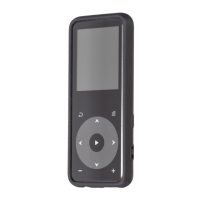
While it’s on radio playing interface, press button to switch
among preset stations, press the button / to find
tunestations. Press button to access to its submenu which
includes:
Start FM Recording/Save/Clear Station/Auto Tune/Tuner
Region/FM Recordings.
a. Repeat Mode.
- Enter. Press the button to enter.
- Set. Press button to confirm the starting time A when A
isflashing. Then press button to set the ending time B when
B is flashing. The passage from time A to B will be repeated
automatically. The icon for A-B indication will appear on the
screen. Press button again to back to normal playback.
D. Repeat Settings.
04



 To Next Page