below.
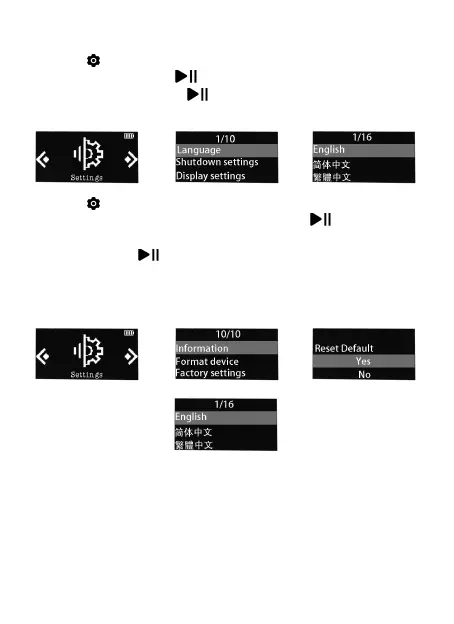
1. Find (Setting) in the home menu and confirm it by
pressing button . Select the first (upper) option
and press button to confirm. Scroll down and
select the language you want to set.
⇨ ⇨
2. Find (Setting) in the home menu, enter and scroll
down to the last menu. Press button to enter and
choose the first (upper) option which means "Yes"
with button to confirm and restore to factory
settings. And then the player will power on
automatically and then you can choose language
again.
⇨ ⇨
⇨
Can't turn on the player; the screen of
player goes blank/black; the player is
crashed or has a firmware bug.
1. Power off the player and try again.
2. Update the firmware. Please contact our customer
service or check our website at


 To Next Page