DocNo.FM5611issueCPage7
6.INSTALLATION
TheMaxpageTerminalrequiresapoweranddataconnection;poweristakenfromthe12V/3Abattery
backedPSUanddatacomesfromthePagerPortonanyTouchsafeProDisplayPanel.
POWERSUPPLYUNIT
Undothesinglelidfixingscrewandopenthelid.
Note:ifthelidisremovedensuretheSafetyEarthisre‐connected.
PositionthePSUwithin2metresofanun‐switched13Amainssocket.
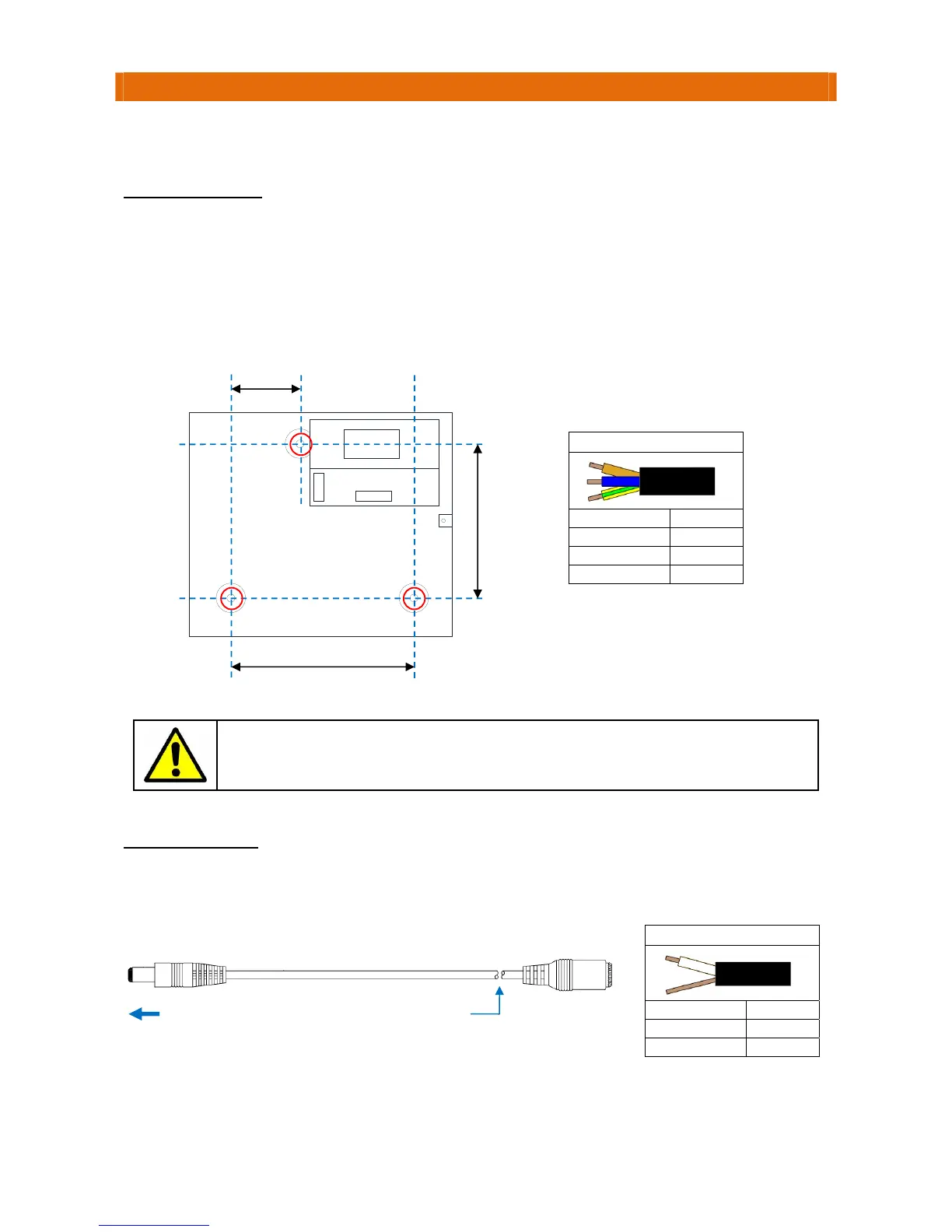
Fixthepowersupplyunittothewallusingthe3holes“A”asshownbelow.
Connectthemainsleadprovidedtothepowersupplyunitmainsterminalsusingthecolourcodeinthe
tablebelow.Note:theplugisfittedwitha240VAC5ABS1362fuse.
ThePSUshouldonlybeopenedduringinstallationandservice–thelidmustbescrewed
shutatallothertimestopreventtheriskofelectricshock.NeverleavealivePSU
unattendedwiththelidopen.
LOWVOLTAGELEAD
Cutthesocket(female)connectoroffoneendoftheDCextensionleadpr ovidedinthekit.
Strip‐backtheinsulationandconnecttothePSUusingthecolourcodeinthetablebelow.
Plugtheleadintothe12VDCsocketontherearoftheMaxpageTerminal.
MainsConnection
Colour Terminal
Brown L
Blue N
Green/Yellow E
160mm
65mm
145mm
A
A
A
12V/3ABoxedPSU
E
N
L
O/P
+‐
CutSocket
offLead
PlugintoMaxpage
Terminal
1.5mLead
12VDCConnection
ColourTerminal
White 12V
Screen 0V



 To Next Page