DocNo.FM5611issueCPage8
6.INSTALLATION
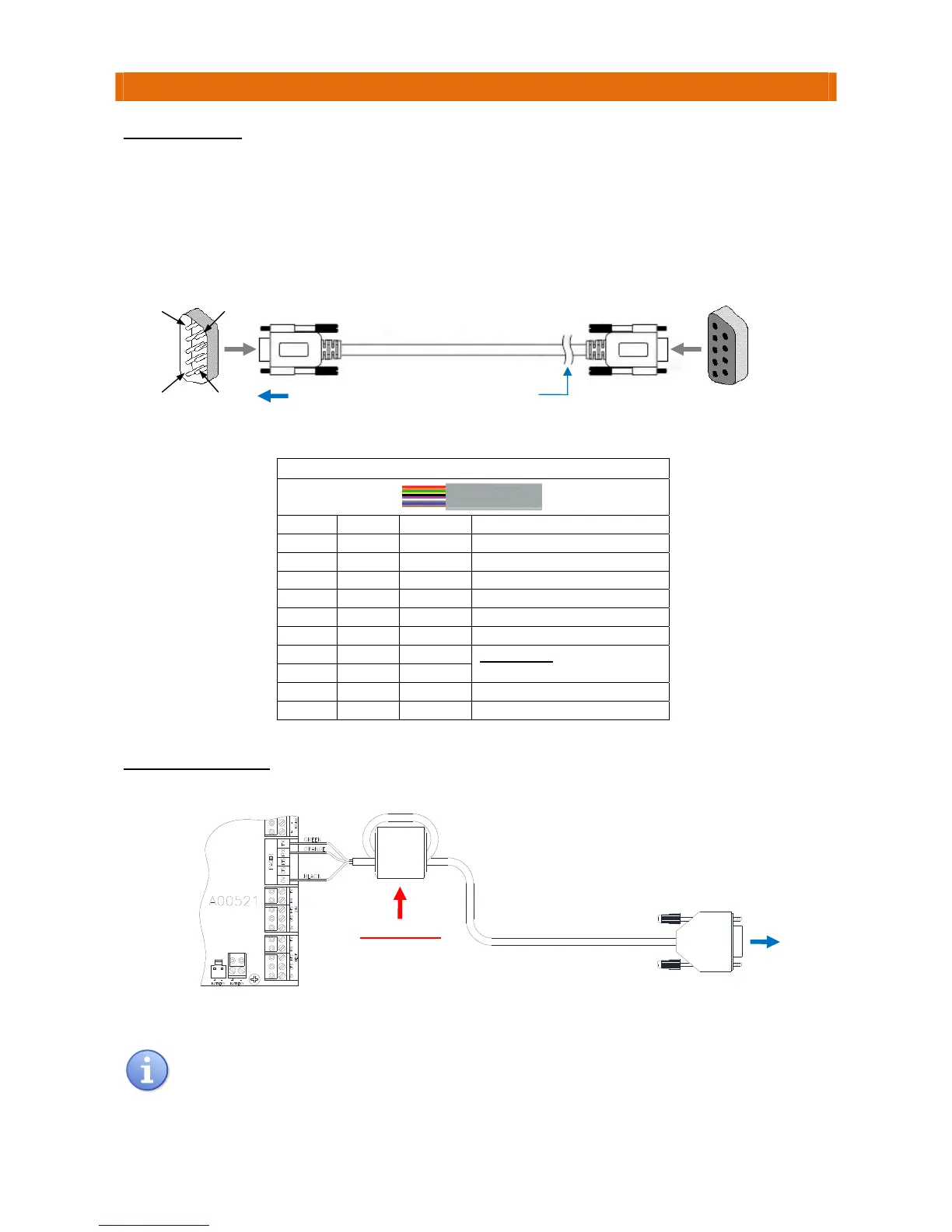
RS232DATALEAD
Cutthesocket(female)connectoroffoneendoftheSerialDataleadprovidedinthekit.
Strip‐backtheinsulationandconnect3wirestotheTouchsafePr o panelPAGERterminalsusingthecolour
codeinthetablebelow.ItisimportantthattheRTSandCTSwiresarejoined
together.
Note:thedataleadcanbeextendeduptoamaximumof20metresusingLSF(LowSmokeandFume)
screenedTCCA8corealarmcable.ThiscableisavailablefromAidcallbythemetre;PartNo.YW1730.
PlugtheleadintotheRS232INTERFACEsocketontherearoftheMaxpageTerminal.
CONNECTIONDETAILS
Itispossiblewirecoloursmaychangewithoutnotice‐itisgoodpracticetocheckcontinuityof
eachwirecolourtotherelevant9Pin“D”PinNo.withadigitalmeterbeforeterminating.
Maximum20m cablelength
betweenPanelandMaxpageTerminal
CutSocket
offLead
PlugintoMaxpage
Terminal
1.8mLead
RS232InterfaceConnection
PinNo.Colour Terminal ConnectTo…
1 Red DCD
2 Orange TXD TouchsafeProPagerPortRX
3 Green RXD TouchsafeProPagerPortTX
4 Yellow DTR
5 Black 0V TouchsafeProPagerPort0V
6 Violet DSR
7 White RTS
IMPORTANT
:LinkRTStoCTS
byjoiningwhite&greywires
8 Grey CTS
9 Blue RI
Body Brown Screen
IMPORTANT
LooptheCableonce
throughtheFerriteSleeve
rovidedwiththePanel
TouchsafeProPanel
PagerPort
PlugintoMaxpage
Terminal
Socket
NotUsed
5
1
6
9



 To Next Page