Expansions
2
www.aim-sportline.com Release 1.01 – October 11
th
2017
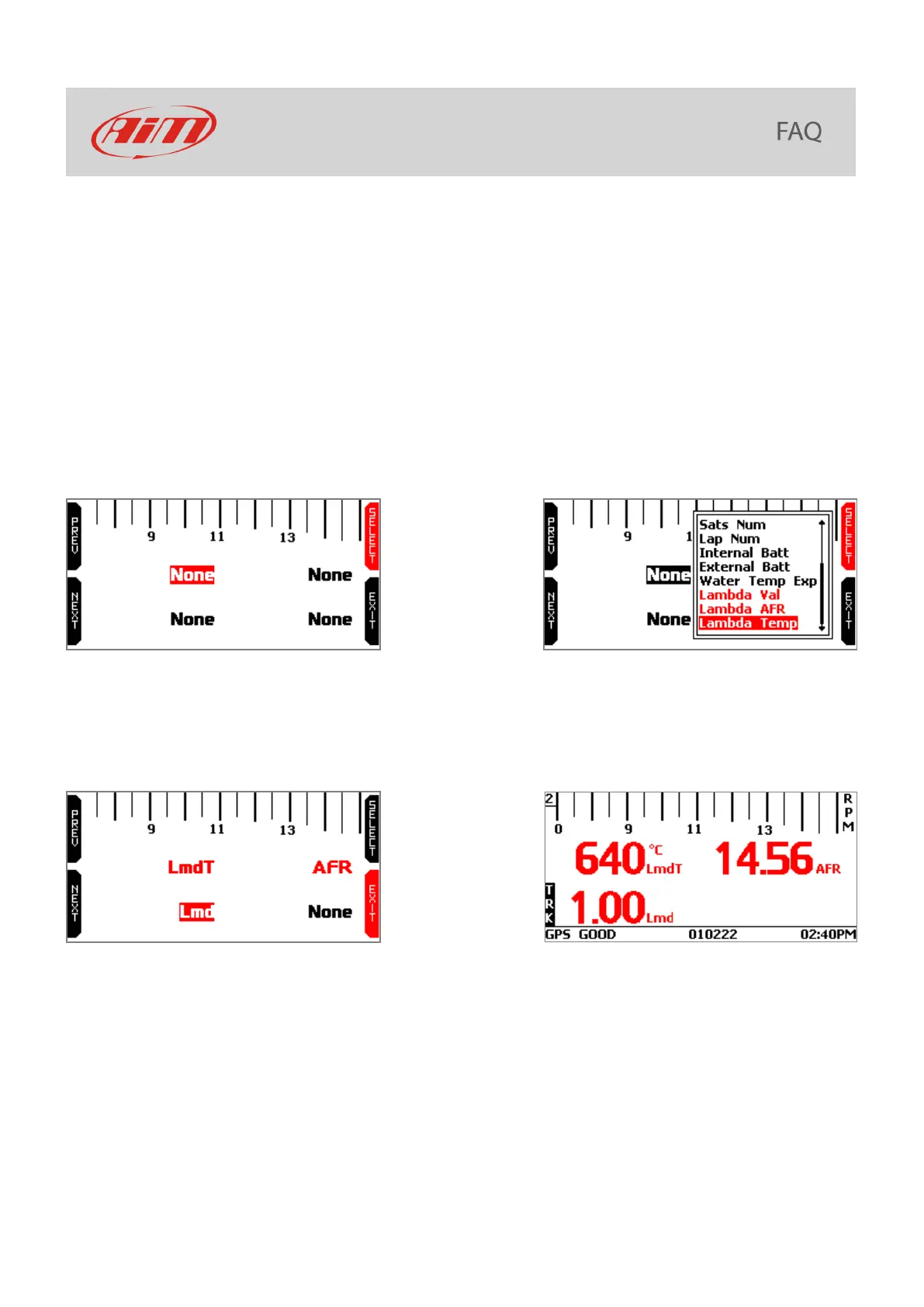
The page shows 4 fields all set as “NONE” with the top left one selected.
• press “SELECT”
• use “PREV” and “NEXT” button to scroll the list of available values;
• the LCU-One values you can see are:
o Lambda Val (that will be labelled Lmd) corresponding to the ration oxygen/air in the
exhaust gas – reference value is 1.00
o Lambda AFR (label AFR) corresponding to lambda value multiplied by the stochiometric
value of the fuel you are using (i.e. petrol stochiometric value is 14.57)
o Lambda Temp (labelled LmdT) corresponding to the probe internal temperature
• select the desired value and press “SELEZ”; repeat the operation for the three values
• at the end MyChron5 will show all fields set: press “EXIT” until you reach MyChron5 home page
• press “ON/VIEW” until you reach LCU page you configured and you will see in real time the values
of the fields you set.


 To Previous Page