Need help?
Do you have a question about the Aim MyChron5 and is the answer not in the manual?
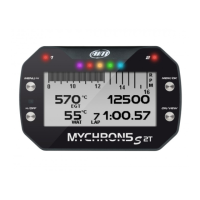
Introduces the MyChron5 gauge, its purpose, and capabilities for kart installation.
Lists and describes all the items included in the MyChron5 product package.
Guidance on installing the MyChron5 on a steering wheel, including vibration reduction.
Instructions for correctly mounting the RPM sensor lead for optimal signal reception.
Procedures for installing the temperature sensor on the kart.
Navigating the device's menu for setting various parameters and options.
Customizing display backlight color, brightness, and automatic activation.
Setting general device parameters like units, RPM range, and alarms.
Managing GPS data and selecting/configuring race tracks for accurate timing.
Configuring the device's wireless network (WiFi) connection.
Accessing and viewing real-time data and pages on the device.
Displaying speed data alongside other parameters using bar graphs.
Retrieving and reviewing past test session data from the device.
Viewing detailed lap times, including best laps and split times.
Overview of WiFi connectivity options and setup procedures.
Configuring the MyChron5 to act as its own WiFi hotspot.
Connecting the MyChron5 to an established wireless local area network.
Step-by-step guide for setting up the device in Access Point mode.
Detailed steps to connect the MyChron5 to an existing WiFi network.
Configuration guidelines for optimized WLAN performance with AiM devices.
Discussion on internet access impact on AiM device communication.
WiFi configuration for MyChron5 on macOS and virtualized Windows.
Establishing the WiFi connection between the MyChron5 and a PC.
Managing track data, including transmission and coordinate editing.
Process for downloading recorded data from the MyChron5 to a PC.
Using software tools to analyze downloaded test data and graphs.
Information on updates for device firmware and PC software.
Technical drawings and physical dimensions of the MyChron5 unit.

 To Next Page

 General