CHAPTER 8
42 43
MYCHRON5
For establishing the WiFi connection
with your PC:
n
be sure your MyChron 5 has the WiFi
enabled (MyChron 5 MENU / WiFi
Menu / WiFi mode has to be ON)
n
read the name of your MyChron 5,
available in the center of the lower row
of the OnLine Page:
n
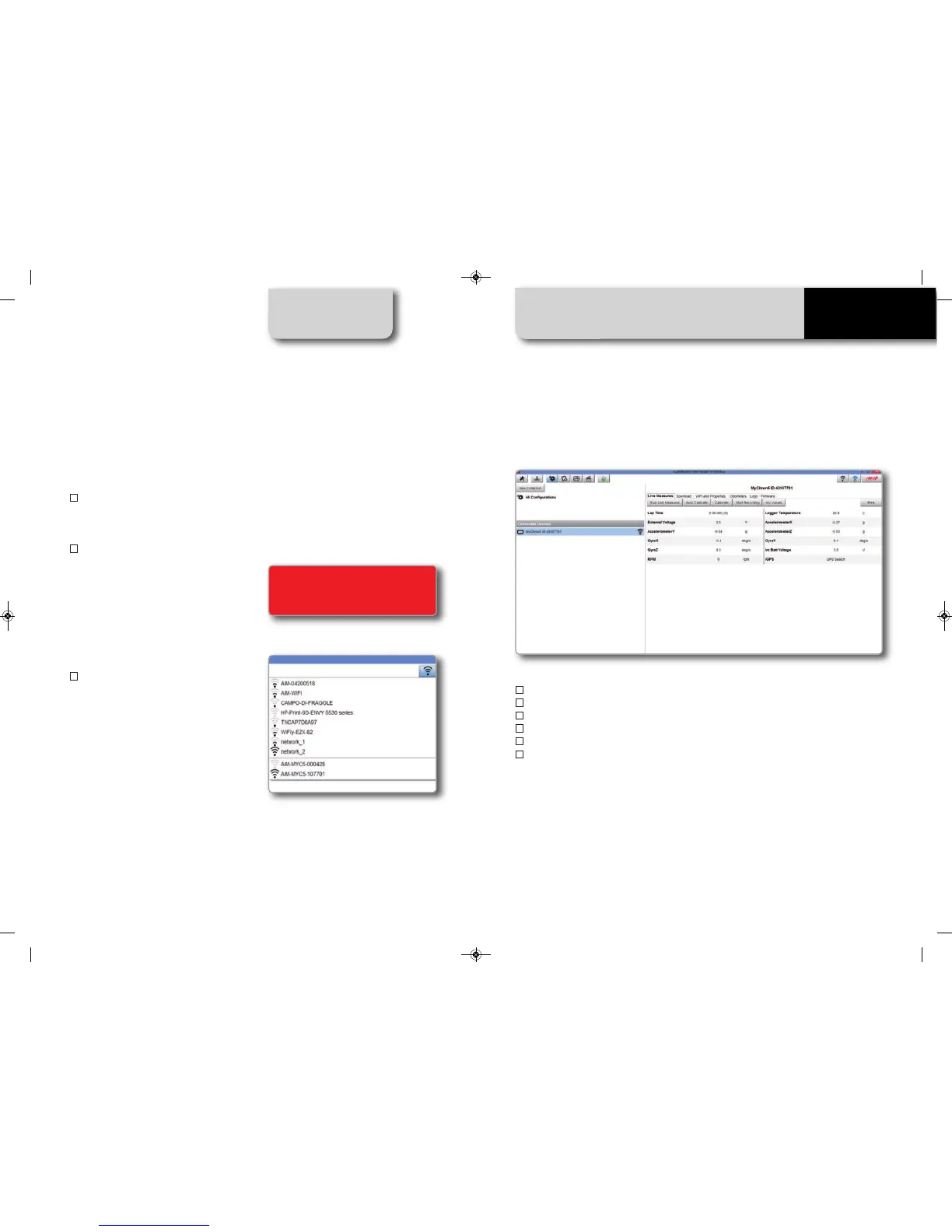
click on the WiFi Icon of RaceStudio3
and select your MyChron 5:
n
OnLine
n
Data Download
n
Wifi and Proprierties
n
Odometers Management
n
Logo Management
n
Firmware Information
The OnLine page lets you check all the MyChron 5 channels.
Data Download is explained in chapter 10
Odometers Management lets you set the name and reset the value of 5 different
odometers.
Through Logo Management, you can change the logo that appears on the display
when you turn your MyChron 5 on.
8. PC Connection
For establishing the WiFi connection
MANUALE IMPAGINATO.qxp_Layout 1 25/11/15 16:04 Pagina 49


 To Next Page