CHAPTER 9 TRACK MANAGEMENT
44 45
MYCHRON5
10. Data Download
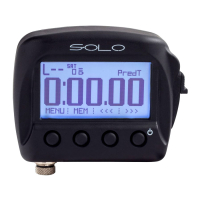
After having established the WiFi connection between your MyChron5 and the PC,
press Download for downloading the data recorded.
You will see the information about the files recorded in the system: number of laps,
best lap time, date/time, and dimension of the file creation.
Please select one or more files and push Download for getting them into your PC for
a deep analysis of them.
9. Track Management
Through Track Manager it is possible to:
n
Transmit and receive the track information to and from MyChron5
n
create a new track to be written to the database
n
modify the start / split points coordinates
Click on the Track icon to enter the Track Manager
MANUALE IMPAGINATO.qxp_Layout 1 25/11/15 16:04 Pagina 53


 To Next Page