CHAPTER 4 CONFIGURATION
12 13
MYCHRON5
4. Configuration Menu
Before using your MyChron5, don't forget to set some parameters, as explained
below. You can enter the Configuration Menu by pressing the MENU button.
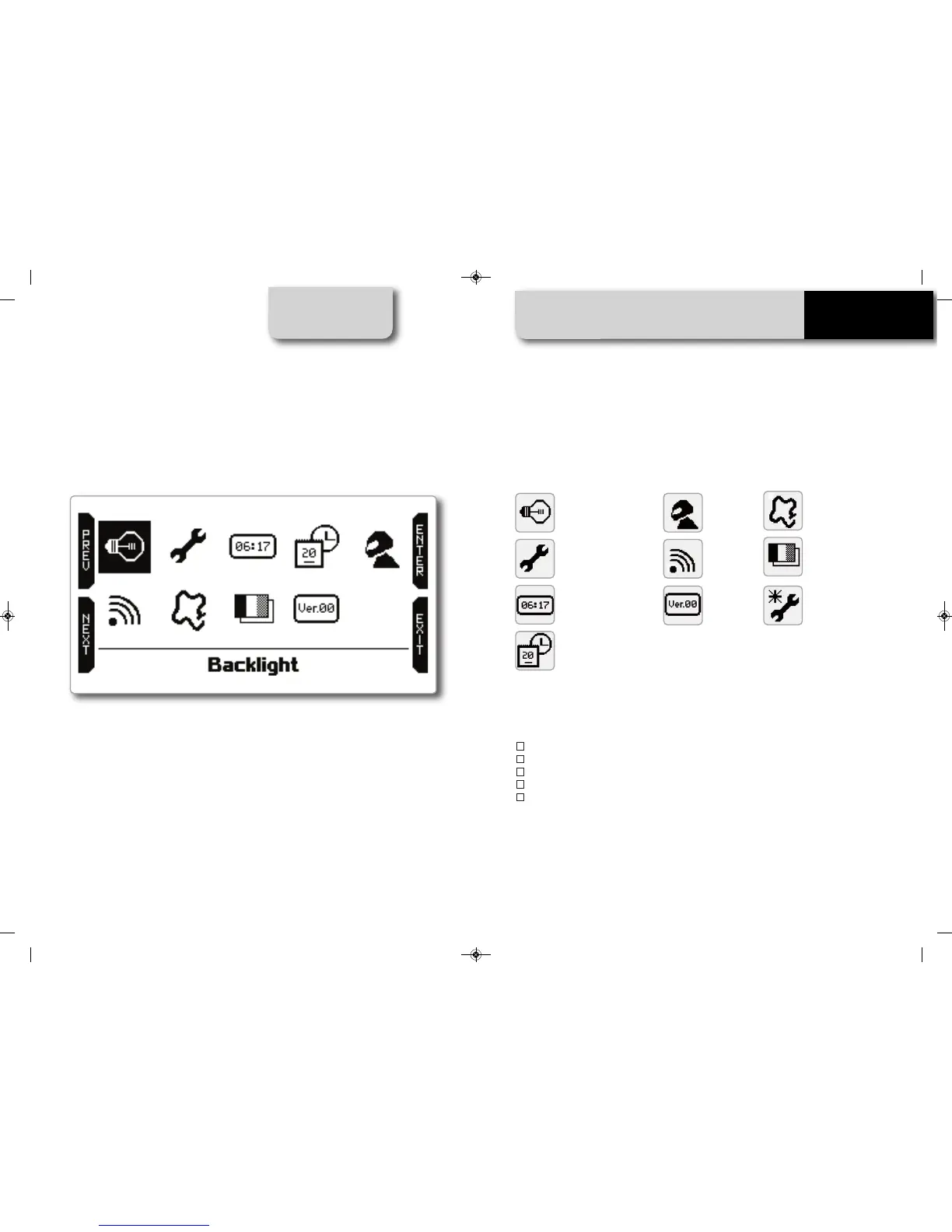
The icons have the following meanings:
The Wizard icon helps you to set the most important parameters of your new MyChron 5:
n
Language
n
Temperature unit (Fahrenheit or Celsius)
n
Speed unit (mph or Km/h)
n
Maximum RPM
n
Drive type (direct drive, low-stall clutch, gearbox)
By scrolling through the icons, you can easily set all the required parameters.
Only a few of them require some deeper explanation.
Backlight - for changing
backlight color
Parameters - unit of
measure, RPM end of scale
and freq, Drive setup, LED
management
4 counters to keep your kart
under control
Date and Time
MyChron5
Info
Wizard - to select at
the first Powe
r ON
Driver Name
WiFi setup
Tracks Management
Language selection
MANUALE IMPAGINATO.qxp_Layout 1 25/11/15 16:04 Pagina 15


 To Next Page