CHAPTER 4 CONFIGURATION
18 19
MYCHRON5
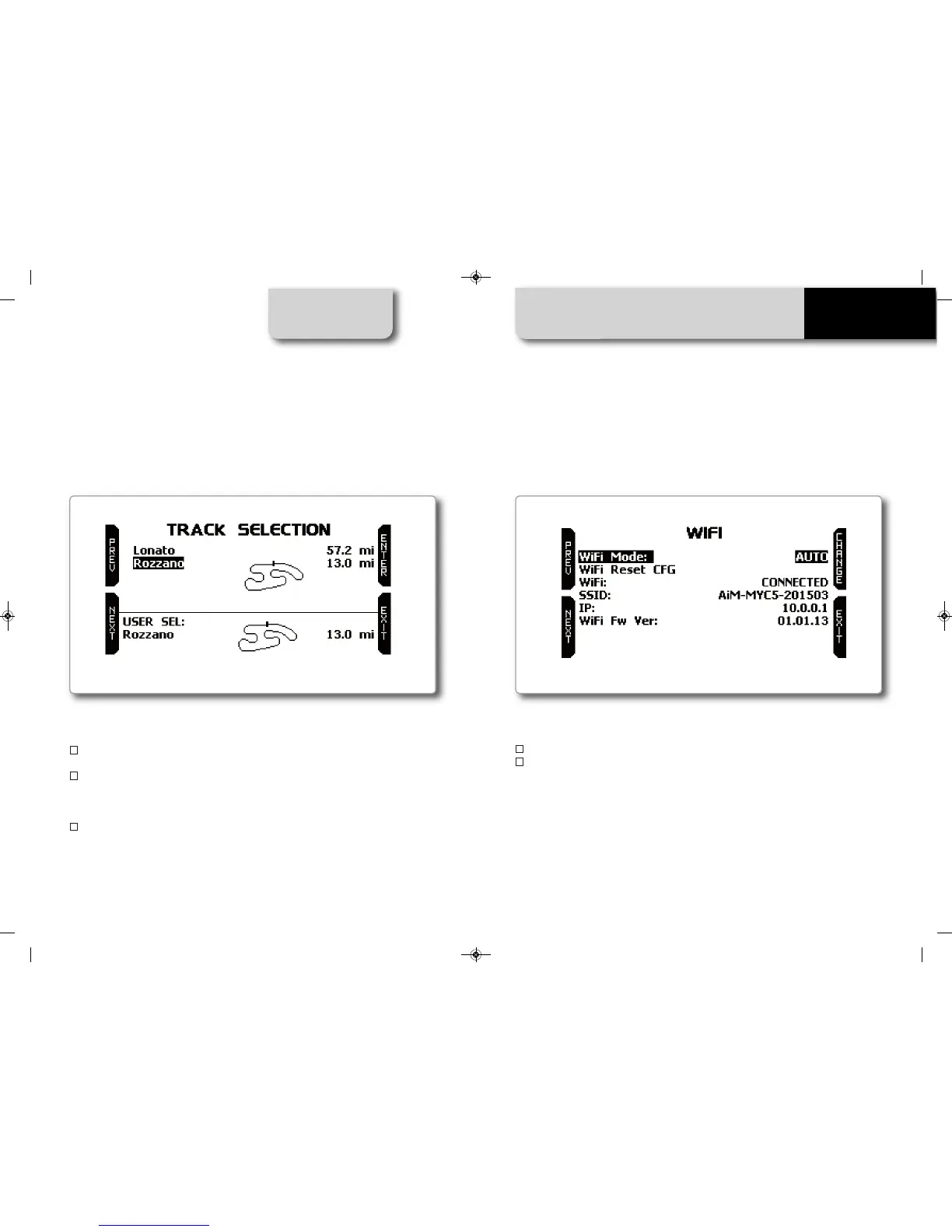
The tracks in the dbase are shown in the upper part of the display. The nearest are
shown first. You will see the name of the track, the shape, and the distance from where
you are. In the lower part of the track, the selected track is shown.
Please, note that, in case you run on a kart track that is NOT described in our track
database, MyChron5 enters into an "Apprentice mode", doing the following steps
n
It starts recording the different points of the track
n
As soon as it realizes that it is passing from a point where it has already passed by,
it understands that the circuit is closed and sets a temporary Starting Line, showing
the lap time every time the kart is passing from that point.
n
This new map can then be stored into the MyChron5 database and the starting
line coordinates can be eventually modified.
The name of the track can be added too and it can be transmitted to the PC at the
first PC-MyChron5 connection.
4.4 WiFi Setup
Please select the WiFi icon and enter the WiFi setup page.
There are two sets available:
n
WiFi mode
n
WiFi reset
WiFi mode has three options: on, off, and auto.
In auto mode, the MyChron5 turns the WiFi module on when the kart is not moving
and turns it off when the speed is higher than 10 km/h.
In on mode, the WiFi module is always active, while in off mode, it is always disabled.
MANUALE IMPAGINATO.qxp_Layout 1 25/11/15 16:04 Pagina 23


 To Next Page