Page 11 of 32
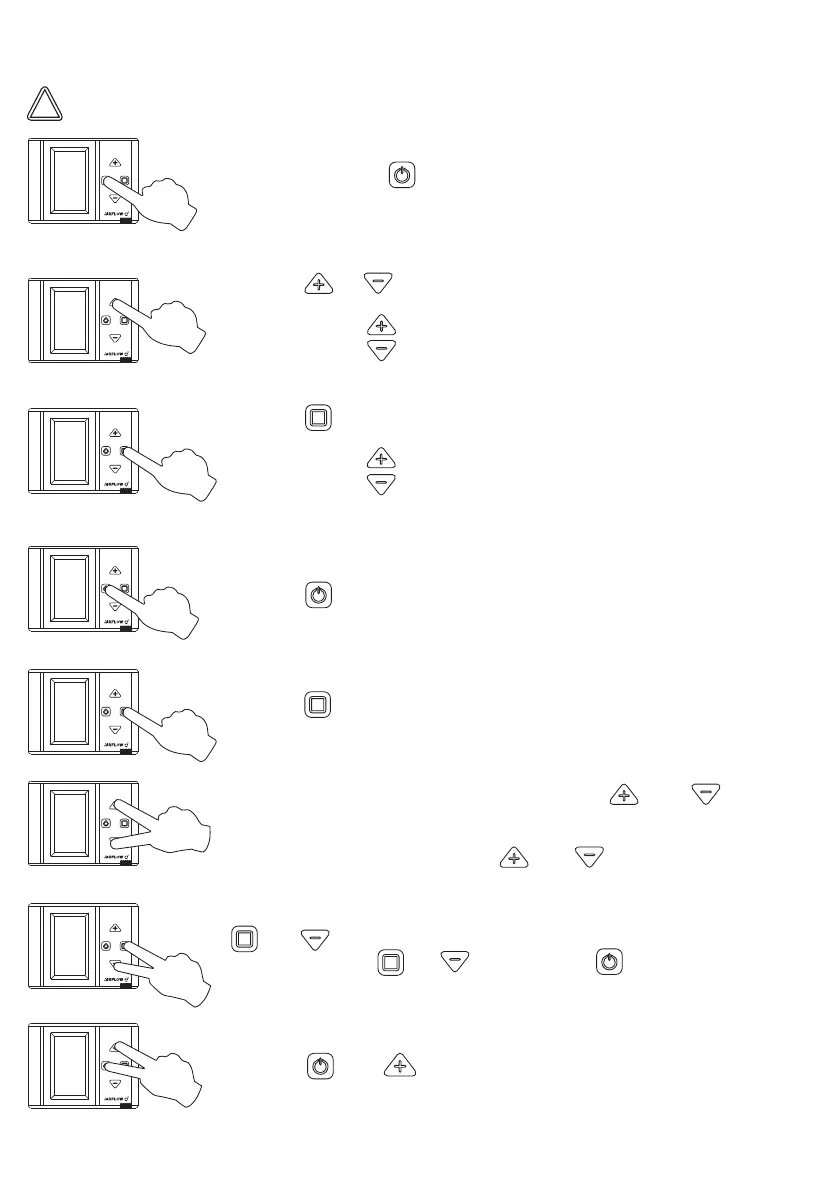
9.1 Pro Control Settings
1.ON / OFF: Press for 3 seconds.
2. Press or to switch to screens in between.
- Press to switch to next screen.
- Press to switch to previous screen.
3. Press to change any value on screen.
- Press to increase existing value +1
- Press to decrease existing value -1
4. Press to exit existing menu.
6. Child Lock: To activate this function, press and for 3
seconds. When child proof protection is active, keypad is locked
and buttons do not work.
To deactivate this function press and for 3 seconds.
8. Press and simultaneously to adjust screen brightness and
contrast.
5. Press to activate “boost” function for 3 seconds.
Do not connect any accessorıes or ancillerias, such as the pro panel or any additional sensors,
unless the unit ıs down powered and isolated from the mains electricty supply.
!
7. To reset the filter timer, press and continue to hold
and . This will start countdown from 6. Once this countdown
is finished release and and then press .


 To Next Page