9.4.4 Modbus Register List
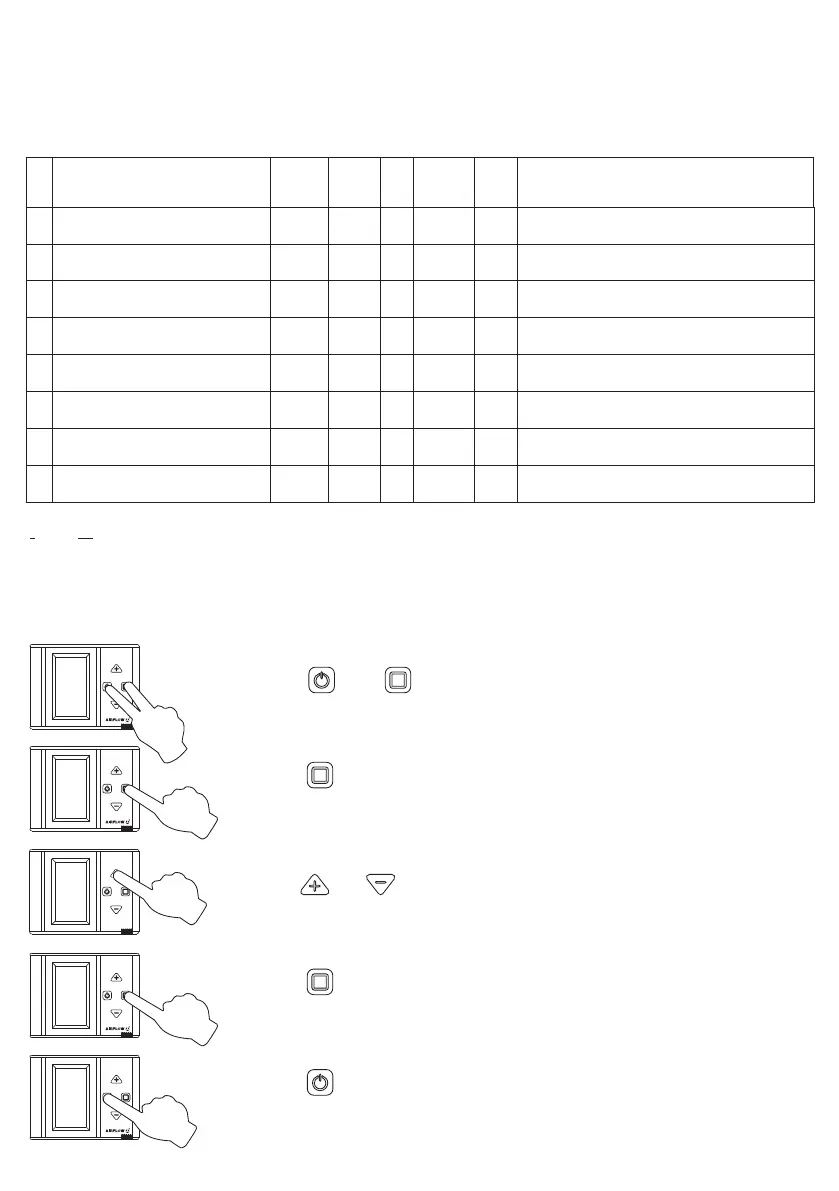
9.4.5 Pro Panel Service Menu
9.4 Modbus Connection
Multiplier
Access
Unit
Limit
Valid
Explanation
Name
ID
[5,60]
[0,1]
[0,100]
[0,100]
[0,1]
1
1
100
100
1
rw
rw
rw
rw
rw
min
-
%
%
-
Fan fault period
Sensor-1 status
Lower limit value of sensor
Upper limit value of sensor
Sensor-2 status
5
0
-
-
0
90
91
92
93
96
100
101
113
1
1
1
rw
rw
rw
-
-
-
[1,254]
[1,254]
[0-9999]
Control board connection address
Pro-Panel modbus address
Service menu password
1
1
1919
-
-
-
-
0-Passive, 1-Active
-
-
0-Passive, 1-Active
r: read, rw: read and write
Page 18 of 32
1. Press and simultaneously for 3 seconds to active “service”
menu.
2. Press for entering password.
4. Press for approval.
5. Press for return main menu screen.
3. Press and for changing values.


 To Next Page