A100
ACTIVE S P EAKE R S YST EM
A100
ACTIVE S P EAK ER S YST EM
A100
ACTIVE S PE AKE R S YSTE M
A100
ACTIVE S PE AKE R S YSTE M
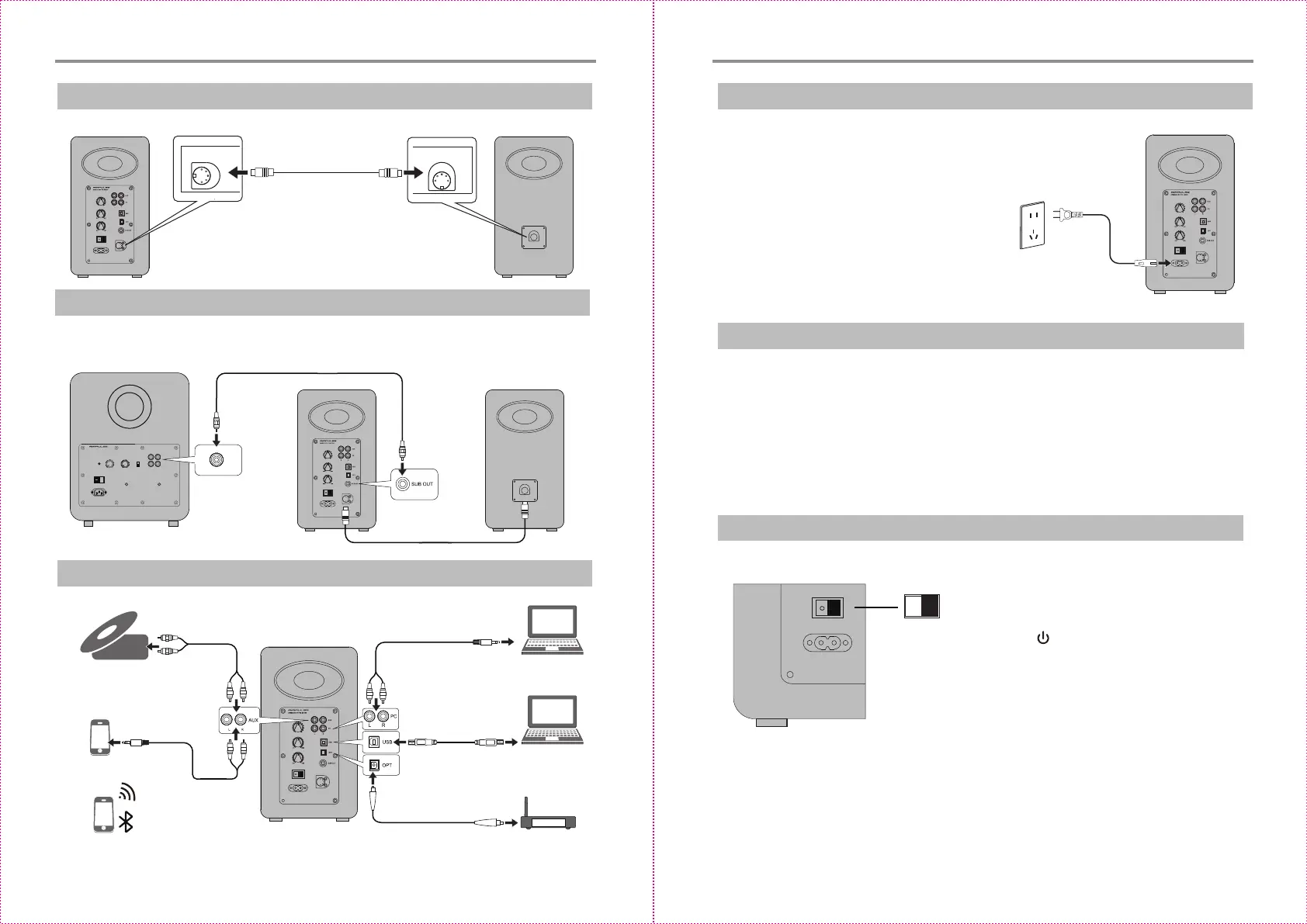
CD player/music player
/audio decoder, etc
Set Top Box
Blu-ray player
LEFT SPEAKER
Using the speaker connecng
cable included to connect
CD player
3.Connect to playback devices
6.Turn on main power
* Aer all cables are connected securely, press
power switch on the rear panel to turn on main
power;
* Press the “ ” on the remote control to let
the speaker enter standby state;
* LED indicator will be lit to show current audio
mode, please select the correct audio source
with the corresponding connecon.
O
POWER
2. Connect to subwoofer (cable not included)
109
Connecng the A100 to subwoofer will improve low frequency effect from the system
* Place the passive and acve speaker on a solid, leveled and steady surface.
* For the opmum stereo sound effect, the listener can slightly adjust speaker angel.
* The treble has certain direcvity, and for more direct sound the speaker's tweeter
should be at ear level of the listener.
L SPEAKER OUT
DES IG NE D B Y P HI L J ON ES
O
I
IN
LOW LEVEL
Using RCA audio cable
POW ER
OFF ON
Preparaons
1.Connect speakers
RCA audio cable
RCA audio cable
RCA audio cable
PC or Mac
PC or Mac
USB cable
Fiber opc input audio cable
4.Connect to power source
Connect the power cable included to power
input port on the rear panel, and then insert
power plug into wall outlet.
Preparaons
5.Speaker placement
English English


 To Next Page