EasyManua.ls Logo

Aiwa CSD-EL33 - CD Playing; CD Operations and Track Selection

Aiwa CSD-EL33
16 pages
Print Icon
To Next Page IconTo Next Page
To Previous Page IconTo Previous Page
Loading...
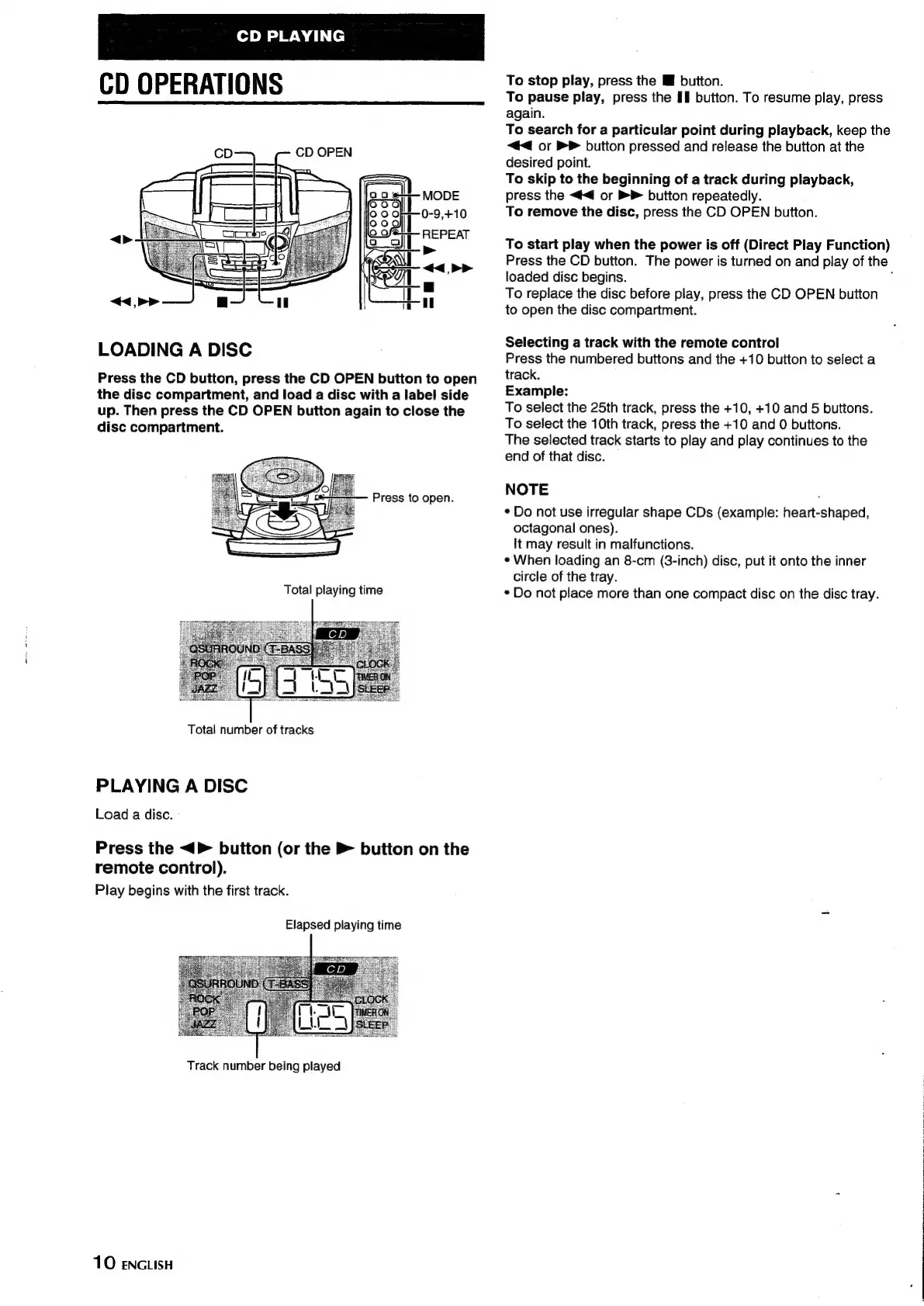
CD
PLAYING
CD
OPERATIONS
CD
OPEN
LOADING
A
DISC
Press
the
CD
button,
press
the
CD
OPEN
button
to
open
the
disc
compartment,
and
load
a
disc with
a
label
side
up.
Then
press
the
CD
OPEN
button
again
to
close
the
disc
compartment.
Press
to
open.
Total
number
of
tracks
PLAYING
A
DISC
Load
a
disc.
Press
the
<>
button
(or
the
button
on
the
remote
control).
Play
begins
with
the
first
track.
Elapsed
playing
time
Track
number
being
played
10
ENGLISH
To
stop
play,
press
the
I
button.
To
pause
play,
press
the
II
button.
To
resume
play,
press
again.
To
search
for
a
particular
point
during
playback,
keep
the
<<
or
>
button
pressed
and
release
the
button
at
the
desired
point.
To
skip
to
the
beginning
of
a
track
during
playback,
press
the
<<
or
button
repeatedly.
To
remove
the
disc,
press
the
CD
OPEN
button.
To
start
play
when
the
power
is
off
(Direct
Play
Function)
Press
the
CD
button.
The
power
is
turned
on
and
play
of
the
loaded
disc
begins.
To
replace
the
disc
before
play,
press
the
CD
OPEN
button
to
open
the
disc
compartment.
Selecting
a
track
with
the
remote
control
Press
the
numbered
buttons
and
the
+10
button
to
select
a
track.
Example:
To
select
the
25th
track,
press
the
+10,
+10
and
5
butions.
To
select
the
10th
track,
press
the
+10
and
0
buttons.
The
selected
track
starts
to
play
and
play
continues
to
the
end
of
that
disc.
NOTE
¢
Do
not
use
irregular
shape
CDs
(example:
heart-shaped,
octagonal
ones).
It
may
result
in
malfunctions.
¢
When
loading
an
8-cm
(3-inch)
disc,
put
it
onto
the
inner
circle
of
the
tray.
*
Do
not
place
more
than
one
compact
disc
on
the
disc
tray.

Other manuals for Aiwa CSD-EL33

Related product manuals