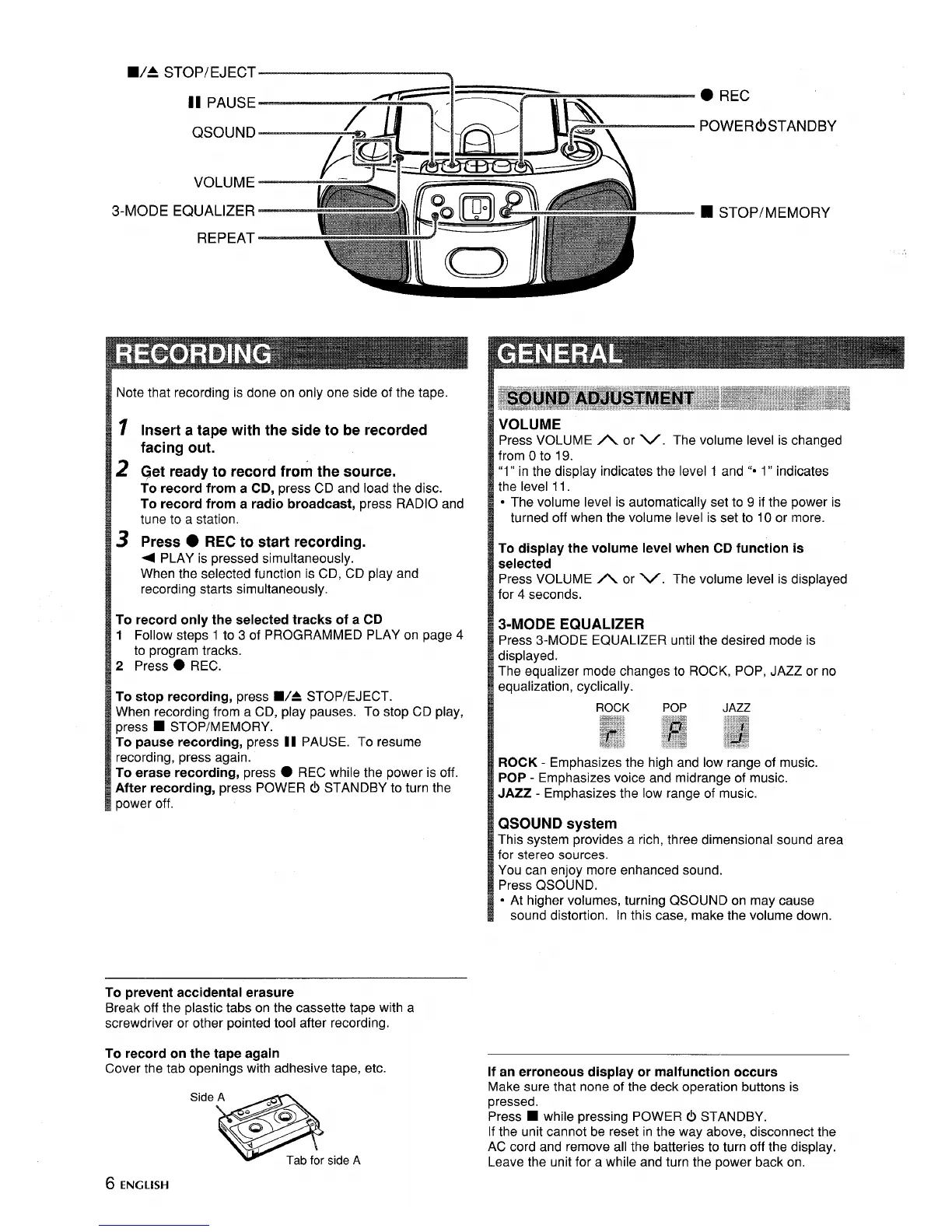
3-MODE
:::7g15~
—
If
.— -
EQUALIZER —
REPEAT
Note that recording is done on only one side of the tape.
1
2
3
Insert a tape with the side to be recorded
facing out.
~et ready to record from the source.
To record from a CD, press CD and load the disc.
To record from a radio broadcast, press RADIO and
tune to a station.
Press ● REC to start recording.
+ PLAY is pressed simultaneously .-
When the selected function is CD, CD play and
recording starts simultaneously.
To record only the selected tracks of a CD
1 Follow steps 1 to 3 of PROGRAMMED PLAY on page 4
to program tracks.
2 Press
● REC.
To stop recording, press W= STOP/EJECT.
When recording from a CD, play pauses. To stop CD play,
press
■ STOP/MEMORY.
To pause recording, press 11 PAUSE. To resume
recording, press again.
To erase recording, press
● REC while the power is off.
After recording, press POWER 0 STANDBY to turn the
power off.
To prevent accidental erasure
Break off the plastic tabs on the cassette tape with a
screwdriver or other pointed tool after recording.
To record on the tape again
Cover the tab openings with adhesive tape, etc.
● REC
POWER(!) STANDBY
❑ STOP/MEMORY
VOLUME
Press VOLUME
A or V. The volume level is changed
from Oto 19.
“1” in the display indicates the level 1 and ““ 1” indicates
the level 11.
s The volume level is automatically set to 9 if the power is
turned off when the volume level is set to 10 or more.
To display the volume level when CD function is
selected
Press VOLUME A or V. The volume level is displayed
for 4 seconds.
3-MODE EQUALIZER
Press 3-MODE EQUALIZER until the desired mode is
displayed.
The equalizer mode changes to ROCK, POP, JAZZ or no
equalization, cyclically.
ROCK - Emphasizes the high and low range of music.
POP - Emphasizes voice and midrange of music.
JAZZ - Emphasizes the low range of music.
QSOUND system
This system provides a rich, three dimensional sound area
for stereo sources.
You can enjoy more enhanced sound.
Press QSOUND.
● At higher volumes, turning QSOUND on may cause
sound distortion. In this case, make the volume down.
If an erroneous display or malfunction occurs
Make sure that none of the deck operation buttons is
pressed.
Press
■ while pressing POWER (!) STANDBY.
If the unit cannot be reset in the way above, disconnect the
AC cord and remove all the batteries to turn off the display.
Leave the unit for a while and turn the power back on.
6 ENGLISH



 To Next Page