EasyManua.ls Logo

Aiwa HV-E212 - Page 10

Aiwa HV-E212
70 pages
Print Icon
To Next Page IconTo Next Page
To Previous Page IconTo Previous Page
Loading...
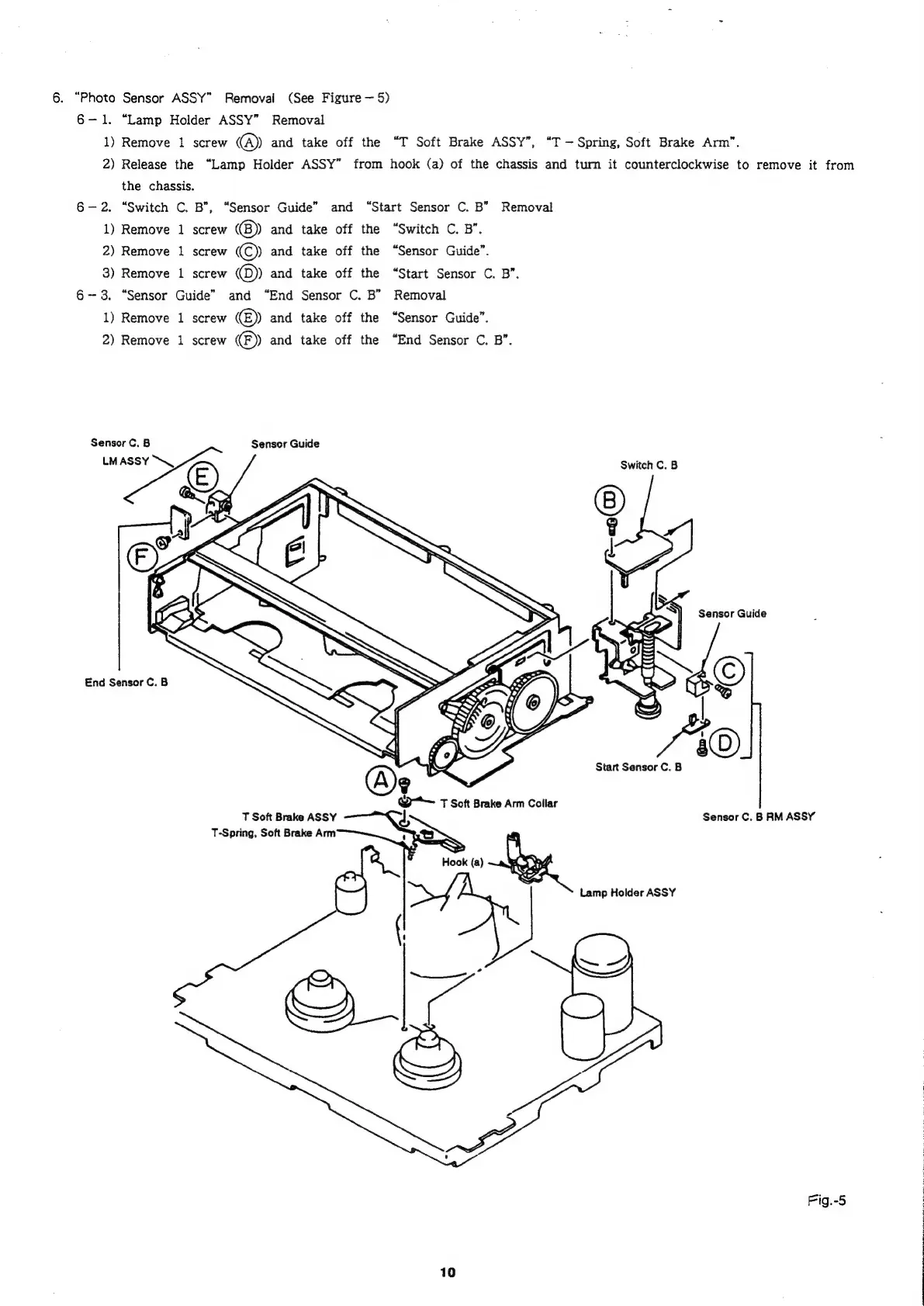
6.
“Photo
Sensor
ASSY”
Removal
(See
Figure
5)
6-1.
“Lamp
Holder
ASSY”
Removal
1)
Remove
1
screw
@
and
take
off
the
“T
Soft
Brake
ASSY”’,
“T
Spring,
Soft
Brake
Arm”.
2)
Release
the
“Lamp
Holder
ASSY”
from
hook
(a)
of
the
chassis
and
turn
it
counterclockwise
to
remove
it
from
the
chassis.
6-2.
“Switch
C.
B",
“Sensor
Guide”
and
“Start
Sensor
C.
B”
Removal
1)
Remove
1
screw
((B))
and
take
off
the
“Switch
C.
B”.
2)
Remove
1
screw
©
and
take
off
the
“Sensor
Guide”.
3)
Remove
1
screw
@)
and
take
off
the
“Start
Sensor
C.
B”.
6-3.
“Sensor
Guide”
and
“End
Sensor
C.
B”
Removal
1)
Remove
1
screw
(E))
and
take
off
the
“Sensor
Guide”.
2)
Remove
1
screw
©)
and
take
off
the
“End
Sensor
C.
B”.
Sensor
C.
B
Sensor
Guide
LMASSY
\,
&)
Switch
C.
B
Sensor
Guide
End
Sensor
C.
B
Start
Sensor
C.
B
@*—
T
Soft
Brake
Arm
Collar
T
Soft
Brake
ASSY
Sensor
C.
B
RM
ASSY
T-Spring,
Soft
Brake
Arm
2~]
Hook
(a)
yy
Lamp
Holder
ASSY
(!
~,
=
4
gb
Fig.-5
10

Related product manuals