EasyManua.ls Logo

Aiwa HV-E212 - Page 12

Aiwa HV-E212
70 pages
Print Icon
To Next Page IconTo Next Page
To Previous Page IconTo Previous Page
Loading...
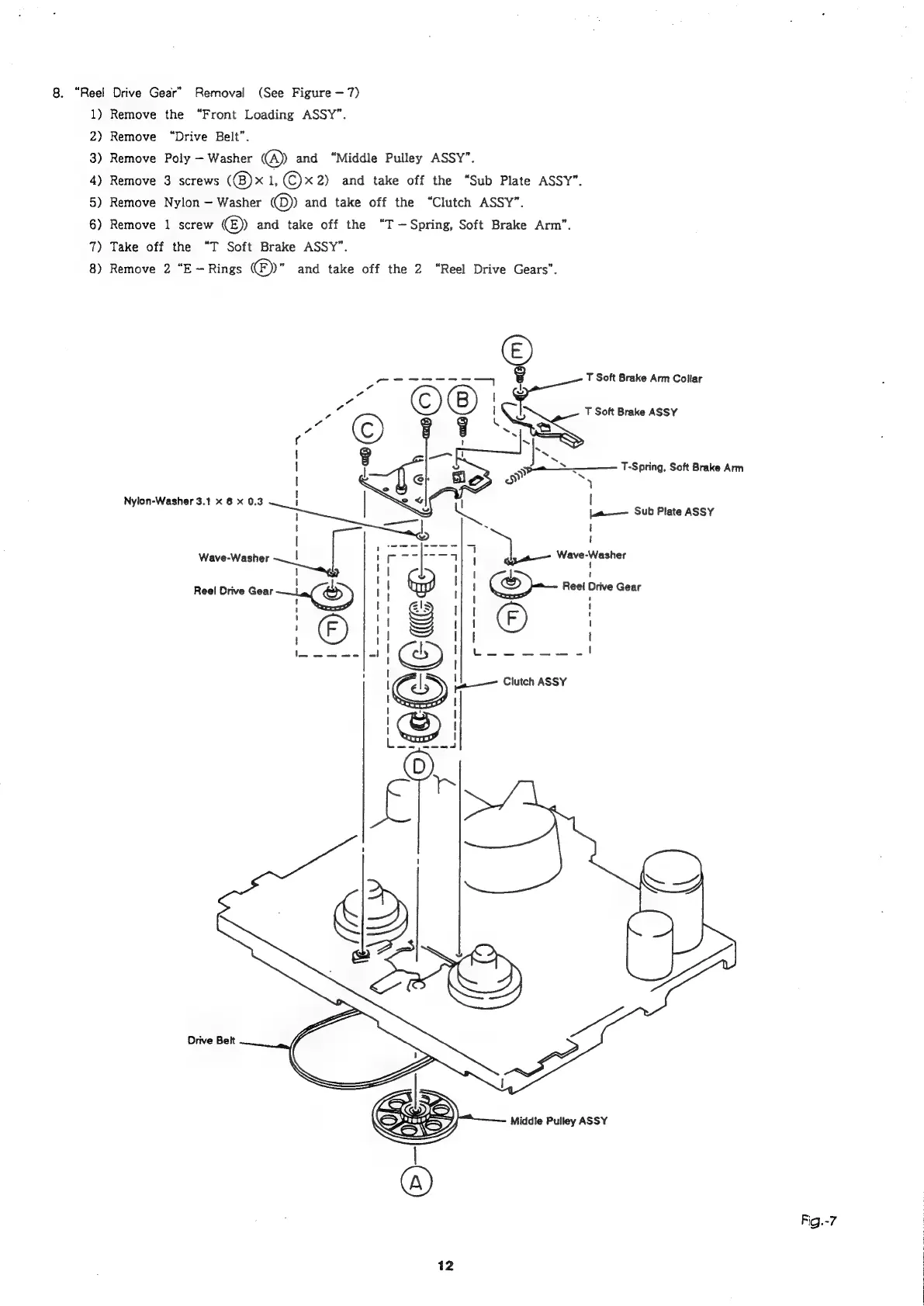
8.
“Reel
Drive
Gear”
Removal
(See
Figure
7)
1)
Remove
the
“Front
Loading
ASSY”.
2)
Remove
“Drive
Belt”.
3)
Remove
Poly
Washer
@
and
“Middle
Pulley
ASSY”.
4)
Remove
3
screws
(@)x
1,
©x
2)
and
take
off
the
“Sub
Plate
ASSY”.
5)
Remove
Nylon
Washer
@)
and
take
off
the
“Clutch
ASSY”.
6)
Remove
1
screw
©
and
take
off
the
“T
—Spring,
Soft
Brake
Arm”.
7)
Take
off
the
“T
Soft
Brake
ASSY”.
8)
Remove
2
“E
Rings
©)"
and
take
off
the
2
“Reel
Drive
Gears”.
ports
=a
i
T
Soft
Brake
Arm
Collar
©O'g
7
&
3
!
T
Soft
Brake
ASSY
s
7]
“©
Fi
Ss
¢
|
{
‘s
|
3
Se
T-Spring,
Soft
Brake
Arm
I
>)
a
y
Nylon-Washer
3.1
x
6
x
0.3
|
|
Se
ja
Sub
Plate
ASSY
i
reap
|
.
\
|
[
ita,
Lae
7)
Wave-Washer
|
cic
haeaniee
|
oe
Wave-Washer
i
!
!
|
'
!
3)
Reel
Drive
Gear
!
O
|
1
I
I
7
Middle
Pulley
ASSY
Fig.-7

Related product manuals