EasyManua.ls Logo

Aiwa HV-E212 - Page 16

Aiwa HV-E212
70 pages
Print Icon
To Next Page IconTo Next Page
To Previous Page IconTo Previous Page
Loading...
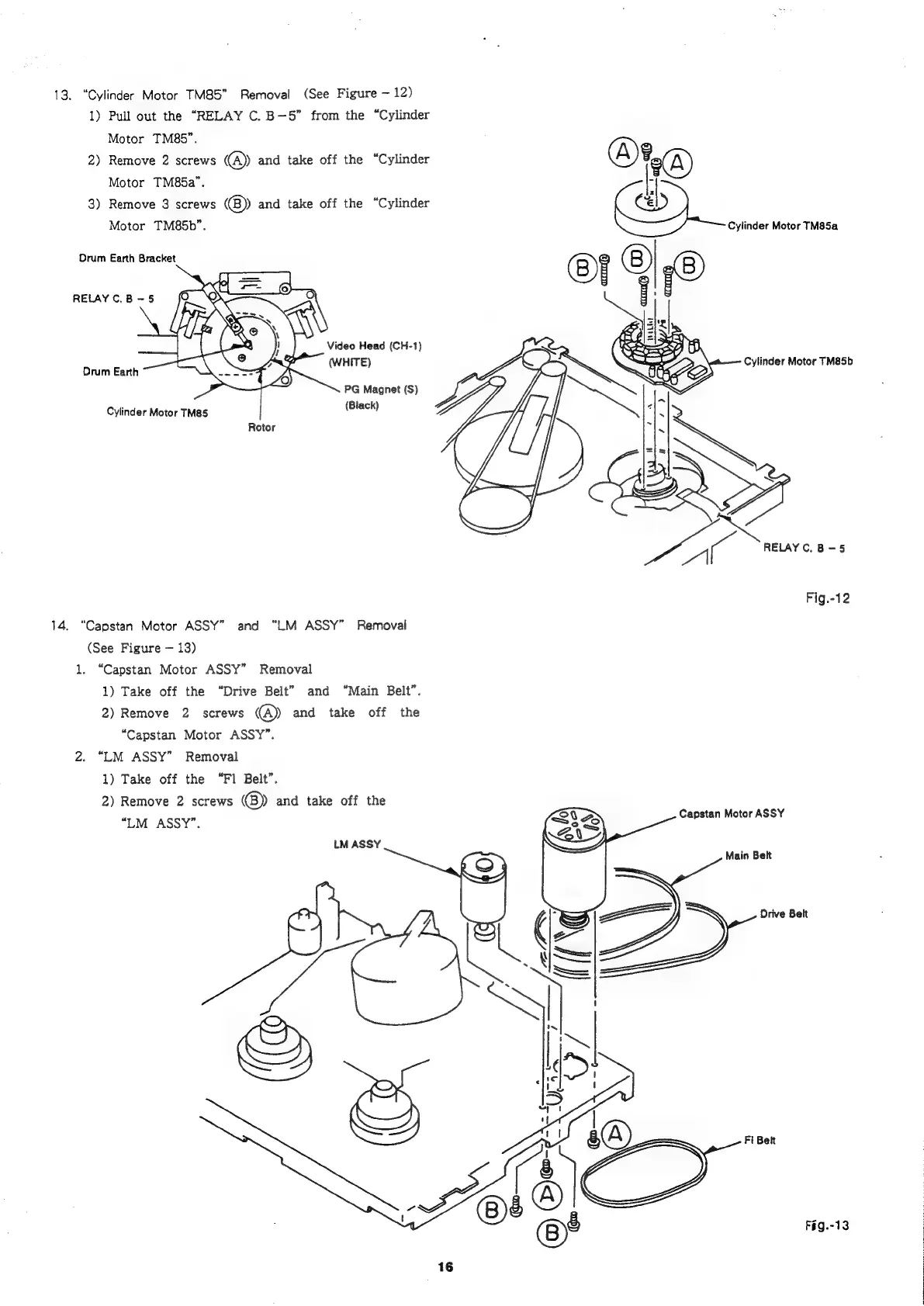
13.
“Cylinder
Motor
TM85"
Removal
(See
Figure
12)
1)
Pull
out
the
“RELAY
C.
B-—5”
from
the
“Cylinder
Motor
TM85”.
2)
Remove
2
screws
@
and
take
off
the
“Cylinder
Motor
TM85a”.
3)
Remove
3
screws
@®)
and
take
off
the
“Cylinder
Motor
TM85b”.
Cylinder
Motor
TM85a
S
©
(#
Orum
Earth
Bracket
RELAY
C.B
-
5
Video
Head
(CH-1)
(WHITE)
Cylinder
Motor
TM85b
Drum
Earth
PG
Magnet
(S)
Cylinder
Motor
TM85
(Black)
Rotor
oa
Fig.-12
14,
“Capstan
Motor
ASSY”
and
“LM
ASSY”
Removal
(See
Figure
13)
1.
“Capstan
Motor
ASSY”
Removal
1)
Take
off
the
“Drive
Belt”
and
“Main
Belt”.
2)
Remove
2
screws
@)
and
take
off
the
“Capstan
Motor
ASSY”.
2.
“LM
ASSY”
Removal
1)
Take
off
the
“Fl
Belt”.
2)
Remove
2
screws
(B))
and
take
off
the
“UM
ASSY”.
Capstan
Motor
ASSY
LM
ASSY
Main
Belt
Drive
Belt
F§g.-13

Related product manuals