EasyManua.ls Logo

Aiwa HV-E212 - Page 51

Aiwa HV-E212
70 pages
Print Icon
To Next Page IconTo Next Page
To Previous Page IconTo Previous Page
Loading...
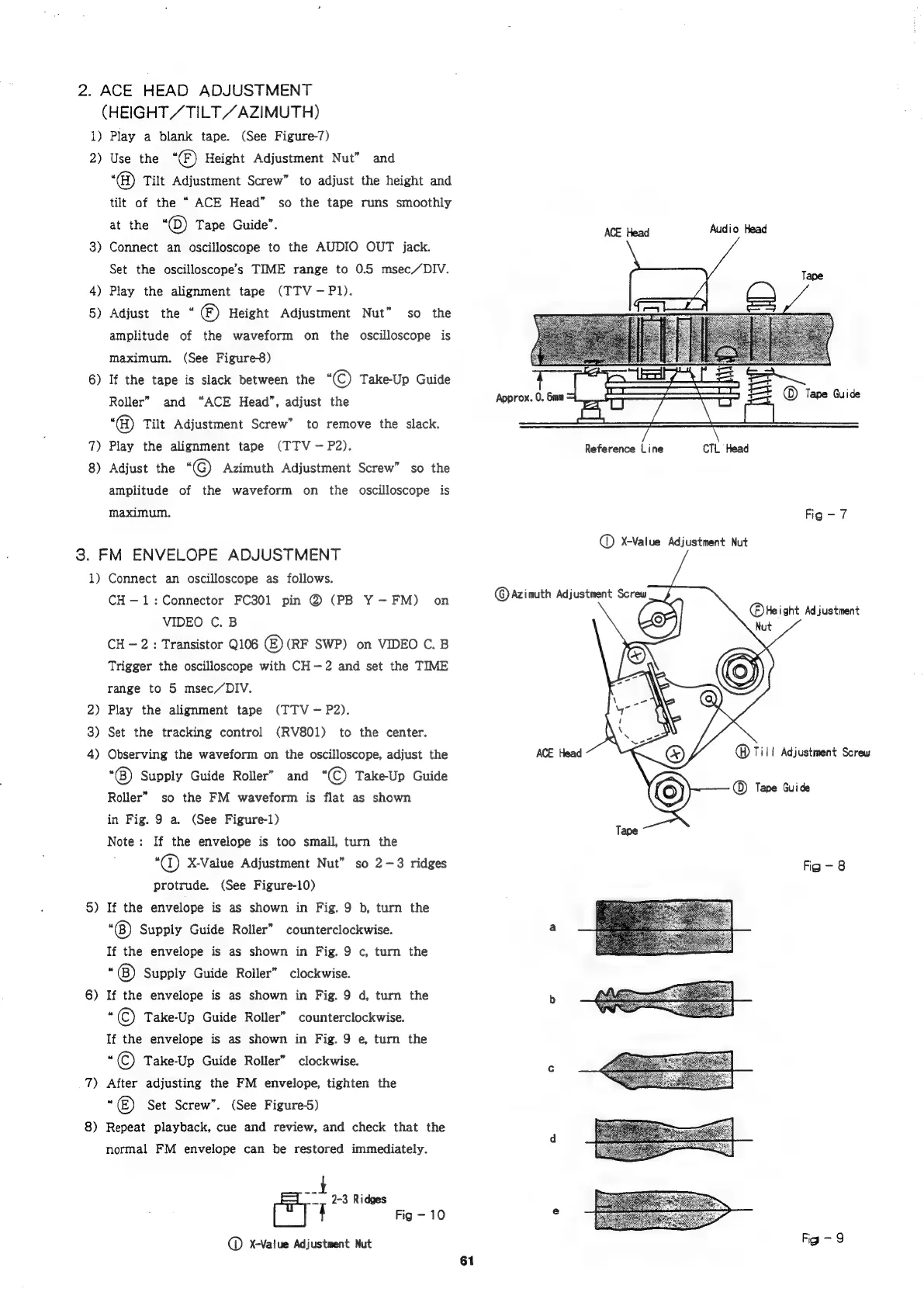
2.
ACE
HEAD
ADJUSTMENT
1)
2)
3)
4)
5)
6)
7)
8)
(HEIGHT
/
TILT
ZAZIMUTH)
Play
a
blank
tape.
(See
Figure-7)
Use
the
“®)
Height
Adjustment
Nut”
and
“@
Tilt
Adjustment
Screw”
to
adjust
the
height
and
tilt
of
the
ACE
Head”
so
the
tape
runs
smoothly
at
the
“©)
Tape
Guide”.
Connect
an
oscilloscope
to
the
AUDIO
OUT
jack.
Set
the
oscilloscope’s
TIME
range
to
0.5
msec/DIV.
Play
the
alignment
tape
(TTV—P1).
Adjust
the
“*
®)
Height
Adjustment
Nut”
so
the
amplitude
of
the
waveform
on
the
oscilloscope
is
maximum.
(See
Figure8)
If
the
tape
is
slack
between
the
KC)
Take-Up
Guide
Roller”
and
“ACE
Head”,
adjust
the
‘®
Tilt
Adjustment
Screw”
to
remove
the
slack.
Play
the
alignment
tape
(TTV
—-
P2).
Adjust
the
‘©
Azimuth
Adjustment
Screw”
so
the
amplitude
of
the
waveform
on
the
oscilloscope
is
maximum.
3.
FM
ENVELOPE
ADJUSTMENT
1)
2)
3)
4)
5)
6)
7)
8)
Connect
an
oscilloscope
as
follows.
CH-—1:
Connector
FC301
pin
@
(PB
Y—-FM)
on
VIDEO
C.
B
CH
-
2:
Transistor
Q106
(E)
(RF
SWP)
on
VIDEO
C.
B
Trigger
the
oscilloscope
with
CH-2
and
set
the
TIME
range
to
5
msec/DIV.
Play
the
alignment
tape
(TTV-—
P2).
Set
the
tracking
control
(RV801)
to
the
center.
Observing
the
waveform
on
the
oscilloscope,
adjust
the
“(®)
Supply
Guide
Roller”
and
“(C)
TakeUp
Guide
Roller”
so
the
FM
waveform
is
flat
as
shown
in
Fig.
9
a.
(See
Figure-1)
Note:
If
the
envelope
is
too
small,
turn
the
“@®
X-Value
Adjustment
Nut”
so
2-3
ridges
protrude.
(See
Figure-10)
If
the
envelope
is
as
shown
in
Fig.
9
b,
turn
the
“®)
Supply
Guide
Roller”
counterclockwise.
If
the
envelope
is
as
shown
in
Fig.
9
c,
turn
the
“(B)
Supply
Guide
Roller”
clockwise.
If
the
envelope
is
as
shown
in
Fig.
9
d,
turn
the
“©
Take-Up
Guide
Roller”
counterclockwise.
Tlf
the
envelope
is
as
shown
in
Fig.
9
e,
turn
the
7
©
Take-Up
Guide
Roller”
clockwise.
After
adjusting
the
FM
envelope,
tighten
the
“6)
Set
Screw”.
(See
Figure-5)
Repeat
playback,
cue
and
review,
and
check
that
the
normal
FM
envelope
can
be
restored
immediately.
ae
~~
9-3
Ridges
fy
{
Fig
-
10
@
X-Value
Adjustment
Nut
61
Approx.
0.
6mm
@Azimuth
Adjustment
Screw
ACE
Head
Reference
Line
CTL
Head
Fig-7
@
X-Value
Adjustment
Nut
Tape
@
Till
Adjustment
Screw
Tape
Guide
Fig-8
Fig
-
9

Related product manuals