7
En
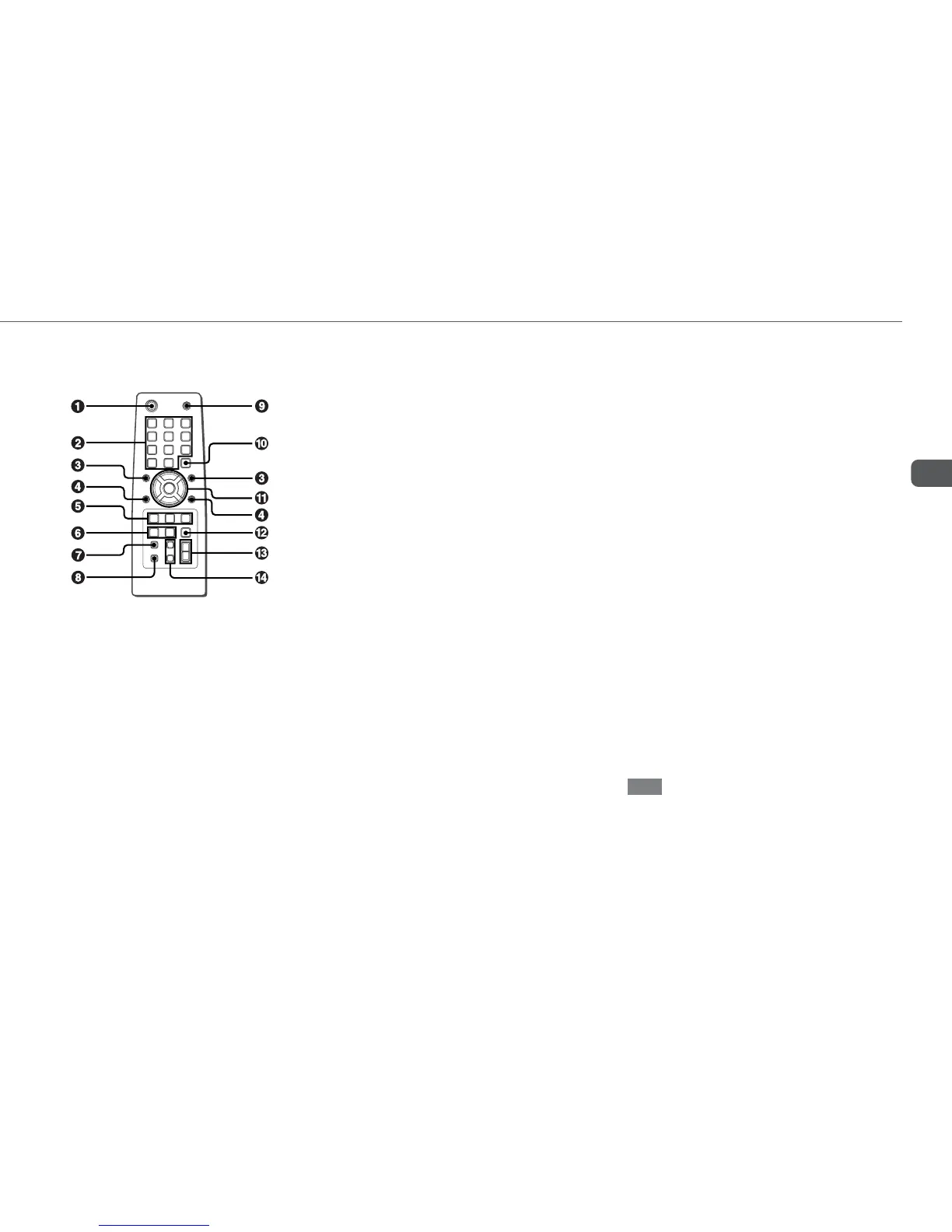
Buttons with the same or similar names with the main unit
basically have the same function.
1 POWER (8)
2 1-0/10, +10 (10-12, 14)
CD: selects a CD track of the specified number.
Tuner: tunes in to the station with the specified preset
number.
The numbered buttons take on these functions below when pressed
with SHIFT held down
:
EDIT (17, 18)
Enters AI Edit Recording or Programmed Edit Recording
mode when pressed in stop mode.
BAND (14)
Selects Tuner function and the radio band.
TAPE A/B (16)
SPECTRUM (8)
Changes the spectrum analyzer display.
TUNER MODE (15)
Switches between stereo or monaural FM reception.
3 r, t (9-11, 14, 15, 17-21)
CD: selects a track.
Tuner: selects a preset station.
Tape: specifies tape length.
BASS and TREBLE: adjusts the level.
Clock and Timer: sets the time.
4 ALBUM M, N (12)
Selects a previous album or a succeeding album.
5 PLAY MODE (11)
Selects Shuffle or Programmed playback in CD function.
REPEAT (10)
Enters CD repeat playback mode.
ENTER (8-12, 14, 19-21 )
6 CLOCK/TIMER/SET (9, 20, 21)
Enters timer setting mode.
CLOCK/TIMER/SELECT (20, 21)
Selects timer playback, timer recording or timer off.
7 DISPLAY (9, 10)
8 SHIFT
Hold down when pressing a numbered button to change
its function to that printed above the number.
e.g.)
"Press SHIFT+BAND on the remote" indicates "Hold
down SHIFT and press '2' (BAND)". Doing so makes you
be able to select Tuner function and the radio band.
9 FUNCTION
Switches the active function among CD, TAPE, TUNER
and VIDEO (AUX or TV).
0 DISC SKIP (10)
Select a disc.
! c/d (8, 10-12, 16)
When the unit is turned off: activates or deactivates
DEMO.
CD and Tape: starts playback.
s (10, 11, 16-18)
CD and Tape: stops playback.
f,g (10, 14, 16)
CD: searches a track in fast forward or fast reverse
playback when held down.
Tape: fast forwards or rewinds the tape.
Tuner: manually tunes down or up within the band.
a (10, 16)
CD and Tape: pauses playback.
@ SLEEP (20)
Switches the sleep-timer on/off and selects the duration.
# VOLUME (+, -) (8)
Adjusts the volume.
$ SOUND (19)
Selects BASS or TREBLE setting mode
CLEAR (11, 14)
Clears a track of the CD programmed playback and a
Radio preset station.
Note
The button not explained above (KARAOKE) does not
operate for this unit.
Remote control
Refer to the pages indicated in parentheses for details.



 To Next Page