EasyManua.ls Logo

Aiyima A9 - User Manual

Aiyima A9
3 pages
Print Icon
To Next Page IconTo Next Page
Loading...
Multi-Channels Bluetooth
Audio Power Amplifier
1
1 2 3 4 5 6 7 8
2 3 4 5 6 7
8 9
10
Front panel introduction
Power Switch lnput mode select switch
Subwoofer volume control
Surround volume Control
Total vol
Front volume Control
Output mode select switch
Center volume Control
Front volume Control
Front Bass Control
Bluetooth input OPT input
Active subwoofer output
COA input
2.0CH Channel input
2.0CH/2.1CH/5.1CH Channel input
5.1CH Channel input
Power input DC 12-24V
Rear panel introduction
1
2
3 4
5 6
7 8
9 10
1
2
3 4
5 6
7 8
USER MANUALS
Model: A9
1
Question and Answer IconNeed help?

Do you have a question about the Aiyima A9 and is the answer not in the manual?

Summary

Front Panel Controls and Indicators

Power Switch

Controls the power state of the amplifier.

Input Mode Select Switch

Selects the audio input source for playback.

Output Mode Select Switch

Selects the audio output mode (e.g., 2.0, 2.1, 5.1).

Volume Controls

Adjusts volume levels for front, center, surround, and subwoofer channels.

Tone Controls

Adjusts bass and treble levels for the front channels.

Rear Panel Connectivity

Audio Inputs

Connects to various audio sources like Bluetooth, Optical, Coaxial, and RCA.

Audio Outputs

Provides audio output for active subwoofers and speaker systems.

Power Input

Connects the DC power supply to the amplifier.

Main Specifications and Parameters

Physical and Electrical Specs

Details size, weight, working power, and amplifier chip.

Audio Performance

Covers output power, frequency response, and sampling rates.

Indicator Function Guide

Power Indicator Status

Shows the power status (On/Off, Standby) of the amplifier.

Input;Output Indicators

Displays the selected input source and active output mode.

Initial Use and Troubleshooting

Preparation and Setup

Guidance on connecting power, speakers, and understanding basic functions.

Troubleshooting Common Issues

Addresses problems like failure to turn on, no sound, and Bluetooth search.

Overview

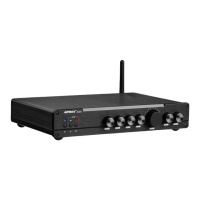
The AIYIMA A9 is a multi-channels Bluetooth audio power amplifier designed for home audio systems, offering versatile input and output options to enhance sound quality. It supports various audio sources and output configurations, making it suitable for different listening preferences and speaker setups.

Function Description:

The AIYIMA A9 serves as a central hub for audio amplification, capable of receiving audio signals from multiple sources and delivering amplified sound to speakers. Its core function is to boost audio signals to drive passive speakers, while also providing a dedicated output for an active subwoofer. The amplifier supports both wired and wireless audio inputs, including Bluetooth, coaxial, optical, and analog RCA connections. It features multiple output modes, allowing users to switch between 2.0-channel stereo, 2.1-channel with subwoofer, and 5.1-channel surround sound configurations.

The front panel of the A9 provides intuitive controls for managing various aspects of the audio experience. A power switch allows for turning the device on and off. An input mode select switch enables users to cycle through available audio sources (Bluetooth, coaxial, optical, 2.0CH RCA, 5.1CH RCA). An output mode select switch facilitates switching between the 5.1, 2.0, and 2.1 output configurations. Individual volume controls are provided for the center channel, subwoofer, surround channels (SL/SR), and front channels (FL/FR), allowing for precise sound balancing. A master total volume control adjusts the overall output level. Additionally, dedicated controls for front bass and treble allow for tone adjustments.

The rear panel houses all the input and output connections. For inputs, it includes Bluetooth, optical (OPT), coaxial (COAX-IN), 2.0CH analog RCA (INPUT), and 5.1CH analog RCA (INPUT). The output section features speaker terminals for the front (FL/FR), surround (SL/SR), center (CEN), and subwoofer (SW) channels, designed for passive speakers. A dedicated RCA output is provided for an active subwoofer (SUB-OUT). The device is powered by a DC 12-24V input.

The indicator function guide on the front panel provides visual feedback on the amplifier's status. The power indicator shows green for standby and blue for turned on. The input indicator changes color to reflect the active input mode: blue for Bluetooth, green for 2.0CH input, purple for COA IN, red for 5.1CH input, and cyan for OPT IN. The output indicator also changes color to show the selected output mode: red for 5.1CH OUT, green for 2.0CH OUT, and blue for 2.1CH OUT.

Important Technical Specifications:

  • Model: A9
  • Dimensions: 260mm (L) x 180mm (W) x 48mm (H)
  • Net Weight: 1.35 KG
  • Working Power: DC 24V 4.5A
  • Audio Input: Bluetooth/Coaxial/Optical/ 2.0 Channel RCA / 5.1 Channel RCA
  • Amplifier Chip: TPA3116D2
  • Output Power:
    • Front main channel: 50W + 50W (recommend 3-8" speakers)
    • Surrounded channel: 50W + 50W (recommend 3-8" speakers)
    • Center channel: 50W (recommend 3-8" speakers)
    • Bass channel: 100W (recommend 5-10" speakers)
  • Output Impedance: 4-8Ω
  • THD: 0.01% (@1KHz)
  • S/N Ratio: ≥102dB
  • Frequency Response:
    • Front main channel: 10Hz-40KHz
    • Surrounded channel: 10Hz-40KHz
    • Center channel: 10Hz-40KHz
    • Bass channel: 10Hz-180Hz
    • Treble & bass range: ±10dB (±2dB)
  • Supported Sampling Rate:
    • COAX IN: 16-32Bit / 44.1-192KHz
    • OPT IN: 16-32Bit / 44.1-192KHz
    • Bluetooth IN: 16-24Bit / 44.1-96KHz
  • Bluetooth: Qualcomm 5.0, QCC3031 (SBC/AAC/APTX/APTX-HD)

Usage Features:

The AIYIMA A9 is designed for straightforward use, with a clear initial setup process:

  1. Power Connection: Connect the DC plug of the power supply to the amplifier's power jack, then connect to a 220V power source. The amplifier requires a 24V DC power supply, with a 5.5*2.5mm interface, positive pole inside and negative pole outside.
  2. Speaker Connection: Connect the amplifier's output interfaces (red positive and black negative) to the corresponding positive and negative terminals of the speakers.
  3. Power On: Long press the "Start" button on the front panel until the power indicator light turns blue.
  4. Input Signal Selection: Use the "Input" button on the panel to switch between wired input signals (coaxial/optical digital, 2.0CH RCA, 5.1CH RCA) and Bluetooth mode.
  5. Output Mode Selection: Use the "Output" button on the panel to switch between 5.1, 2.0, and 2.1 output modes.
  6. Bluetooth Connection: Select Bluetooth playback mode via the "Input" button. Turn on Bluetooth on your mobile device and search for "hifi-Spdif" to connect.
  7. Standby: Press and hold the "Start" button until the indicator light turns green to put the device into standby mode.

The amplifier's internal structure is complex, with vital parts matched to achieve optimal performance. A "running-in" period is recommended for the equipment to reach its ideal state, which can improve sound delicacy, smoothness, elasticity, and dynamic range.

The robust aluminum alloy metal shell provides good thermal conductivity and durability. The surface is treated with an anodized frosting process, giving it a delicate and round texture. The high-density integrated PCB circuit design ensures 100% circuit detection without breakpoints, using high-conductivity copper paving materials that exceed industry standards to minimize external interference and achieve high-fidelity audio.

Maintenance Features:

The manual provides troubleshooting tips for common issues:

  • Cannot turn on:
    • Check if the power adapter's indicator is on. If not, the power adapter may be faulty.
    • If the indicator lights up normally, check the connection between the power amplifier and the power adapter.
    • Try reconnecting the power supply.
  • No sound when playing:
    • Verify that the amplifier's playback mode matches the audio source input being used.
    • Check if the output wiring is loose.
  • Only one channel has sound:
    • Test if the problem persists when switching between different input methods. If yes, use a different speaker to test the left and right channels. If no, check the input signal and signal wire.
  • Power amplifier Bluetooth cannot be searched:
    • Turn off the amplifier for about one minute, then turn it on again and search for connections. Ensure the amplifier is switched to Bluetooth mode.
    • If another mobile phone is already connected to the amplifier, disconnect it from the first phone (turn off its Bluetooth) to allow other devices to search and connect.
  • Abnormal noise inside the power amplifier:
    • The amplifier uses a relay to switch between wired and wireless signals. When Bluetooth connection is used and playback is paused, the relay may make a clicking sound, which is considered normal operation.

The AIYIMA A9 is designed to be a reliable and versatile audio amplifier, offering a rich set of features for various audio setups while providing basic troubleshooting guidance for user convenience.
Aiyima A9 Specifications

General IconGeneral
BrandAiyima
ModelA9
CategoryAmplifier
LanguageEnglish

Related product manuals