2
1
Front & Back Surface Interface Instruction Operation Steps
2
1
5
6
7
8
3
4
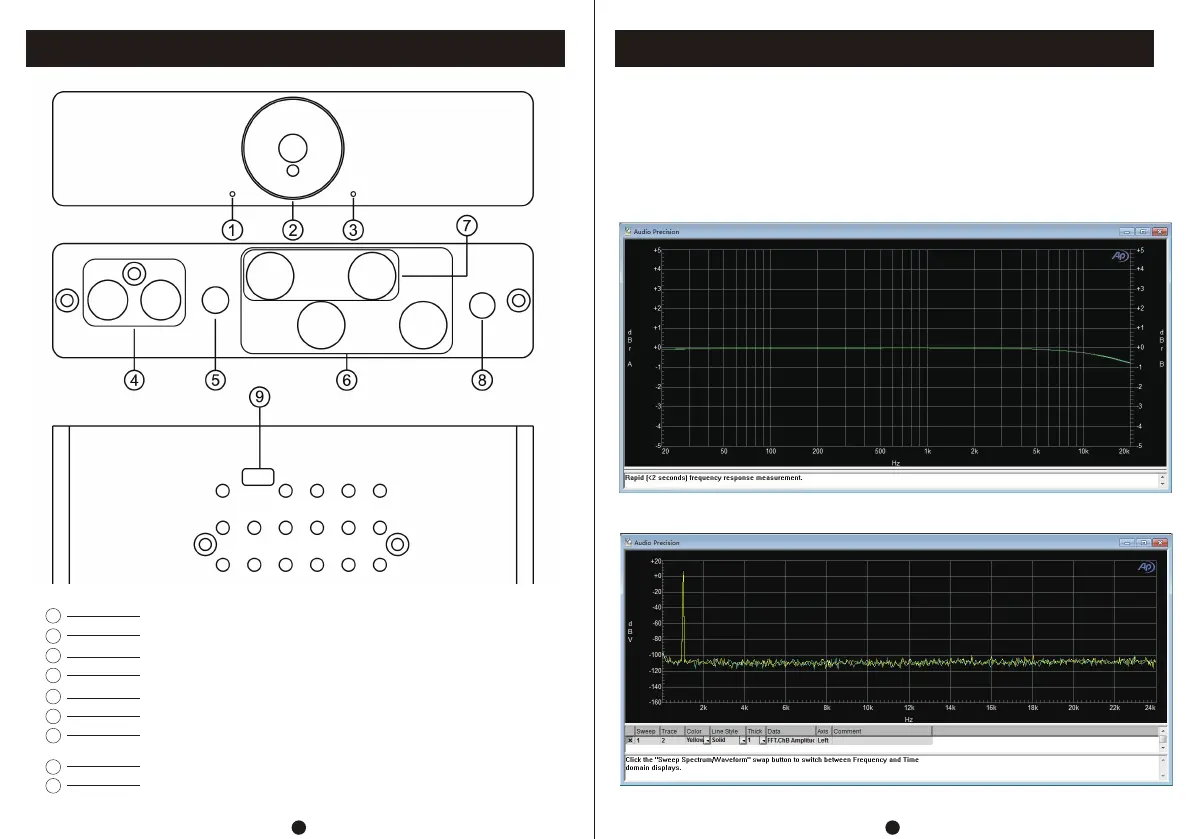
Mono mode indicator light
On/Off/Total Volume Control Knob
Stereo mode indicator light
3.5 AUX output
Speaker interface
Mono speaker interface(red/positive, black/negative; R connected to
right speaker, L connected to left speaker)
Power interface (DC voltage 24-48V)
9
Mono/stereo mode switching
RCA input(White/left channel, red/right channel)
1. Connect the passive speaker to the speaker interface.
2. Connect the audio source to be used to the RCA input port.
3. Connect the power supply (DC voltage range: 24-48V).
4. Switch the mono/stereo mode switch on the lower shell of the machine to select the
desired mode for use.
5.T urn the on/off knob clockwise to start the machine and adjust to the appropriate volume.
Frequency Response:
FFT:


 To Next Page