6
User Controls
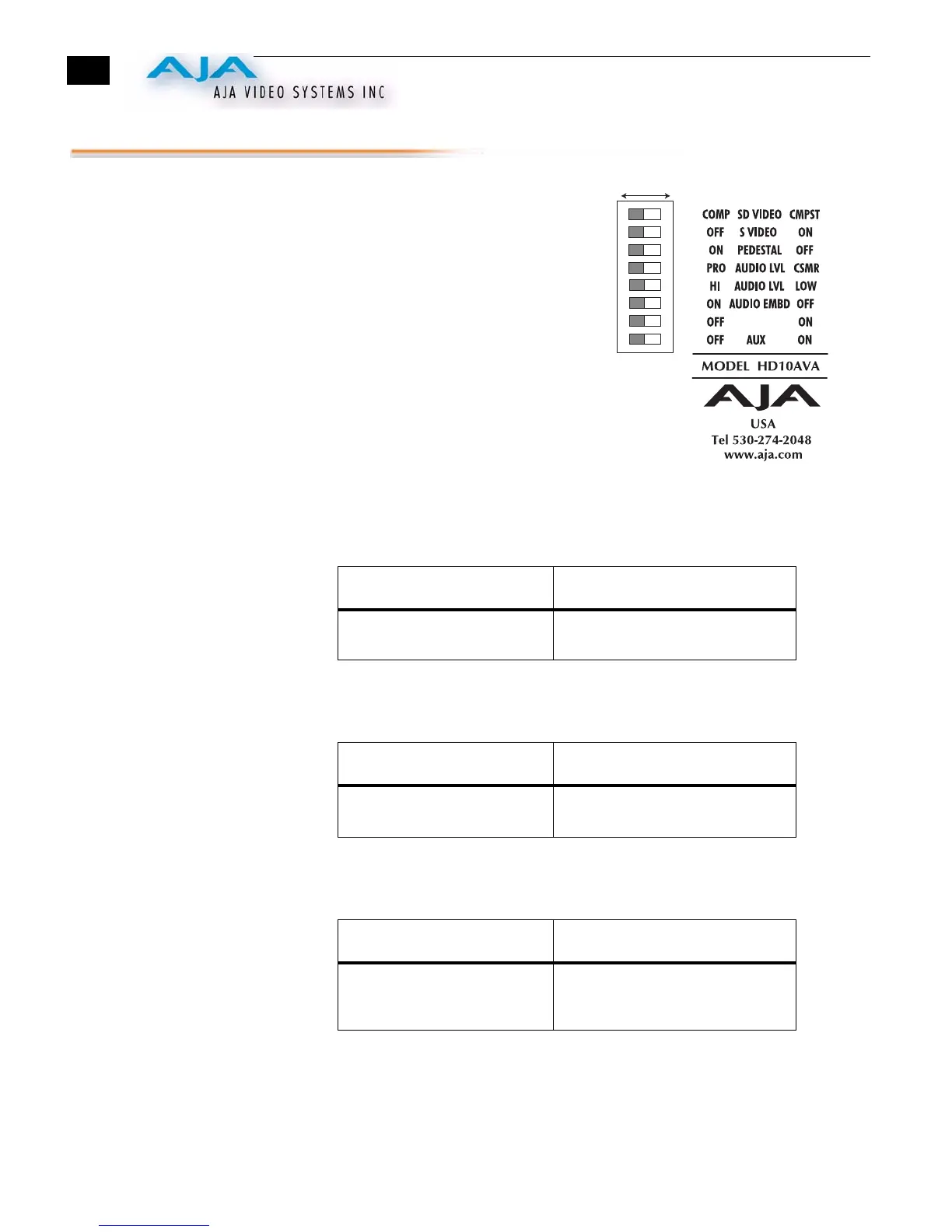
The user interface for the HD10AVA is an 8-
switch DIP accessible through a cut-out in the
bottom of the unit. Use the DIP switches to
configure functions, formats and levels.
Note:
The combination of switch settings
determines the overall operation of the
HD10AVA.
The exact purpose of each DIP switch and what it
controls is described on the following pages.
Switch 1 (SD VIDEO)—Selects Component or Composite
Analog Input for Standard Definition (HD is component only)
:
Switch 2 (S VIDEO)—Selects S-Video Input
(Switch 1 must be in “CMPST” position to select “S-Video”)
:
Switch 3 (PEDESTAL)—Configures Pedestal Processing
(Also Configures SD Component for SMPTE/BETA)
:
LEFT (COMP) RIGHT (CMPST)
Selects SD Component Analog
Input
Selects SD Composite Input
LEFT (OFF) RIGHT (ON)
Input BNC 1 (Green) is
Composite
Input BNC 1 (Green) is S-Video “Y”,
BNC 2 (Blue) is S-Video “C”
LEFT (ON) RIGHT (OFF)
Pedestal is present in input
video; also configures SD
component for BETA
Pedestal is not present in input
video; also configures SD
component for SMPTE
1 2 3 4
5 6 7 8
DIP Switch Setting
LEFT RIGHT
AUX



 To Next Page