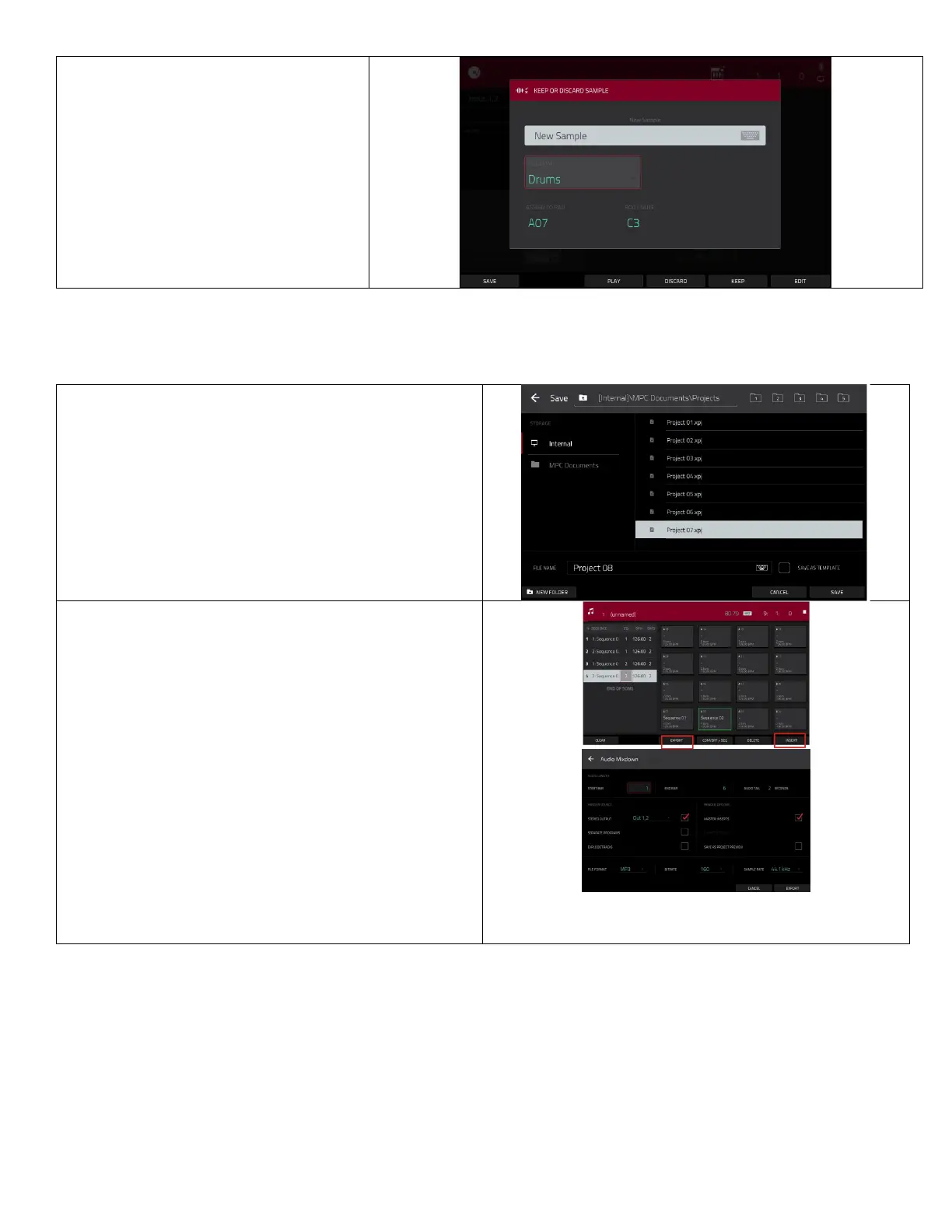
Each pad has a number below the
boom-le corner.
• To use the sample in your
sequence, return to
add a new drum track and make
sure the
matches
the
you saved the sample
to.
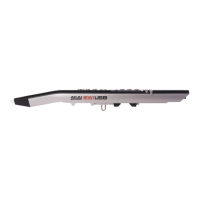
Save and Export
• To save your project to your SD card or flash drive
go to
• You can save the enre project, the program, or the
sequence, but make sure that you only save things
to your SD card or flash drive
.
•
Any projects or samples saved to the internal drive
will be deleted.
To
your project, go to
• Click on
to add you sequences and arrange
them in any order.
• Click
to open the
page.
• From here you can pick the file format.
•
files are great for sharing online.
•
files are good if you’re going to connue
eding on another soware.
• Click
on the boom right and save your file
to your SD card or flash drive.
•
your SD card or flash drive go to
Shi+menu/browse > places
then hit the
next to the name of your device.
• Removing your SD card or flash drive without doing
this can result in damaged files.


 To Next Page