EasyManua.ls Logo

Akai TX-500 - Page 16

Akai TX-500
82 pages
Print Icon
To Next Page IconTo Next Page
To Previous Page IconTo Previous Page
Loading...
3)
After
replacement,
check
the
tape
speed
and
if
the
result
is
not
satisfactory,
tape
speed
adjustment
must
be
performed.
;
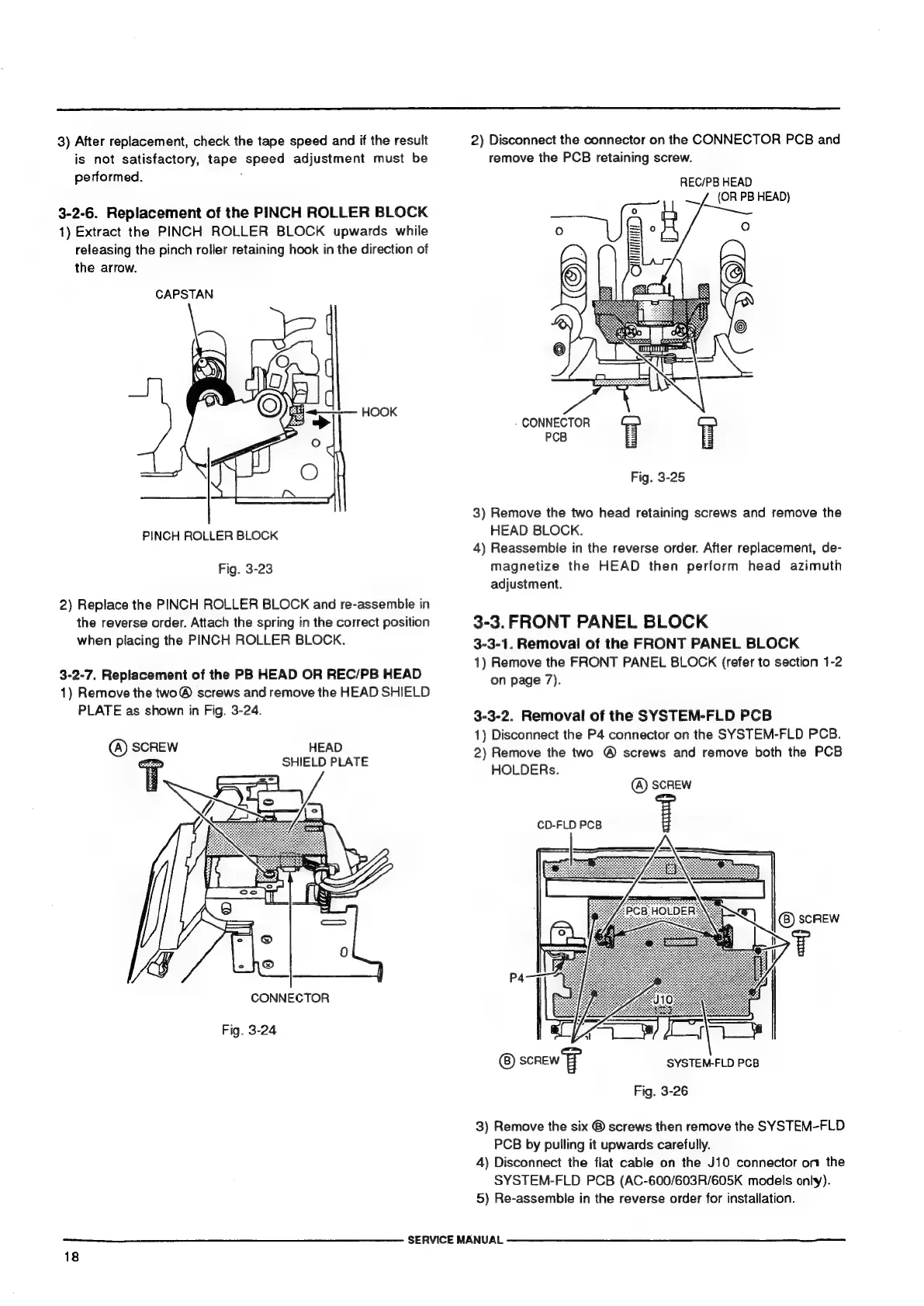
3-2-6.
Replacement
of
the
PINCH
ROLLER
BLOCK
1)
Extract
the
PINCH
ROLLER
BLOCK
upwards
while
releasing
the
pinch
roller
retaining
hook
in
the
direction
of
the
arrow.
CAPSTAN
PINCH
ROLLER
BLOCK
Fig.
3-23
2)
Replace
the
PINCH
ROLLER
BLOCK
and
re-assemble
in
the
reverse
order.
Attach
the
spring
in
the
correct
position
when
placing
the
PINCH
ROLLER
BLOCK.
3-2-7.
Replacement
of
the
PB
HEAD
OR
REC/PB
HEAD
1)
Remove
the
two®
screws
and
remove
the
HEAD
SHIELD
PLATE
as
shown
in
Fig.
3-24.
(A)
SCREW
HEAD
om
SHIELD
PLATE
CONNECTOR
Fig.
3-24
—_——]——————————
SERVICE
MANUAL
18
2)
Disconnect
the
connector
on
the
CONNECTOR
PCB
and
remove
the
PCB
retaining
screw.
REC/PB
HEAD
(OR
PB
HEAD)
CONNECTOR
PCB
Fig.
3-25
3)
Remove
the
two
head
retaining
screws
and
remove
the
HEAD
BLOCK.
4)
Reassemble
in
the
reverse
order.
After
replacement,
de-
magnetize
the
HEAD
then
perform
head
azimuth
adjustment.
3-3.
FRONT
PANEL
BLOCK
3-3-1.
Removal
of
the
FRONT
PANEL
BLOCK
1)
Remove
the
FRONT
PANEL
BLOCK
(refer
to
section
1-2
on
page
7).
3-3-2.
Removal
of
the
SYSTEM-FLD
PCB
1)
Disconnect
the
P4
connector
on
the
SYSTEM-FLD
PCB.
2)
Remove
the
two
@
screws
and
remove
both
the
PCB
HOLDERs.
(A)
SCREW
CD-FLD
PCB
P4
sonew
SYSTEM-FLD
PCB
Fig.
3-26
3)
Remove
the
six
®
screws
then
remove
the
SYSTEM-FLD
PCB
by
pulling
it
upwards
carefully.
4)
Disconnect
the
flat
cable
on
the
J10
connector
on
the
SYSTEM-FLD
PCB
(AC-600/603R/605K
models
only).
5)
Re-assemble
in
the
reverse
order
for
installation.