EasyManua.ls Logo

Akai TX-500 - Page 17

Akai TX-500
82 pages
Print Icon
To Next Page IconTo Next Page
To Previous Page IconTo Previous Page
Loading...
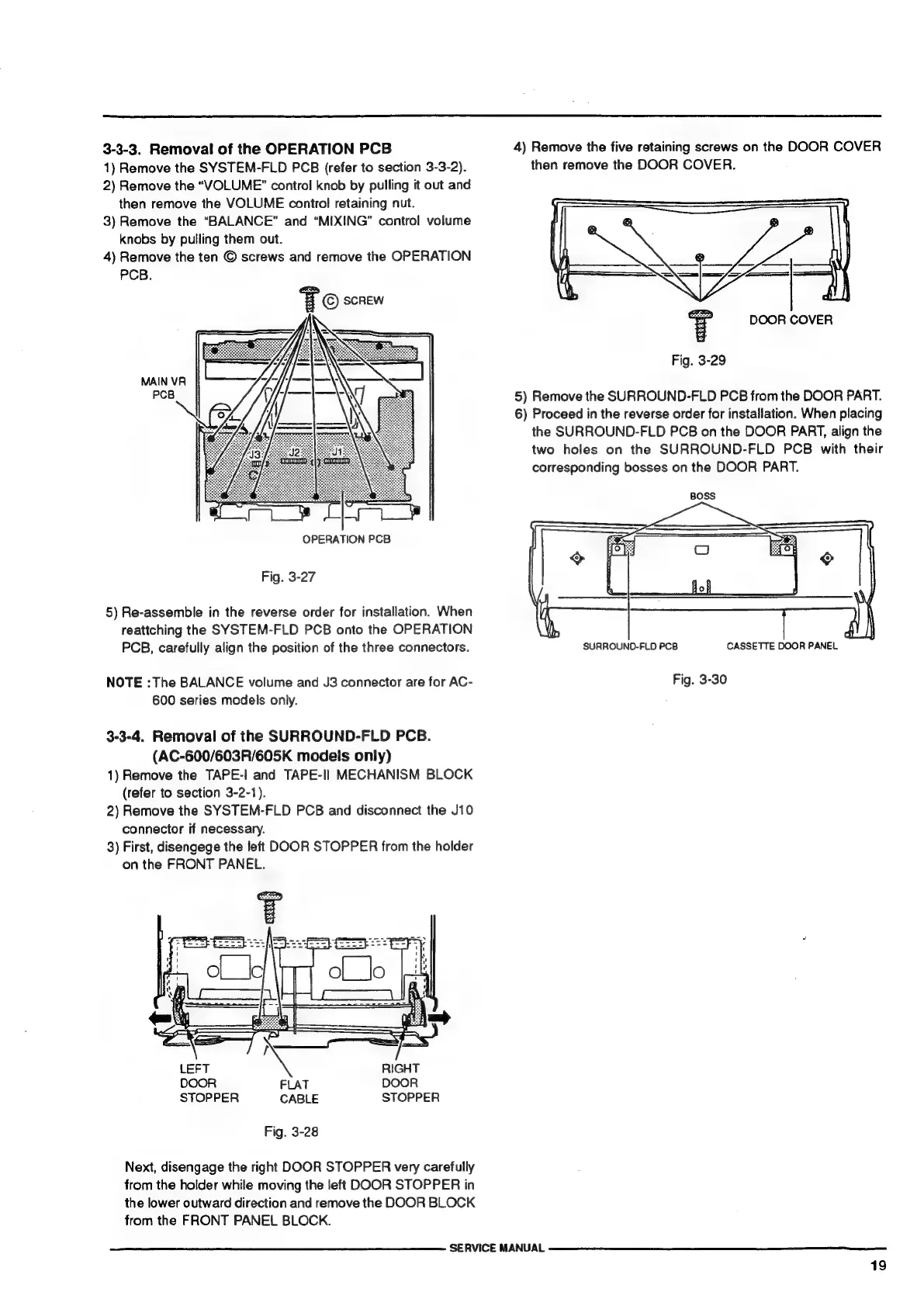
3-3-3.
Removal
of
the
OPERATION
PCB
1)
Remove
the
SYSTEM-FLD
PCB
(refer
to
section
3-3-2).
2)
Remove
the
“VOLUME”
control
knob
by
pulling
it
out
and
then
remove
the
VOLUME
control
retaining
nut.
3)
Remove
the
“BALANCE”
and
“MIXING”
control
volume
knobs
by
pulling
them
out.
4)
Remove
the
ten
©
screws
and
remove
the
OPERATION
PCB.
FO
SCREW
MAIN
VR
PCB
=
OPERATION
PCB
Fig.
3-27
5)
Re-assemble
in
the
reverse
order
for
installation.
When
reattching
the
SYSTEM-FLD
PCB
onto
the
OPERATION
PCB,
carefully
align
the
position
of
the
three
connectors.
NOTE
:The
BALANCE
volume
and
J3
connector
are
for
AC-
600
series
models
only.
3-3-4.
Removal
of
the
SURROUND-FLD
PCB.
(AC-600/603R/605K
models
only)
1)
Remove
the
TAPE-!
and
TAPE-Il
MECHANISM
BLOCK
(refer
to
section
3-2-1).
2)
Remove
the
SYSTEM-FLD
PCB
and
disconnect
the
J10
connector
if
necessary.
3)
First,
disengege
the
left
DOOR
STOPPER
from
the
holder
on
the
FRONT
PANEL.
=
p
=
LEFT
<
RIGHT
DOOR
FLAT
DOOR
STOPPER
CABLE
STOPPER
Fig.
3-28
Next,
disengage
the
right
DOOR
STOPPER
very
carefully
from
the
holder
while
moving
the
left
DOOR
STOPPER
in
the
lower
outward
direction
and
remove
the
DOOR
BLOCK
from
the
FRONT
PANEL
BLOCK.
SERVICE
MANUAL
4)
Remove
the
five
retaining
screws
on
the
DOOR
COVER
then
remove
the
DOOR
COVER.
DOOR
COVER
Fig.
3-29
5)
Remove
the
SURROUND-FLD
PCB
from
the
DOOR
PART.
6)
Proceed
in
the
reverse
order
for
installation.
When
placing
the
SURROUND-FLD
PCB
on
the
DOOR
PART,
align
the
two
holes
on
the
SURROUND-FLD
PCB
with
their
corresponding
bosses
on
the
DOOR
PART.
BOSS
CASSETTE
DOOR
PANEL
SURROUND-FLD
PCB
Fig.
3-30
19