SP2/SP8/SP8-X20 Manual
Updated until firmware 413 - 26 -
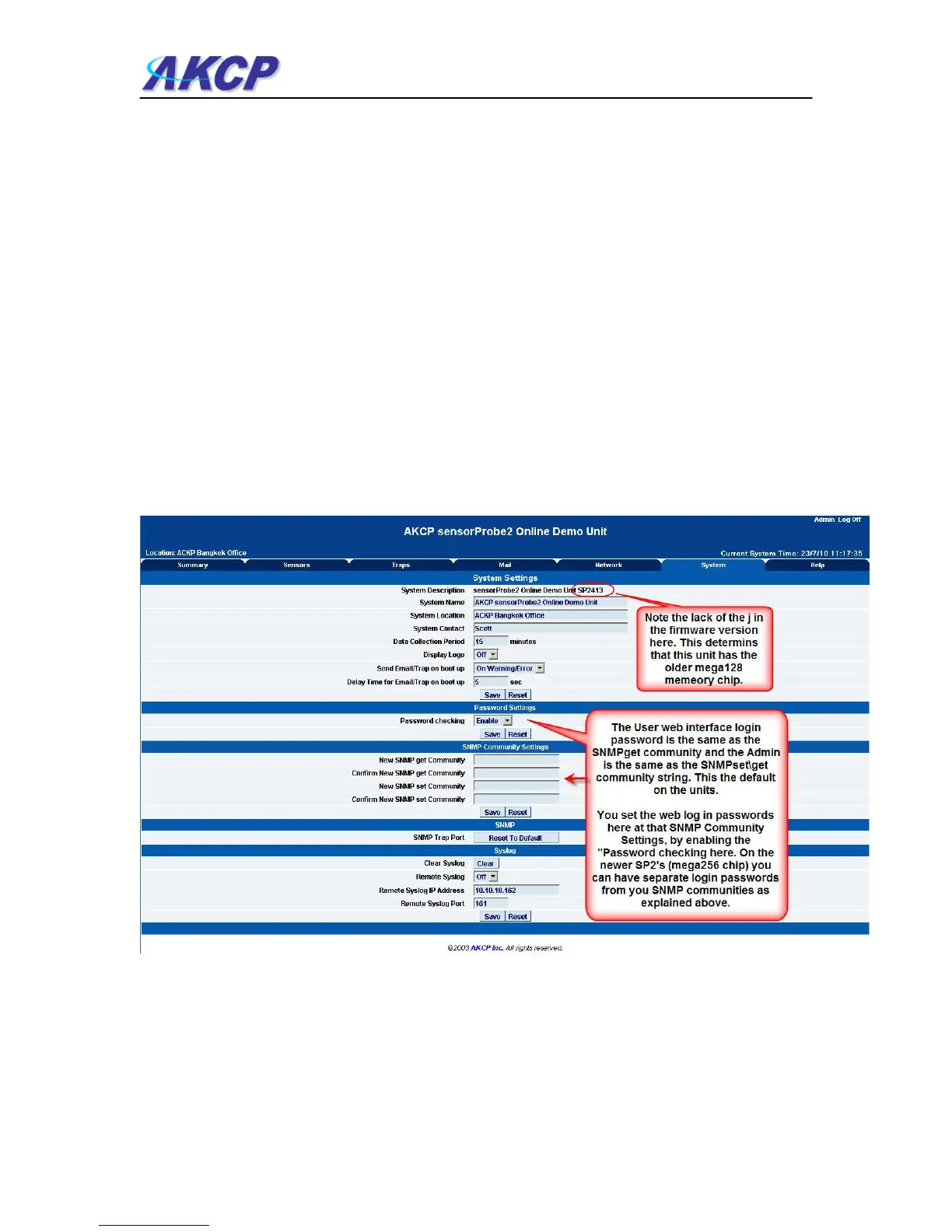
System Name / Location / Contact :- These are used to identify the system. They are accessed
via standard SNMP utilities. The SNMP utilities use these to get information about the unit.
Data Collection Period :- This controls how often data is collected for use in the graph function.
Display Logo : Turn off displaying the logo by using this option. This option can be turned off to
allow the web pages to be loaded faster.
Send Email / Trap on boot up :- Use this option to send an Email and SNMP trap each time the
system boots up.
Delay Time for Email / Trap on boot up :- The time in seconds to delay before sending the boot
up Email or trap.
Remember to click the “Save” button after making any changes.
c) The next section is used for setting a user password, or changing the admin password.
Depending on which version of sensorProbe2 you have your System page may appear different.
The sensorProbe2 units that were shipped prior to October of 2009 have the older memory
mega128 chip. If this is the case your screen will appear like the screen shot shows above. This
System page will also show in the sensorProbe8 web interface.



 To Next Page