EasyManua.ls Logo

AKG Microtools WMS40 - User Manual

AKG Microtools WMS40
46 pages
Go to English
Print Icon
To Next Page IconTo Next Page
Loading...
- WICHTIGE INFORMATION -
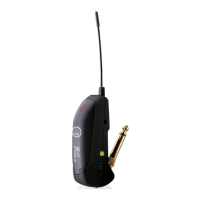
Bitte beachten Sie, dass die Funktionsweise der Kontroll-LED der Sender GB 40, MP 40 und SO 40 wie
folgt geändert wurde:
Die zweifarbige Kontroll-LED zeigt den Ladezustand der Batterie bzw. des Akkus an.
•Wenn Sie den Sender einschalten und die Batterie/der Akku ausreichend geladen ist, leuchtet die Kontroll-
LED kurz rot auf und leuchtet konstant grün weiter.
Solange die Kontroll-LED konstant grün leuchtet, ist die Batterie/der Akku in Ordnung.
•Wenn die Kontroll-LED konstant rot zu leuchten beginnt, ist die Batterie in ca. 60 Minuten, der Akku in ca.
30 Minuten erschöpft. Tauschen Sie die Batterie aus bzw. laden Sie den Akku auf.
Diese Änderung betrifft Kapitel 2.5 Bedienelemente und Kapitel 3.1 Batterie einlegen/austauschen und
testen.
- IMPORTANT INFORMATION -
Please note that the function of the status LEDs on the GB 40, MP 40, and SO 40 transmitters has been
changed.
The status bicolor LED indicates the current battery charge level.
On switching power to the transmitter ON, the status LED will illuminate red for a moment and be lit green
constantly to indicate the battery is properly charged.
As long as the status LED is lit green, the battery is OK.
The status LED will be lit red constantly to indicate the battery will be dead in about 60 minutes if you are
using a dry battery, or in 30 minutes if you are using a rechargeable type. Replace or recharge the battery.
Never try to recharge dry batteries: they may explode!
This information replaces the corresponding passages in section 2.5 Controls and section
3.1 Inserting/Replacing and Testing the Battery.
- INFORMATION IMPORTANTE -
Le mode de fonctionnement des LED témoins des émetteurs GB 40, MP 40 et SO 40 a été modifié
comme suit :
La LED bicolore indique l’état de charge de la pile ou de l’accu.
Lorsque vous mettez l’émetteur sous tension et que la charge de la pile/de l’accu est suffisante, la LED jette
une lueur rouge puis s’allume de façon constante sur vert.
•Tant que la LED reste sur vert la pile / l’accu est en bon état.
Lorsque la LED s’allume de façon constante sur rouge, vous n’avez plus qu’une autonomie de 60 minutes
pour la pile, 30 minutes pour l’accu. Vous devez alors remplacer la pile ou recharger l’accu.
Cette modification concerne le point 2.5 Eléments de commande et le point 3.1 Mise en place / rem-
placement et essai de la pile.
GB 40guitar bug MP40micropen SO 40snapon
WMS40
microtools
BITTE LESEN! - READ ME! - A LIRE ATTENTIVEMENT ! -
ATTENZIONE! - ¡SE RUEGA LEER! - LEIA POR FAVOR!
GB 40guitar bug MP40micropen SO 40snapon
WMS40
microtools
GB 40guitar bug MP40micropen SO 40snapon
WMS40
microtools
Question and Answer IconNeed help?

Do you have a question about the AKG Microtools WMS40 and is the answer not in the manual?

Summary

Read Me and Important Information

LED Status Indicator Changes

Details the modified function of status LEDs for GB 40, MP 40, SO 40 transmitters.

FCC Compliance Statement

Safety and Environmental Precautions

Safety Guidelines

Instructions on protecting the equipment from environmental factors and physical damage.

Environmental Disposal

Guidelines for proper disposal of used batteries and equipment.

Product Description and Components

Introduction and Unpacking

Welcome message, manual guidance, and listing of package contents.

Optional Accessories

Information about optional accessories available for the system.

Transmitter Controls Overview

Explanation of the ON/MUTE/OFF slide switch and its three positions.

Transmitter Features and Operation

Battery Compartment and Frequency Codes

Details the battery compartment and frequency color coding.

Status LED and Input Gain Settings

Explanation of status LED indicators and input gain adjustment.

Connectivity and Antenna

Information on the jack plug for instrument connection and the antenna.

Setting Up the Transmitter

Inserting and Testing the Battery

Step-by-step guide for inserting, testing, and replacing the battery.

Using Rechargeable Batteries

Guidance on using rechargeable batteries and recommended types.

Operating the Wireless System

Attaching the Transmitter

Instructions on how to connect the transmitter to a musical instrument.

Setting Audio Levels

Steps for setting input gain and sound system volume for optimal audio.

Troubleshooting and Maintenance

Instruments with Recessed Output Jacks

Instructions for using the adapter plug with recessed instrument jacks.

Troubleshooting Hints

Reference to the receiver manual for troubleshooting advice.

Cleaning the Transmitter

Guidance on how to clean the transmitter case using a soft cloth.

Specifications and Compliance

Technical Specifications

Detailed technical data for the WMS40 GB 40 system.

Regulatory Standards Compliance

List of standards and directives the product complies with.

Frequency Usage Guidelines

Country-Specific Frequency Use

Table indicating frequency set availability across various R&TTEd countries.

Declaration of Conformity

Product Conformity Declaration

Official declaration of product compliance with essential requirements of Directive 1999/5/EC.

Summary

Read Me and Important Information

LED Status Indicator Changes

Details the modified function of status LEDs for GB 40, MP 40, SO 40 transmitters.

FCC Compliance Statement

Safety and Environmental Precautions

Safety Guidelines

Instructions on protecting the equipment from environmental factors and physical damage.

Environmental Disposal

Guidelines for proper disposal of used batteries and equipment.

Product Description and Components

Introduction and Unpacking

Welcome message, manual guidance, and listing of package contents.

Optional Accessories

Information about optional accessories available for the system.

Transmitter Controls Overview

Explanation of the ON/MUTE/OFF slide switch and its three positions.

Transmitter Features and Operation

Battery Compartment and Frequency Codes

Details the battery compartment and frequency color coding.

Status LED and Input Gain Settings

Explanation of status LED indicators and input gain adjustment.

Connectivity and Antenna

Information on the jack plug for instrument connection and the antenna.

Setting Up the Transmitter

Inserting and Testing the Battery

Step-by-step guide for inserting, testing, and replacing the battery.

Using Rechargeable Batteries

Guidance on using rechargeable batteries and recommended types.

Operating the Wireless System

Attaching the Transmitter

Instructions on how to connect the transmitter to a musical instrument.

Setting Audio Levels

Steps for setting input gain and sound system volume for optimal audio.

Troubleshooting and Maintenance

Instruments with Recessed Output Jacks

Instructions for using the adapter plug with recessed instrument jacks.

Troubleshooting Hints

Reference to the receiver manual for troubleshooting advice.

Cleaning the Transmitter

Guidance on how to clean the transmitter case using a soft cloth.

Specifications and Compliance

Technical Specifications

Detailed technical data for the WMS40 GB 40 system.

Regulatory Standards Compliance

List of standards and directives the product complies with.

Frequency Usage Guidelines

Country-Specific Frequency Use

Table indicating frequency set availability across various R&TTEd countries.

Declaration of Conformity

Product Conformity Declaration

Official declaration of product compliance with essential requirements of Directive 1999/5/EC.

AKG Microtools WMS40 Specifications

General IconGeneral
BrandAKG
ModelMicrotools WMS40
CategoryTransmitter
LanguageEnglish

Related product manuals