Rear panel
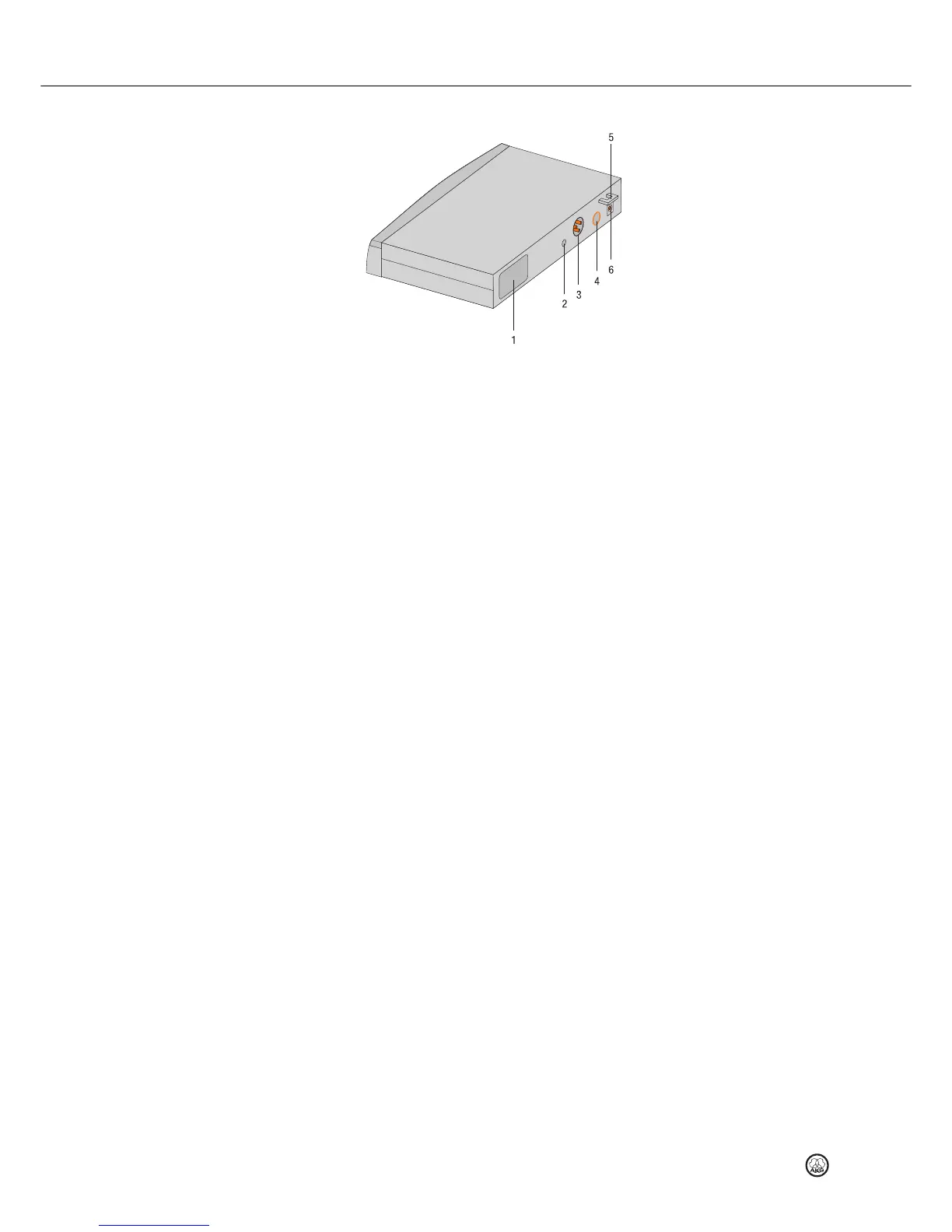
Figure 2: Rear panel controls on SR 45 receiver
1 Carrier frequency label: A label indicating the carrier frequency range and up to 8 carrier
frequencies is affixed to the rear panel of the receiver.
2 SQUELCH: The automatic squelch circuit switches the receiver off if the received signal is
too weak, in order to suppress the interference noise or background noise of the receiver
while the transmitter is off. Set the squelch control to minimum before switching on the
receiver for the first time.
3 AUDIO OUT/BALANCED: Balanced audio output to 3-pin XLR connector. Can be connected
to a microphone input on a mixer, for example.
4 AUDIO OUT/UNBALANCED: Unbalanced audio output to 1/4" (6.3 mm) mono jack socket.
Can be connected to a guitar amplifier, for example.
5 Strain relief for the feeder cable of the supplied AC adapter.
6 DC IN: Input connector for the supplied AC adapter.


 To Next Page