13
9.- Operation
9.1.- Compressor control
NORMAL OPERATION
CONTINUOUS CYCLE MODE
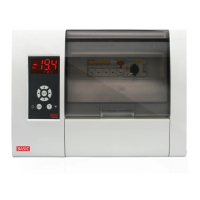
Use this function to cool the cold rooms before loading products.
It is activate pressing the O key for 5 seconds, the display shows the % icon while this mode is active.
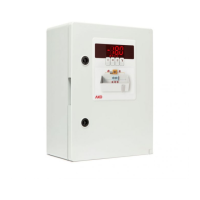
“CHANGE OF SET POINT” FUNCTION
Modifies the set point value in the low-use periods of the refrigeration device. If this variation is positive (increases
the value), the display will show the ECO icon.
It can be activated after a certain time has elapsed (defined in parameter C11) without activity in the cold room
door, to do this one of the digital inputs such as “door contact” (P10 or P11 = 1) must be configured.
Optionally, you can activate and deactivate this mode at will, using an external pushbutton (1 press to
activate/deactivate), configuring one of the digital inputs as “Change set point” (P10 or P11 = 4).
If we set parameter C11 to 0, it can only be activated by external pushbutton.
ON
SP SP+Dif.
OFF
COMP.
ºC
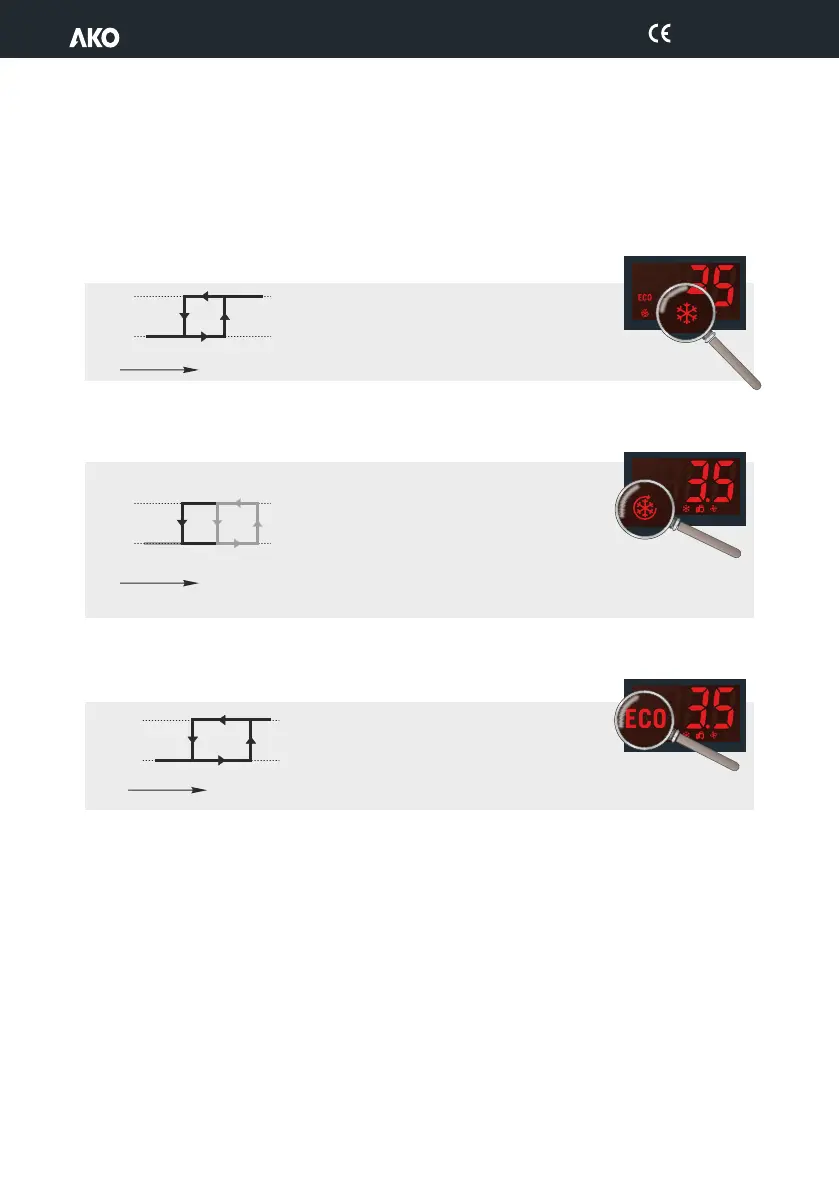
When the temperature in probe 1 reaches the set
point value (SP) plus the probe's differential (C1),
the compressor activates and makes the
temperature drop. When the set point value (SP) is
reached, the compressor stops.
ON
SP
C9
SP+C1
OFF
COMP.
ºC
9.- Operation
9.1.- Compressor control
NORMAL OPERATION
CONTINUOUS CYCLE MODE
Use this function to cool the cold rooms before loading products.
It is activate pressing the O key for 5 seconds, the display shows the % icon while this mode is active.
“CHANGE OF SET POINT” FUNCTION
Modifies the set point value in the low-use periods of the refrigeration device. If this variation is positive (increases
the value), the display will show the ECO icon.
It can be activated after a certain time has elapsed (defined in parameter C11) without activity in the cold room
door, to do this one of the digital inputs such as “door contact” (P10 or P11 = 1) must be configured.
Optionally, you can activate and deactivate this mode at will, using an external pushbutton (1 press to
activate/deactivate), configuring one of the digital inputs as “Change set point” (P10 or P11 = 4).
If we set parameter C11 to 0, it can only be activated by external pushbutton.
When the temperature in probe 1 reaches the set
point value (SP) plus the probe's differential (C1),
the compressor activates and makes the
temperature drop. When the set point value (SP) is
reached, the compressor stops.
9.- Operation
9.1.- Compressor control
NORMAL OPERATION
CONTINUOUS CYCLE MODE
Use this function to cool the cold rooms before loading products.
It is activate pressing the O key for 5 seconds, the display shows the % icon while this mode is active.
“CHANGE OF SET POINT” FUNCTION
Modifies the set point value in the low-use periods of the refrigeration device. If this variation is positive (increases
the value), the display will show the ECO icon.
It can be activated after a certain time has elapsed (defined in parameter C11) without activity in the cold room
door, to do this one of the digital inputs such as “door contact” (P10 or P11 = 1) must be configured.
Optionally, you can activate and deactivate this mode at will, using an external pushbutton (1 press to
activate/deactivate), configuring one of the digital inputs as “Change set point” (P10 or P11 = 4).
If we set parameter C11 to 0, it can only be activated by external pushbutton.
9.- Operation
9.1.- Compressor control
NORMAL OPERATION
CONTINUOUS CYCLE MODE
Use this function to cool the cold rooms before loading products.
It is activate pressing the O key for 5 seconds, the display shows the % icon while this mode is active.
“CHANGE OF SET POINT” FUNCTION
Modifies the set point value in the low-use periods of the refrigeration device. If this variation is positive (increases
the value), the display will show the ECO icon.
It can be activated after a certain time has elapsed (defined in parameter C11) without activity in the cold room
door, to do this one of the digital inputs such as “door contact” (P10 or P11 = 1) must be configured.
Optionally, you can activate and deactivate this mode at will, using an external pushbutton (1 press to
activate/deactivate), configuring one of the digital inputs as “Change set point” (P10 or P11 = 4).
If we set parameter C11 to 0, it can only be activated by external pushbutton.
Upon enabling this mode, the compressor starts up
until the temperature of probe 1 reaches the set
point value minus the change indicated in parame-
ter C10.
The unit will then return to normal operation.
If this point is not reached, the unit returns to normal operation after the
time set in C9, or by pressing the O key again for 5 seconds.
ON
SP+C12
(SP+C12)+C1
OFF
COMP.
ºC
Operation is the same as in the normal ode, but
increasing the set point the amount of degrees
defined in the C12 parameter.
1569H042 Ed.03


 To Next Page