1569H042 Ed.03
16
Other parameters
Parameter d5 allows users to specify if the unit will (d5=1) or will not (d5=0) defrost when powered up (initial
start-up or after a power failure). In case of choosing option YES (d5=1), the defrost will start after the delay time
specified in d6.
Using parameter d8, users define the computation of time in d0, choosing between total time elapsed (d8=0) or
the total compressor running time (d8=1).
NOTE: If parameter d1 is set to 0, no defrost will be performed.
Remote defrost
This function allows activating the defrost of the unit using an external button, connecting it to one of the digital inputs
that must be configured as "remote defrost”(P10 ó P11=6) .
9.3.- Fan control
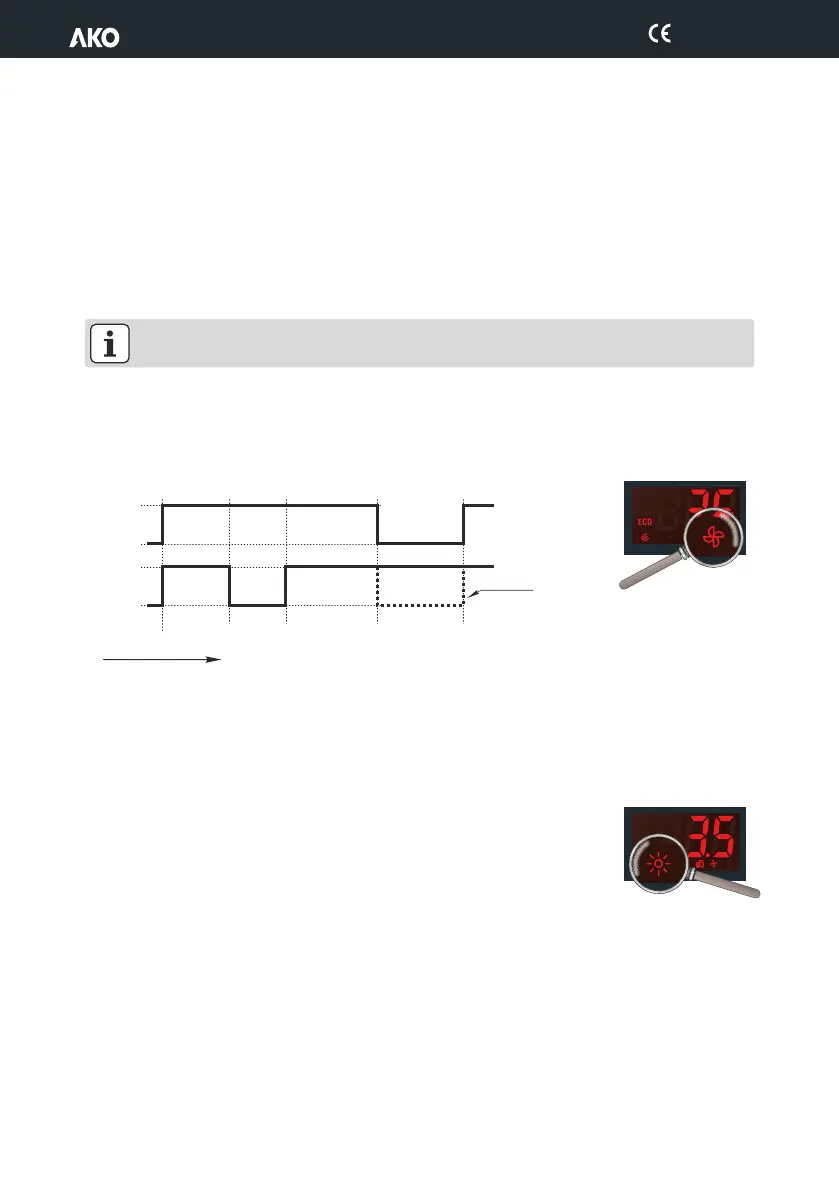
Fans are controlled with probe 2 (evaporator) and parameters F0 (shutdown temperature) and F1 (Probe differential).
Even if probe 2 is not connected or an error is detected in the probe (E2), the fans will always run regardless of
parameters F0 and F1, but taking into account parameters F2 to F5.
Parameter F2 defines the status of the fans during compressor stops.
Parameter F3 defines the status of fans during defrost.
Parameter F4 defines the fan start-up delay after defrost (see section 9.2)
9.4.- Light control
Auxiliary relay 3 must be configured as “Light” (P63=1).
Switching the lights on or off is controlled using:
Ÿ The ? pushbutton: One press switches the lights on or off.
Ÿ The cold room door: When the door is opened, the lights stay on for the time
defined by parameter P22. If the value is 0, when the door closes the lights go out. (One of the digital
inputs must be configured as door contact (P10 or P11=1).
The control even occurs with the equipment in Stand-by.
ON
ON
Fan control
SPF0
(probe 2)
F0+F1
probe 2)
Only if F2=1
SP+C1
OFF
OFF
COMP.
FAN
Time
Other parameters
Parameter d5 allows users to specify if the unit will (d5=1) or will not (d5=0) defrost when powered up (initial
start-up or after a power failure). In case of choosing option YES (d5=1), the defrost will start after the delay time
specified in d6.
Using parameter d8, users define the computation of time in d0, choosing between total time elapsed (d8=0) or
the total compressor running time (d8=1).
NOTE: If parameter d1 is set to 0, no defrost will be performed.
Remote defrost
This function allows activating the defrost of the unit using an external button, connecting it to one of the digital inputs
that must be configured as "remote defrost”(P10 ó P11=6) .
9.3.- Fan control
Fans are controlled with probe 2 (evaporator) and parameters F0 (shutdown temperature) and F1 (Probe differential).
Even if probe 2 is not connected or an error is detected in the probe (E2), the fans will always run regardless of
parameters F0 and F1, but taking into account parameters F2 to F5.
Parameter F2 defines the status of the fans during compressor stops.
Parameter F3 defines the status of fans during defrost.
Parameter F4 defines the fan start-up delay after defrost (see section 9.2)
9.4.- Light control
Auxiliary relay 3 must be configured as “Light” (P63=1).
Switching the lights on or off is controlled using:
Ÿ The ? pushbutton: One press switches the lights on or off.
Ÿ The cold room door: When the door is opened, the lights stay on for the time
defined by parameter P22. If the value is 0, when the door closes the lights go out. (One of the digital
inputs must be configured as door contact (P10 or P11=1).
The control even occurs with the equipment in Stand-by.
Other parameters
Parameter d5 allows users to specify if the unit will (d5=1) or will not (d5=0) defrost when powered up (initial
start-up or after a power failure). In case of choosing option YES (d5=1), the defrost will start after the delay time
specified in d6.
Using parameter d8, users define the computation of time in d0, choosing between total time elapsed (d8=0) or
the total compressor running time (d8=1).
NOTE: If parameter d1 is set to 0, no defrost will be performed.
Remote defrost
This function allows activating the defrost of the unit using an external button, connecting it to one of the digital inputs
that must be configured as "remote defrost”(P10 ó P11=6) .
9.3.- Fan control
Fans are controlled with probe 2 (evaporator) and parameters F0 (shutdown temperature) and F1 (Probe differential).
Even if probe 2 is not connected or an error is detected in the probe (E2), the fans will always run regardless of
parameters F0 and F1, but taking into account parameters F2 to F5.
Parameter F2 defines the status of the fans during compressor stops.
Parameter F3 defines the status of fans during defrost.
Parameter F4 defines the fan start-up delay after defrost (see section 9.2)
9.4.- Light control
Auxiliary relay 3 must be configured as “Light” (P63=1).
Switching the lights on or off is controlled using:
Ÿ The ? pushbutton: One press switches the lights on or off.
Ÿ The cold room door: When the door is opened, the lights stay on for the time
defined by parameter P22. If the value is 0, when the door closes the lights go out. (One of the digital
inputs must be configured as door contact (P10 or P11=1).
The control even occurs with the equipment in Stand-by.


 To Next Page