1569H042 Ed.03
20
10.- Parameter transfer
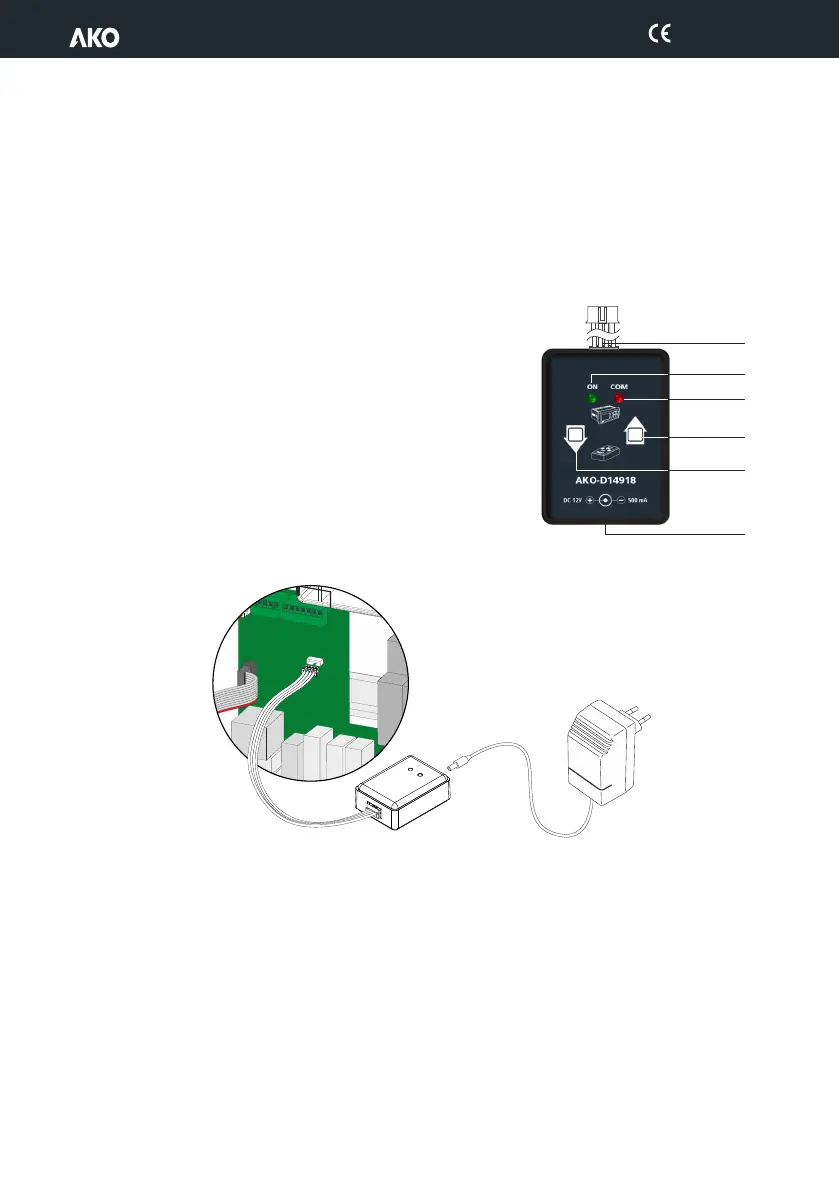
This function allows transferring the programmed parameters from one device to others, using the AKO-D14918
programming key. This will save a lot of time when configuring similar devices.
Requires the use of the AKO-80018 power supply for the programming key.
Transfer parameters from the equipment to the key
ž Disconnect the unit power supply.
ž Connect the programming key in the parameter server connector.
ž Connect the power supply for the programming key.
ž Press the READ key on the programming key.
ž Disconnect the device programming key.
Transfer parameters from the key to the equipment
ž Disconnect the unit power supply.
ž Connect the programming key in the parameter server connector.
ž Connect the power supply for the programming key.
ž Press the RECORD key for the programming key.
ž Disconnect the device programming key.
AKO-80018
AKO-D14918
LED ON
LED COM
Connection cable
Read
Key
Record
Key
External
Power Supply
Connector


 To Next Page