1565H041 Ed.03
13.- Parameters
The programming menu allows adjusting the unit's parameters to the installation's
needs.
Press the SET key for 5 seconds to access the programming menu. If the access
code is activated, a 2 digit code is requested (See page 26), if it is not correct the unit
will not enter programming.
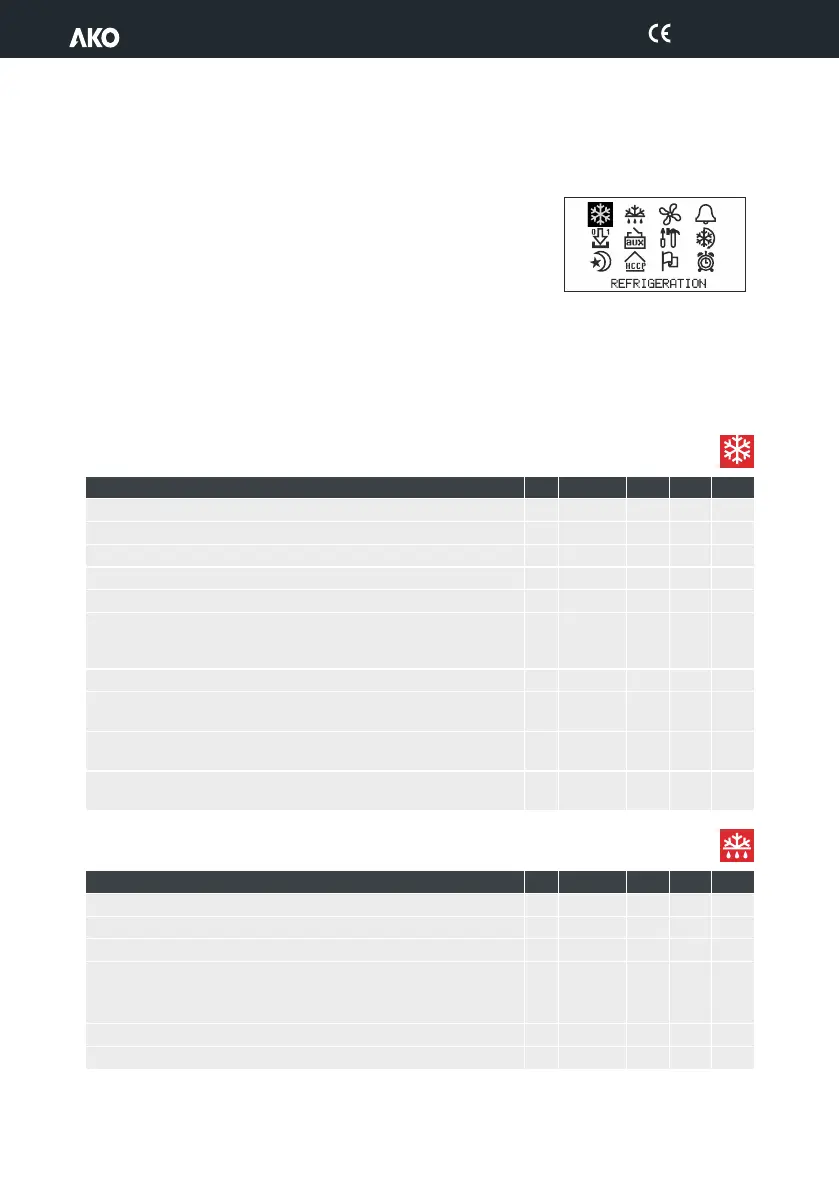
The parameters are grouped by functions in 12 separate menus, to access a given menu, select it using the browser and
press SET.
The Def. column indicates the default parameters.
Temperature values are expressed in ºC (equivalent temperature in ºF).
13.- Parameters
The programming menu allows adjusting the unit's parameters to the installation's
needs.
Press the SET key for 5 seconds to access the programming menu. If the access
code is activated, a 2 digit code is requested (See page 26), if it is not correct the unit
will not enter programming.
The parameters are grouped by functions in 12 separate menus, to access a given menu, select it using the browser and
press SET.
The Def. column indicates the default parameters.
Temperature values are expressed in ºC (equivalent temperature in ºF).
Set point upper limit (it cannot be set above this value)
Set point lower limit (it cannot be set below this value)
Compressor protection
OFF/ON (From the last disconnection)
ON (to the connection)
Compressor ON fault s1
(If it is 0, it will always be stopped)
Compressor OFF fault s1
(If it is 0, it will always be running)
Stop when opening door?
(It requires a digital input configured as door contact)
Defrost count: Frequency Compressor sum Real time clock
Defrost frequency (Time between two starts)
Defrost message: Current temperature
Defrost Start temperat
DEFROST message
Message duration (Time added at the end of the defrost)
Defrost final temperature
REFRIGERATION control (Compressor)
DEFROST control
29


 To Next Page