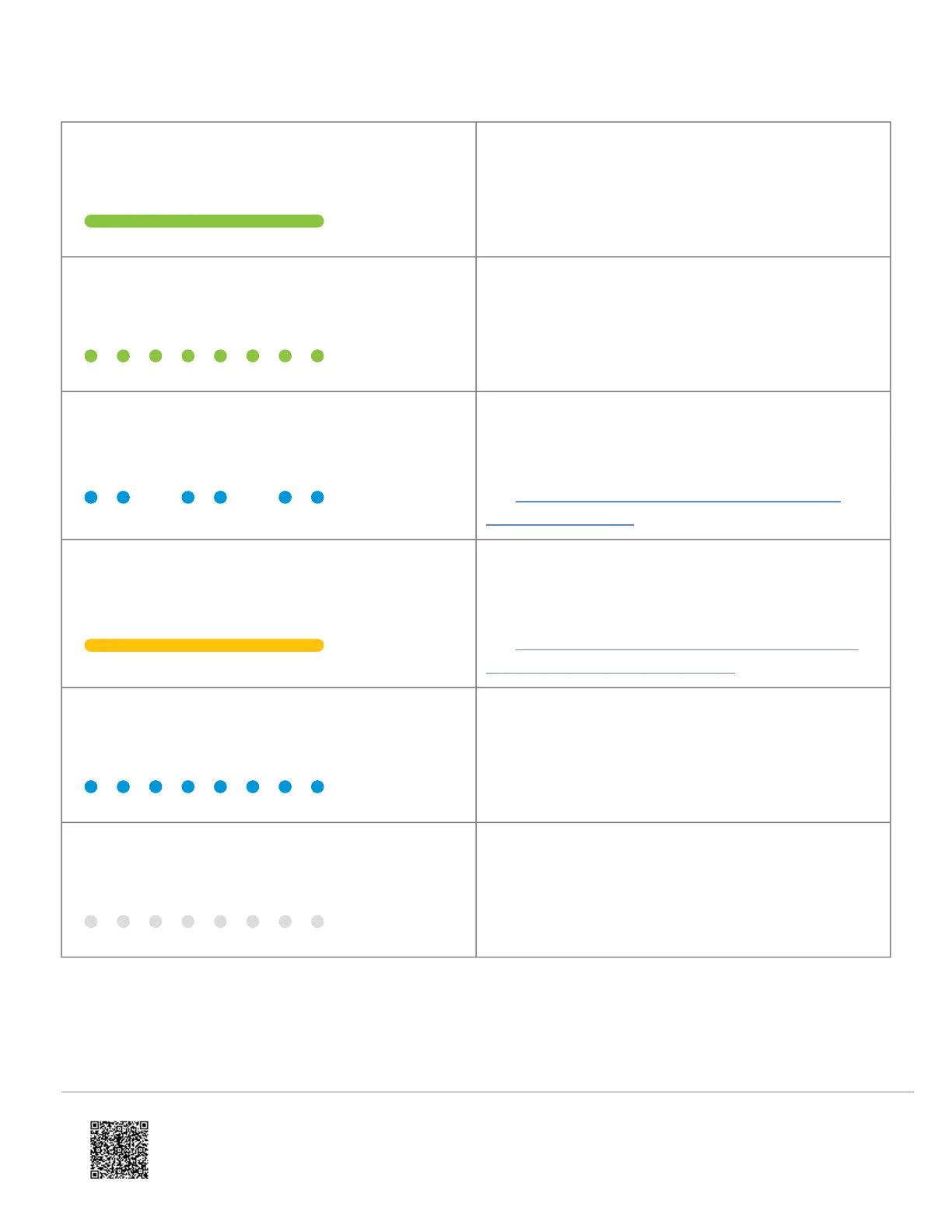
LED pattern Description
Solid green
Connected to Alarm.com
Blinking green
Local network connection
Double-blinking blue
Unable to ring indoor chime
For more information about what causes this status,
see What does the double-blinking blue LED on the
ADC-VDB770 mean?.
Solid yellow
Cool-Down mode is active
For more information about what causes this status,
see The ADC-VDB770 is warm to the touch and has a
solid yellow LED (Cool-Down mode).
Blinking blue
WPS mode (press and hold button for 30-35s)
Blinking white
Wi-Fi Access point mode (press and hold button for
35-40s)
https://answers.alarm.com/Partner/Installation_and_Troubleshooting/Video_Devices/Alarm.com_Video_Doorbell_(ADC-VDB7…
Updated: Wed, 25 Oct 2023 20:50:59 GMT
13

 To Next Page
 Loading...