38
Appendix A – Anti-tippers
As your wheelchair may already be equipped with anti-tippers, Alber anti-tippers are
only offered as optional accessories. The use of original anti-tippers is subject to the
instructions and safety information that apply to their use and are provided by the manu-
facturer.
When using Alber anti-tippers, two further brackets are fitted to your wheelchair in which
the anti-tippers are inserted. The following instructions and safety precautions apply.
Fitting and removing Alber anti-tippers
Switch off the e-fix wheels before fitting the anti-tippers.
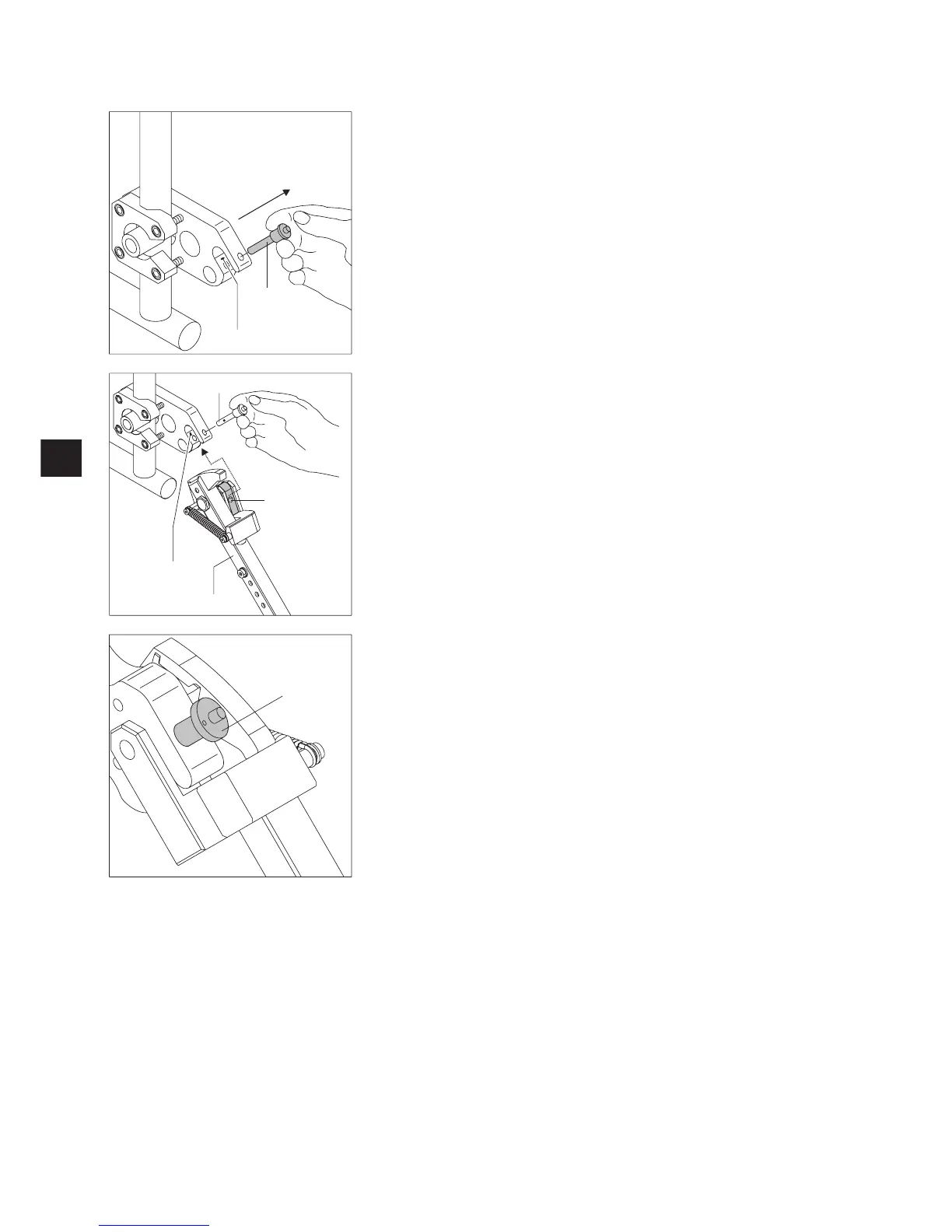
Remove the quickpin [70] from the bracket mounting fork [71], by pressing on the pin
with your thumb whilst pulling it out using your index and middle finger.
Push the clamping piece for the anti-tipper [72] into the bracket mounting fork [16].
Lock the bracket mounting fork [71] using the quickpin [70]. To do this, press the pin
with your thumb and then push it fully into the bracket as far as it will go.
Check the quickpin [70] holds fast in the bracket mounting fork [71]. It must not be
able to be removed without pressing the releasing device.
Fit the second anti-tipper.
The anti-tippers are removed in the reverse sequence.
70
71
70
72
71
73
70



 To Next Page