10
2.5 Throttle handle
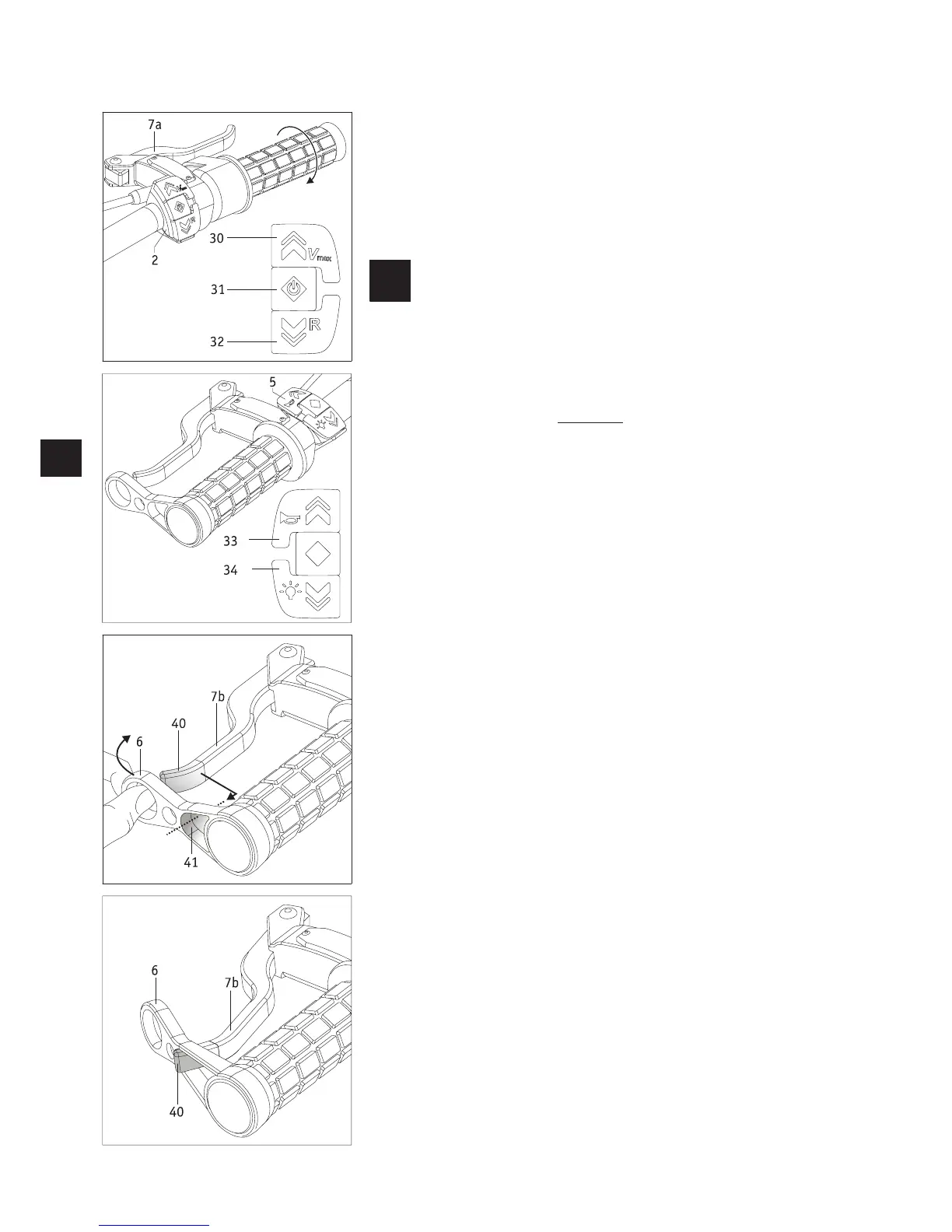
Driving mode is operated using the control elements on the right side of the handlebar.
• Press button [31] on button [2] for approximately two seconds. Do not activate the
throttle handle [1] when doing this.
• The e-pilot is now switched on and the preselected driving mode (see chapter 4.3.4
Driving mode) is shown on the display [3].
• Turn the throttle handle [1] clockwise and travel begins.
Before travelling with the e-pilot for the first time, read the travel
information, as well as the safety and hazard information (all in
chapter 6).
2.6 Button for warning signal and light
Button [5] has two functions, which can be activated when the e-pilot is at a stand-
still (and the battery pack [13] is switched on), or during travel.
• Pressing button [33] emits a warning signal. If release the button, the warning sig-
nal stops.
• Pressing button [34] switches the light [17] on or off.
Note the additional information in chapter 9, as there is an additional button on
the light to switch it on and off.
2.7 Brake lever
The wheel [1] of the e-pilot is not automatically locked when the e-pilot is at a standstill
and it can move freely. To prevent the e-pilot and the attached wheelchair from inadvert-
ently rolling away, you should activate the brakes on the wheel using the brake levers [7a
on the right side of the handlebar and 7b on the left] when at a standstill.
Locking the brake lever
If you are going to be at a standstill for a longer period of time, you can use the locking
mechanism [6] on the brake lever [7b] on the left side of the handlebar to permanently
engage the brake lever.
• With your thumb, push the locking mechanism [6] forwards.
• Push the opening [41] over the end [40] of the brake lever.
• If the end [40] of the brake lever is completely inside the opening [41], you can
gently (not suddenly!) release the locking mechanism [6]. This pulls the brake lever
towards the handle, automatically activating the brake [19] on the wheel.
• Also apply the brakes on your wheelchair.
Your wheelchair and the e-pilot are now secured against inadvertently rolling away.
Releasing the brake lever
•
With your thumb, push the locking mechanism [6] forwards.
• Pull the opening [41] off the end of the brake lever [7a] so that the lever is unob-
structed and the brake is released.
• Only release the brakes on your wheelchair after you have done this.


 To Next Page