5
1.7 Standard scope of delivery
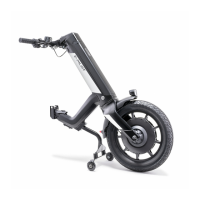
• e-pilot towing device
• Display
• Battery pack with key
• Charger
• This operating manual
• Operating instructions for charger
A special bracket must be present on the wheelchair in order to attach the e-pilot. If it is not present, please contact your specialist dealer
or an Alber agent.
1.8 Optional accessories
• Front base support
• Rear base support
• Shopping bag
• Bottle holder
• Vario support
• Compact bag
• Rear light for push handles
• Supernova E3 pure light
• Manual rear wheels, complete (pair), reinforced
• Rear mirror
• Handrest for throttle handle (operating aid)
We recommend using only original accessories supplied by Alber.
The e-pilot is designed in such a way that it performs best when using Alber original accessories. Alber GmbH shall not be liable for dam-
age to the product or accidents (e.g. fires) caused by a malfunction of non-original accessories or spare parts. The warranty does not cover
repairs for damage caused by malfunction of non-original accessories. Alber GmbH will, however, carry out such repairs for you at a charge.
1.9 The main elements at a glance
(please see overview drawing in the cover)
e-pilot
Throttle handle 1
Button (several functions) 2
Display 3
Holder for display 4
Button for light and horn 5
Locking mechanism for brake lever 6
Brake lever (right) 7a
Brake lever (left) 7b
Mount for bracket 8
Release flap 9
Charger socket (with cover) 10
Display (capacity display) 11
Info button 12
Battery pack 13
Mount for battery pack 14
Key to lock battery 15
Battery lock 16
Light 17
Stand 18
Brakes (activated by brake lever 7a/7b) 19
Valve 20
Wheel 21
Brake disc 22
USB charger socket 35
Charger
Charger 23
Display 24
Charging plug 25
Mains plug 26
Wheelchair
Bracket 27
Quickpin 28
Releasing the quickpin 29


 To Next Page