4
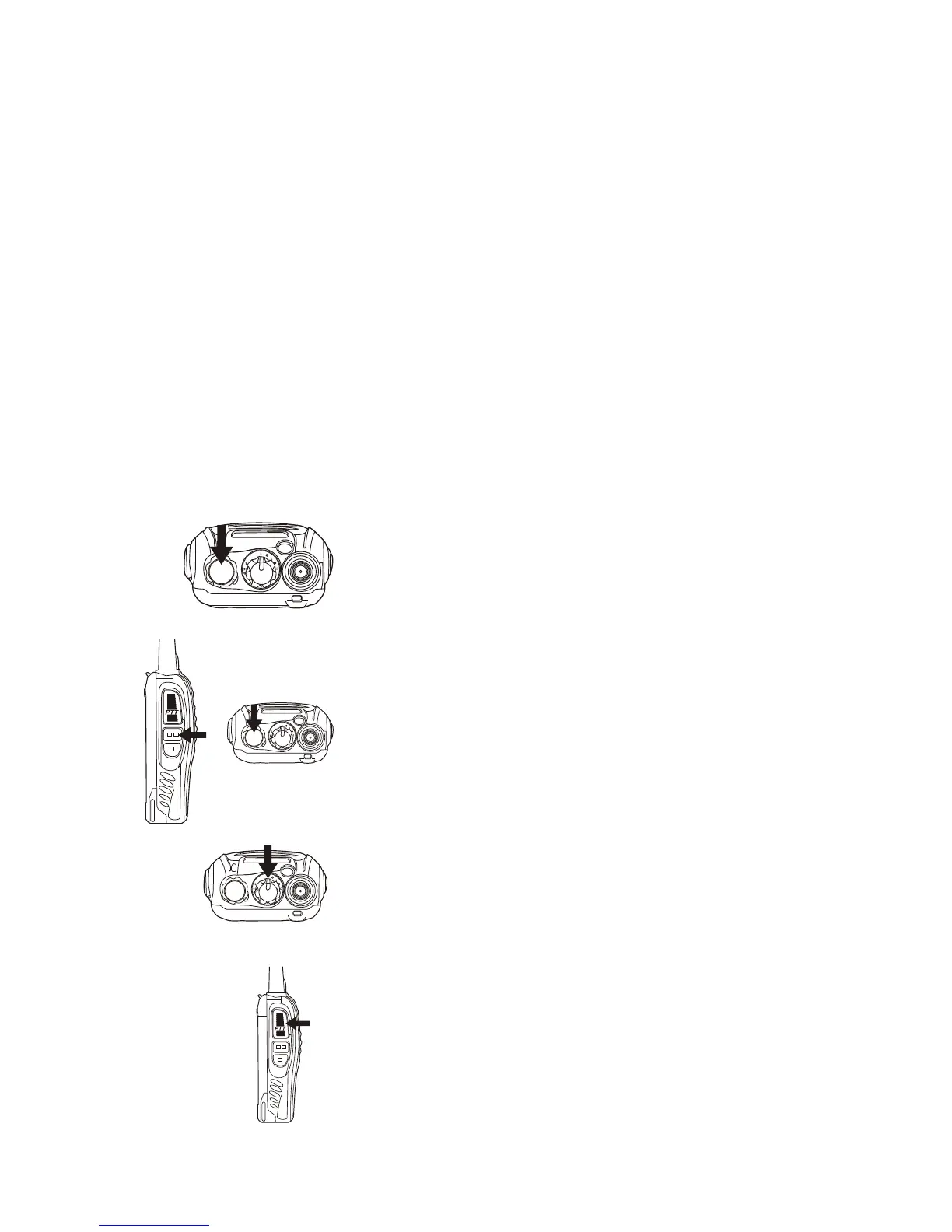
C. POWER SWITCH/VOLUME CONTROL
Turn clockwise to switch the transceiver ON and rotate to adjust the volume. Turn fully
counterclockwise to switch the radio OFF.
D. PTT (PUSH-TO-TALK) BUTTON
Press PTT button, then speak into the microphone to call a station. Release the PTT for
listening.
E. MONITOR BUTTON
Press and hold ( = squelch OFF) to hear the background noise; Release to return to normal
operation.
F. TORCH LIGHT KEY - Just press to activate the torch light.
G. SPEAKER/MICROPHONE - Sockets are below the rubber cover
OPERATION
SWITCHING POWER ON/OFF
Turn the power switch/volume control clockwise.
You will hear a beep and voice announcement,
indicating that the transceiver is ON.
ADJUSTING THE VOLUME
Hold Monitor button down to listen to audio level
while rotating the Power switch/Volume control.
Rotate clockwise to increase and
counterclockwise to decrease volume.
SELECTING A CHANNEL
Turn the channel switch to select your desired
channel. The channels are factory preset with 8
PMR 446 channels + 8 different CTCSS code /
PMR 446 channel combinations
TRANSMITTING
To transmit, press and hold [PTT] and speak into
the microphone with normal voice and about 5-10
cm distance from the mouth. The LED indicator
lights continuously red when transmitting.




 To Next Page